
 Need help?
Do you have a question about the EUFY W31 and is the answer not in the manual?
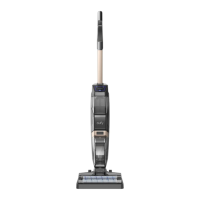
The main vertical component for steering and control.
The central unit containing the motor, tanks, and controls.
The station for powering and storing the vacuum.
An accessory provided for maintenance and cleaning.
A specialized cleaning solution for use with the vacuum.
A spare component for the vacuum's filtration system.
Printed materials included with the product.
Labels major components like tanks, brush, and handles.
Identifies power, speed, spray, and self-cleaning buttons.
Details the clean and dirty water tanks and filtration system.
Describes the rolling brush and its protective cover.
Lists parts related to charging the vacuum.
Instructions for connecting the handle bar to the main body.
Steps for placing the vacuum on the charging base.
Instructions for the first full charge, requiring over 5 hours.
Steps for connecting the vacuum and adapter to a power outlet.
How to access the language menu using specific buttons.
Process of cycling through available languages.
Method to save the chosen language.
How to change volume levels or turn off prompts.
First step in preparing the water tank for refilling.
Accessing the tank opening to add liquids.
Procedure for adding clean water up to the maximum level.
Instructions for adding the designated cleaning solution.
Final steps to secure the water tank after filling.
Steps to start the vacuum and engage the rolling brush.
How to choose between high and low brush speeds.
Procedure for spraying water and cleaner onto the brush.
How to turn off the vacuum after cleaning.
Instructions for placing the vacuum on the charging base.
Detailed instructions for cleaning the dirty water tank and its filter.
Common issues and solutions when the vacuum fails to operate.
Diagnosing problems with suction power or noise levels.
 General
| Model Number | W31 |
|---|---|
| Suction Power | 2500Pa |
| Noise Level | 55dB |
| Wi-Fi Connectivity | Yes |
| App Control | Yes |
| Type | Robotic Vacuum Cleaner |
| Voice Control | Yes (works with Alexa and Google Assistant) |











 To Next Page