12 EN EN 13
6. Place the vacuum onto the charging base to charge, and then start self-
cleaning and self-drying (see the Maintenance section).
• To prevent unpleasant smells, clean the dirty water tank after each use (see the
the Maintenance section).
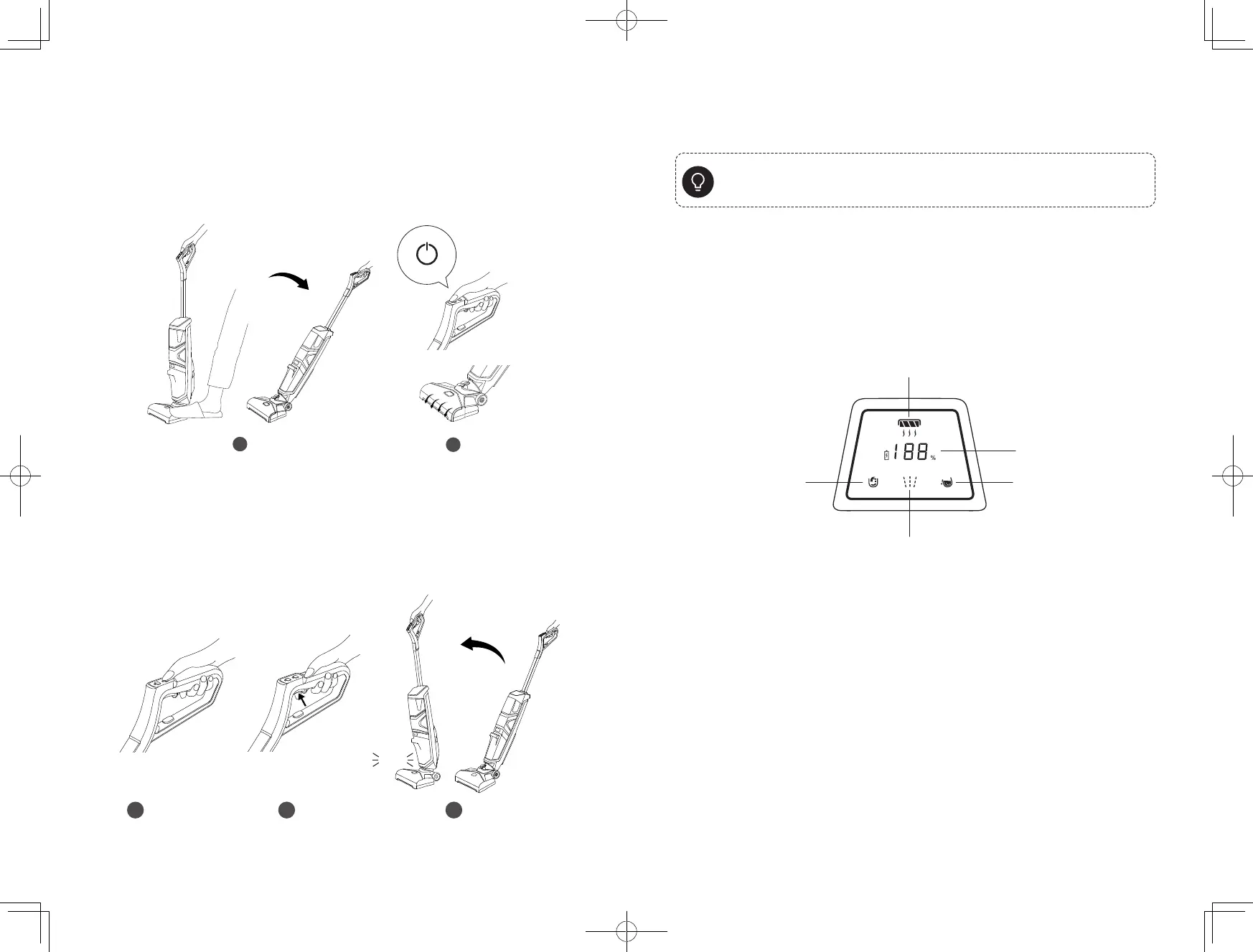
LED Screen Guide
The LED screen will show you the working status of this vacuum.
Self-Cleaning /
Self-Drying Mode
Low Water Alert
Clean Dirty Water Tank /
Filter Alert
Current Charging Status /
Battery Level
Water Spray Mode
Carrying with the Handle
We recommend moving and carrying the vacuum by lifting it by the
specially designed, ergonomic handle, instead of the handlebar, to avoid
damage.
Using the Vacuum
1. Gently step on the foot pedal and push the handle bar backward until
you hear a click.
2. Press the power button. The rolling brush will begin to rotate.
On / Off
3. Press the speed control button to select a rotation speed: High / Low.
4. Press and then release the water spray button. Water and floor cleaner
will spray onto the rolling brush.
5. After cleaning, push the handle bar forward until you hear a click. The
vacuum will automatically turn off and you will hear the corresponding
voice prompt.
3 4 5
click












 To Next Page