10 EN EN 11
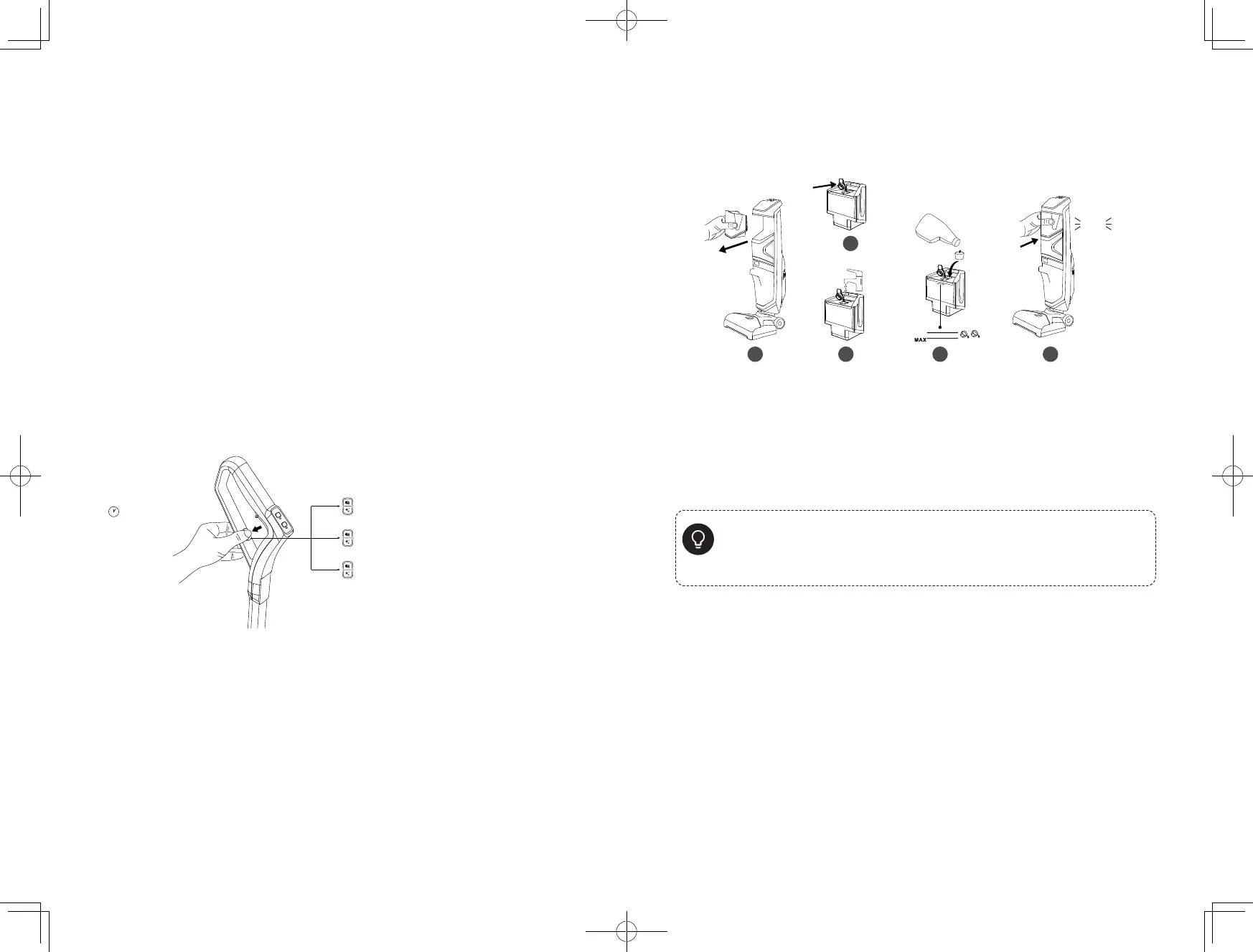
Selecting a Voice Prompt
Language
1. Gently step on the foot pedal and push the handle bar backward until
you hear a click.
2. Press and hold the water spray button with one hand, then hold the
self-cleaning button with the other hand to enter the language selection
mode.
3. Press the water spray button repeatedly to select from the available
languages.
4. When you hear the desired language, press the speed control button to
confirm. The selected language will be saved.
Adjust Volume
Press and hold the self-cleaning button for 3 seconds to adjust the volume
level or turn off the voice prompts.
Low volume level
Standard volume level
Turn off voice prompts
3 seconds
Adding Water and Floor
Cleaner
2
click
1. Remove the clean water tank from the main body.
2. Open the rubber cover.
3. Add water until it reaches the MAX water line.
4. Add 2 bottle caps of floor cleaner into the water tank, then close the
rubber cover.
5. Place the water tank back into the body.
z
• Do not add too much cleaner. Use the floor cleaner designated by eufy only. Use
with any other cleaner may cause severe damage to the vacuum.
• Do not add hot water into the water tank.
• Do not put the water tank into a microwave for heating.
• Do not add floor cleaner with too much foam as it will cause false alarms.












 To Next Page