TEMP CONTROL/GENERAL OPERATION
The temperature controller provides the ability to set the desired temperature level and
display the current cabinet temperature. This electronic controller has been programmed to
maintain an average of the set temperature.
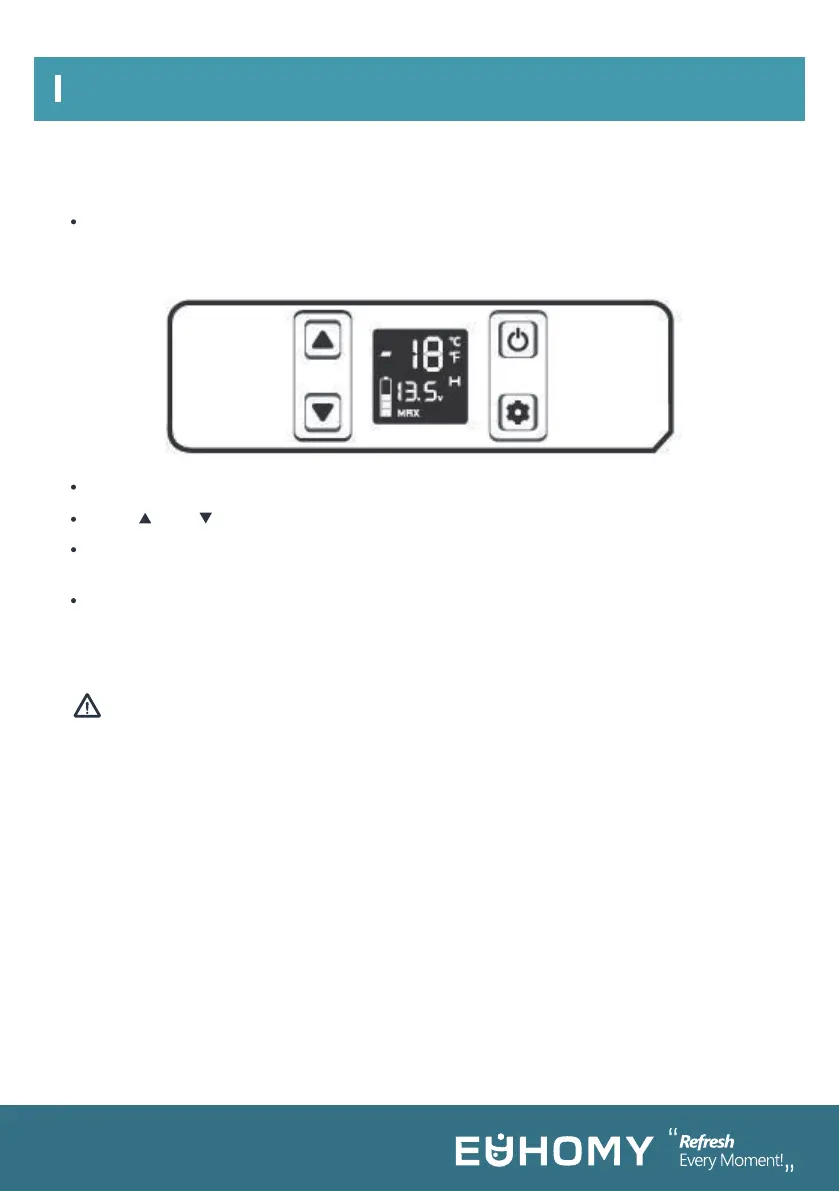
Press power button to switch on/off.
Press or to set temperature.
Press settings button to choose Eco (energy-saving) or Max (fast-cooling) mode. Factory
setting is Max.
Hold settings button for three seconds. When H flashes on the screen, choose a
battery-protection mode (H for High, M for Medium, L for Low) by pressing settings button
again. Factory setting is H.
1. Press power button while fridge is running. Fridge will go into Standby mode and then
switch off after 5 seconds.
2. Press the power button again. Fridge will restart with previously selected settings.
3. Temperature display will flash when selecting temperature and return to solid display
when showing actual internal temperature.
The cooling compartment has varying temperature zones. The values on the digital display
reflect the temperature in the middle of the cabinet.
When your fridge is first connected to AC or DC power, the appliance will automatically
switch on. The LCD control panel will display the current cabinet temperature, battery
monitor, and ECO setting as well as the current input voltage.
Note:
Maximum temperature settings are from –4 °F to 68 °F.
COOLING RANGE
08



 To Next Page