FUNCTIONS
INSTRUCTIONS FOR ASSEMBLY AND
DISASSEMBLY OF ROLLER BRUSH
PREPARATION/START OF WORK
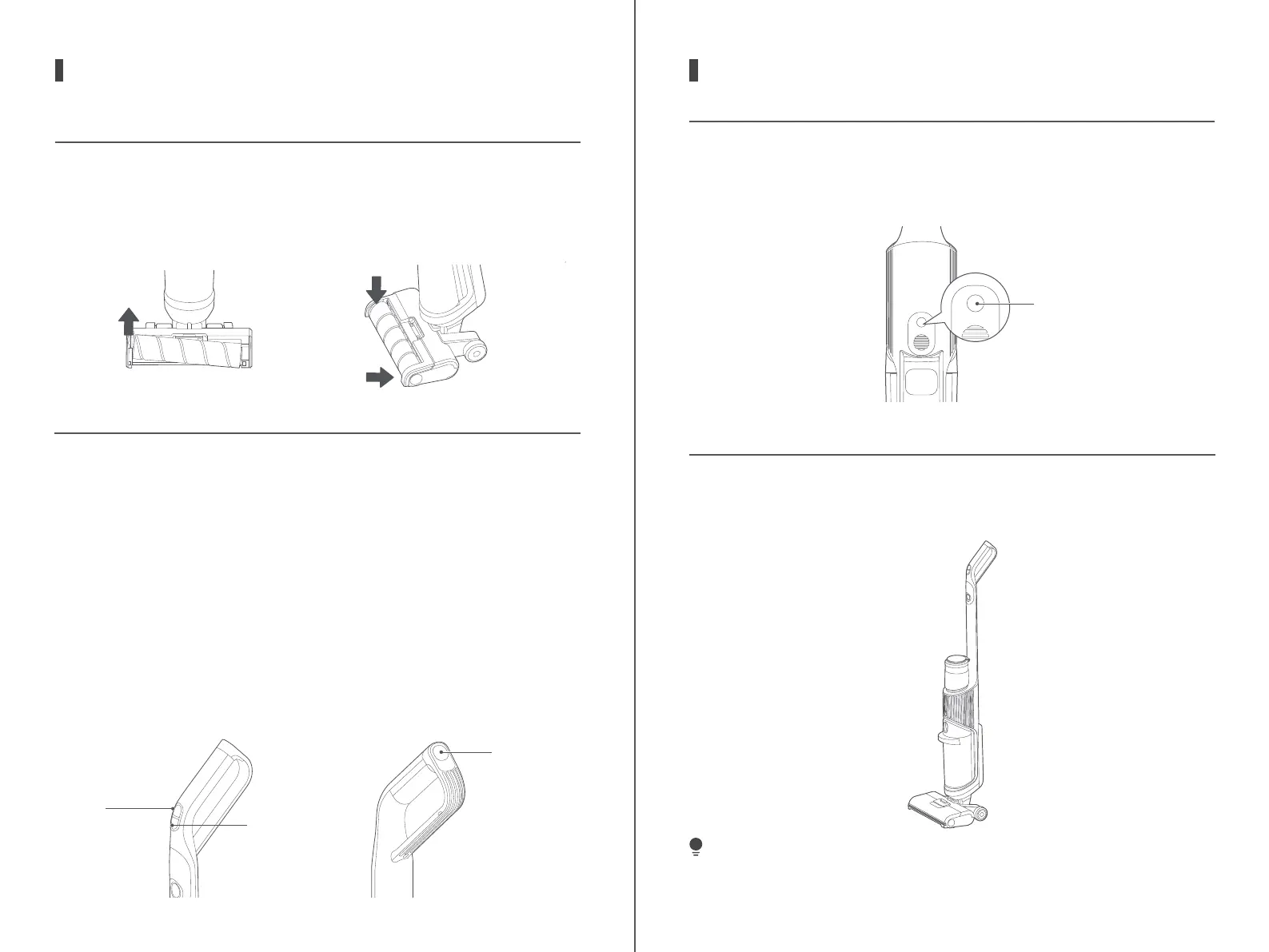
To disassemble the roller brush, just pull the roller brush handle at the
left end up with your finger.
To assemble the roller brush, hold the roller brush handle by hand, align
the right side of roller brush with the right end of cover first, then put
the handle on left side of roller brush into the slot, and the assembly is
successful.
1.
2.
Power on
:
After the product is fully charged, press the main switch button,
and the machine will start. Press this button again, and the machine will stop.
Switching between automatic mode and quick suction mode
:
After the
machine starts, it will enter automatic mode by default. Touch the auto-
matic/quick suction mode button, and the machine will switch to quick
suction mode. Press this button again, and the machine will switch to
automatic mode.
Automatic mode
:
The water pump of the machine works to wet the
roller brush
and clean the floor.
Quick suction mode
:
The pump of machine does not work, in the mode of which
the residual water on the floor can be absorbed by dry or quick suction way.
Electrolytic water mode
:
Press this button, and the real-time electrolytic
water mode will be turned on, in which the germicidal ions in the water
will be decomposed to disinfect the floor. Press this button again, and
the electrolytic water mode will be turned o.
1.
2.
3.
4.
5.
button
Main
switch button
UPRIGHT SWITCH
This machine is equipped with upright switch,when the machine is
placed upright, it will stop running and enter into standby mode. If there is
no operation within one minute, the machine will be shut down.
VOICE SWITCH
FUNCTIONS
When the machine is powered on for the first time, the voice function is
turned on by default, which can be turned o by pressing this button, and
be turned on by pressing this button again.
TIPS
After the machine is used, it is recommended to place it vertically on the
dedicated recharge base.
Voice switch
8 9
a
b




 To Next Page