Maintenance of Self-Emptying Base
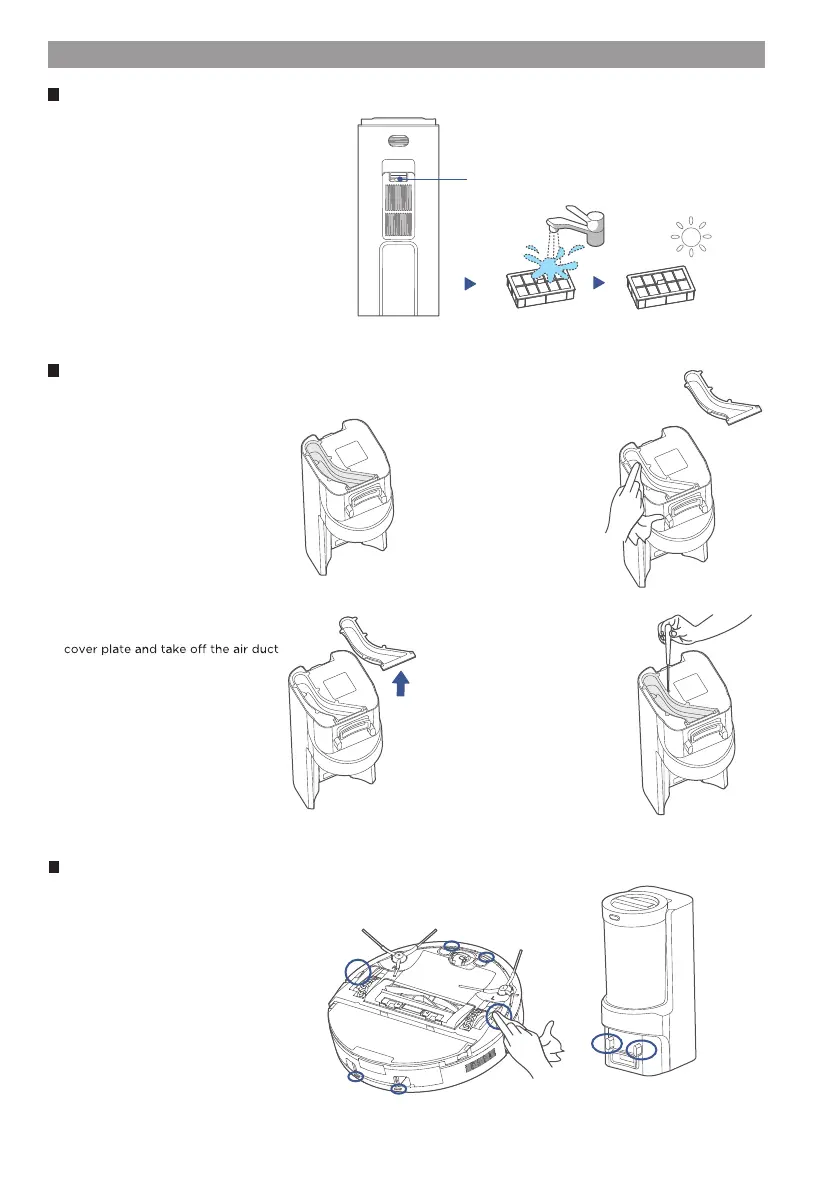
Rinse the filter with clean water until it is
clean. Make sure the filter is completely
dry before putting it back.
2.
Release Button
Press the release tab of the cover of the
filter on the back of the base to remove
the cover.
1.
How to clean the filter
If the air duct has been clogged, use a
screwdriver to unscrew the air duct
cover plate.
2.
Turn the self-emptying base upside
down and check whether the dust
collection air duct has been clogged.
1.
How to clean the dust collection air duct
After cleaning, reinstall the air
duct cover and tighten the air
duct cover.
4.
Clean and wipe the air duct
and air duct cover plate with
a dry cloth.
3.
Sensors and charging contacts cleaning
Wipe the sensors on the robot and charging contacts on both the robot and the base
with a dry, soft cloth.



 To Next Page