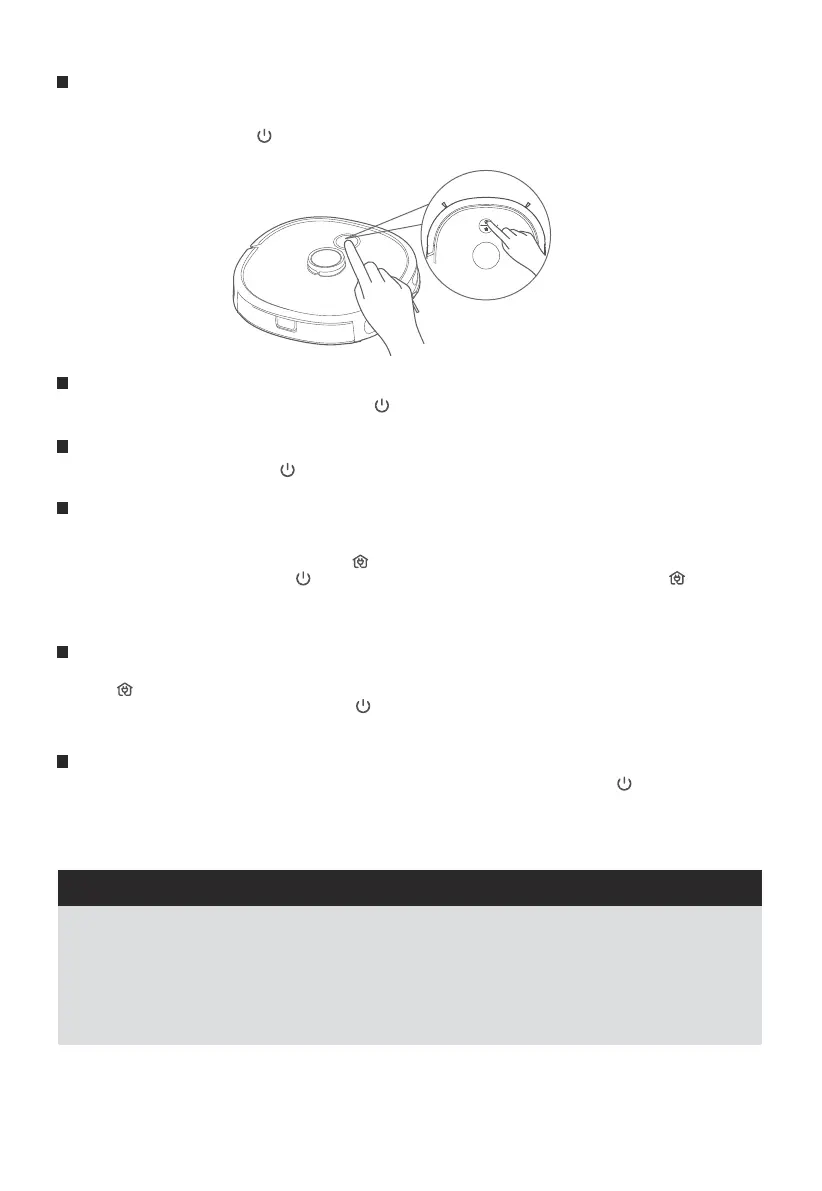
When the robot detects an error, the return-to-charge indicator turns red. Please fix the issue then briefly
press " " for 1 second to indicate to return the robot to standby mode.
Place the robot on the floor then briefly press " " for 1 second to restart cleaning.
After completion of the cleaning, the robot will automatically return to charge. It is recommended that the
robot should be kept in the charging dock.
Startup methods
In normal operation, it is recommeded that cleaning is started using the app or the power button while the robot
is on the charging dock.
To power on the robot, press " " for 3 seconds. The power indicator light will flash and the robot will make a chord
sound. The lit power indicator shows that the robot is in standby mode.
1.
2.
The robot will not start cleaning when the battery charge level is too low. Please charge the robot on the
charging dock before starting to clean.
During cleaning, the robot will automatically return to the charge dock when the battery charge level is
too low. The robot will return to the same position to resume cleaning after the battery is fully charged.
The robot will enter sleep mode after being in standby mode for more than 10 minutes. When in the sleep
mode, press any key will wake up the robot.
The power indicator flashes to signal that the battery is charging and is on continuously when the battery is
fully charged.
1.
2.
3.
4.
Start the cleaning
When the robot is in standby mode, briefly press " " for 1 second, and it will start to clean the whole room.1.
Pause the cleaning
During the cleaning, briefly press " " for 1 second, and the robot will pause the cleaning and enter its standby
status.
1.
After completion of the cleaning, the robot will enter its return-to-charge status.
If return-to-charge is required during the cleaning, proceed as follows:
① When the robot is in standby, briefly press " " for 1 second, and the robot will start to return to charge.
② During the cleaning, briefly press " " for 1 second, and the robot will pause the cleaning; press " " for
another 1 second, and the robot will start to return to charge.
The robot may not be able to return to the charging dock in some situations, for example if the battery charge level
is too low or the robot has become stuck. In these situations, place the robot on the charging dock manually.
Return to charge
1.
2.
3.
Troubleshooting
1.
2.
3.
If the robot will not be used for a long time period and needs to be shut down, long press " " for 3 seconds,
and the power indicator begins to flash.
The robot makes a sound, and when the power indicator turns off, the robot shuts down successfully.
The robot can not fully shut down when it is on the charging dock. If you want to shutdown the robot you must
remove it from the charging dock.
Shutdown
1.
2.
3.
NOTES
How to use your robot
12
Eureka Customer Service HELPLINE 1-800-282-2886





 To Next Page