1. Make sure the device is correctly mounted.
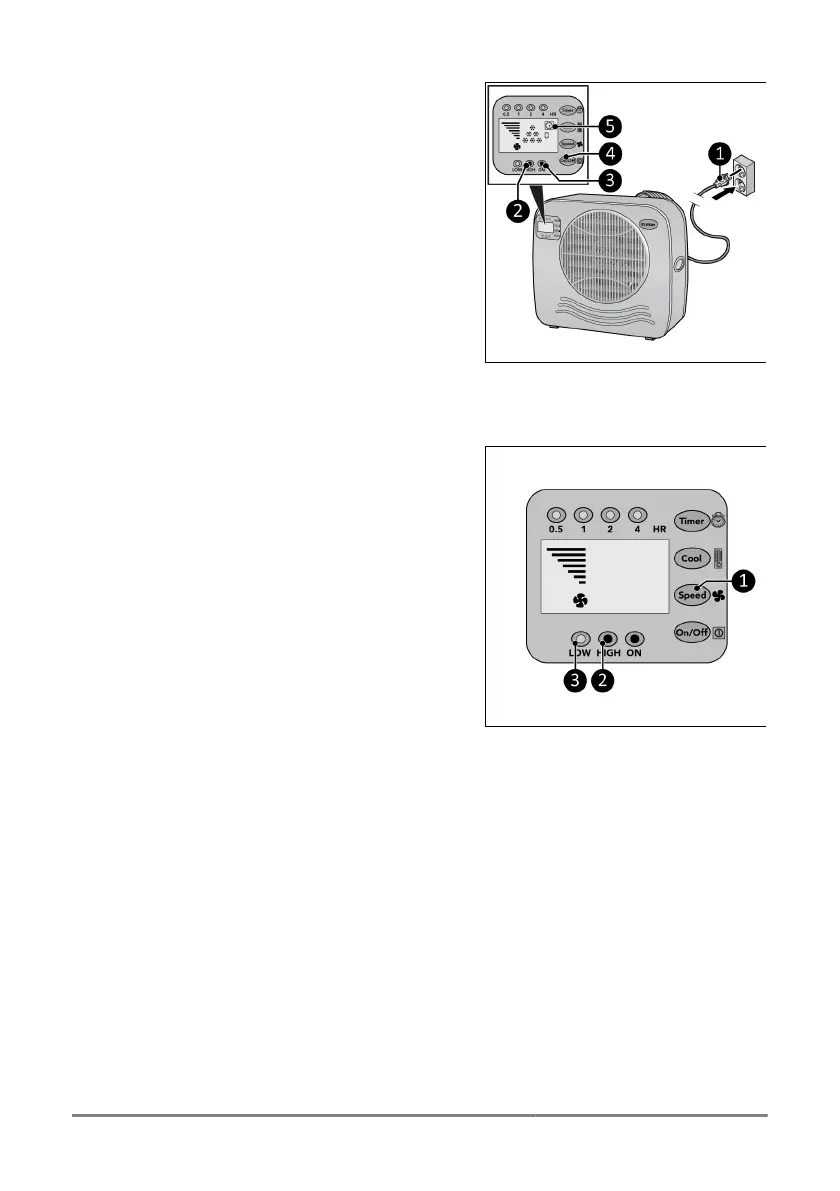
2. Place the power plug (Figure 28,pos.1)
into an earthed wall socket that is easily
accessible. Use an earthed wall socket with
a minimum power of 460 Wa.
3.
Three beeps will sound to indicate the
device is ready for use.
◦ Press the ON/OFF buon (Figure
28,pos4), the power indicator (Figure
28,pos.3) and the high indicator (Figure
28,pos.2) will light up. The display will
show the me indicator and 6 cooling
indicators (Figure 28,pos.5). The device
now operates at high capacity.
Figure 28.
Speed seng
1. Press the Speed buon (Figure 29,pos.1)
repeatedly to set the required speed
seng:
◦ High: high indicator (Figure 29,pos.2)
will light up and the speed graph will
show 7 bars.
◦ Low: low indicator (Figure 29,pos.3) will
light up and the speed graph will show 4
bars
Figure 29.
29


 To Next Page