PAGE
19/20
www.evb.com
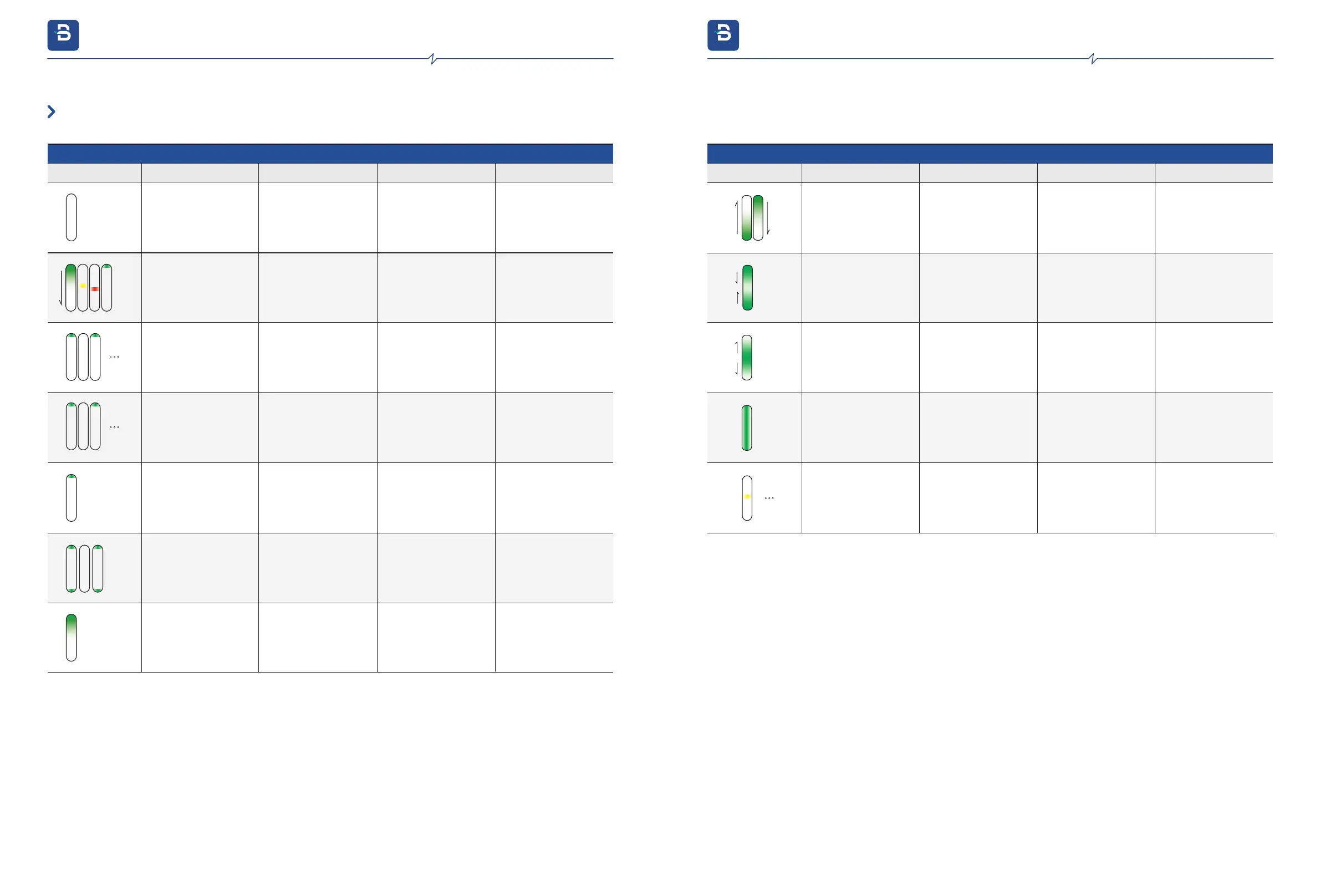
4.4. LED Lights Display
Normal Status
LED Status
Status Description
Potential Cause Solution
LED Behavior
The green lights light up
in sequence from top to
bottom, then the yellow
and red lights light up in
sequence until the first
green light blinks
Charger Power
ON self test
Lights OFF
No power supply No power
Check the power
source
Enter WPS
configuration
The first green light
fast blinking
(ON for 0.25 seconds,
OFF for 0.25 seconds)
In WPS
configuration status
Recheck the
configuration
Standby
The first green light
breathing magenta
The 1-6 green lights
ON, brightness
decreases from
top to bottom
The charger is
reserved
The first green light
slow blinking
(ON for 1 second,
OFF for 1 second)
Wi-Fi connection
failure or wrong
password
1.5G or WPA 2_Enterprise
is not available for charger
2.Ensure password is
correct
3.Restart the APP
The first green and the last
green lights slow blinking.
(ON for 1 second, OFF for
1 second)
Network is not
connected
Charger authorized,
waiting for the
Charging Connector
plug in
Green lights up and
down
The Charging
Connector is plugged
in, waiting for RFID
card authentication
Normal Status
LED Status
Status Description
Potential Cause
SolutionLED Behavior
Green lights end in
the middle
Waiting for the car
start to charge
Charging
Green lights extend
from the middle to
the ends
Charging finished
All green lights ON
Charger is remotely
disabled or not
registered
Yellow lights flashing
Configure the chargerCharger is not
configured
4. Operating instructions
evb.com
4. Operating instructions
evb.com


 To Next Page