positioning your speakers
The EVENT Opal monitors are physically identical. When used in a stereo confi guration, there is no physical or
acoustic distinction between the left and right speakers. While we recommend mounting the Opal in vertical
orientation, it has been designed to allow horizontal alignment (see horizontal mounting).
For precise calibration within your monitoring environment please utilise the Event StudioEQ system,
available free of charge when you register your monitors online at www.eventelectronics.com.
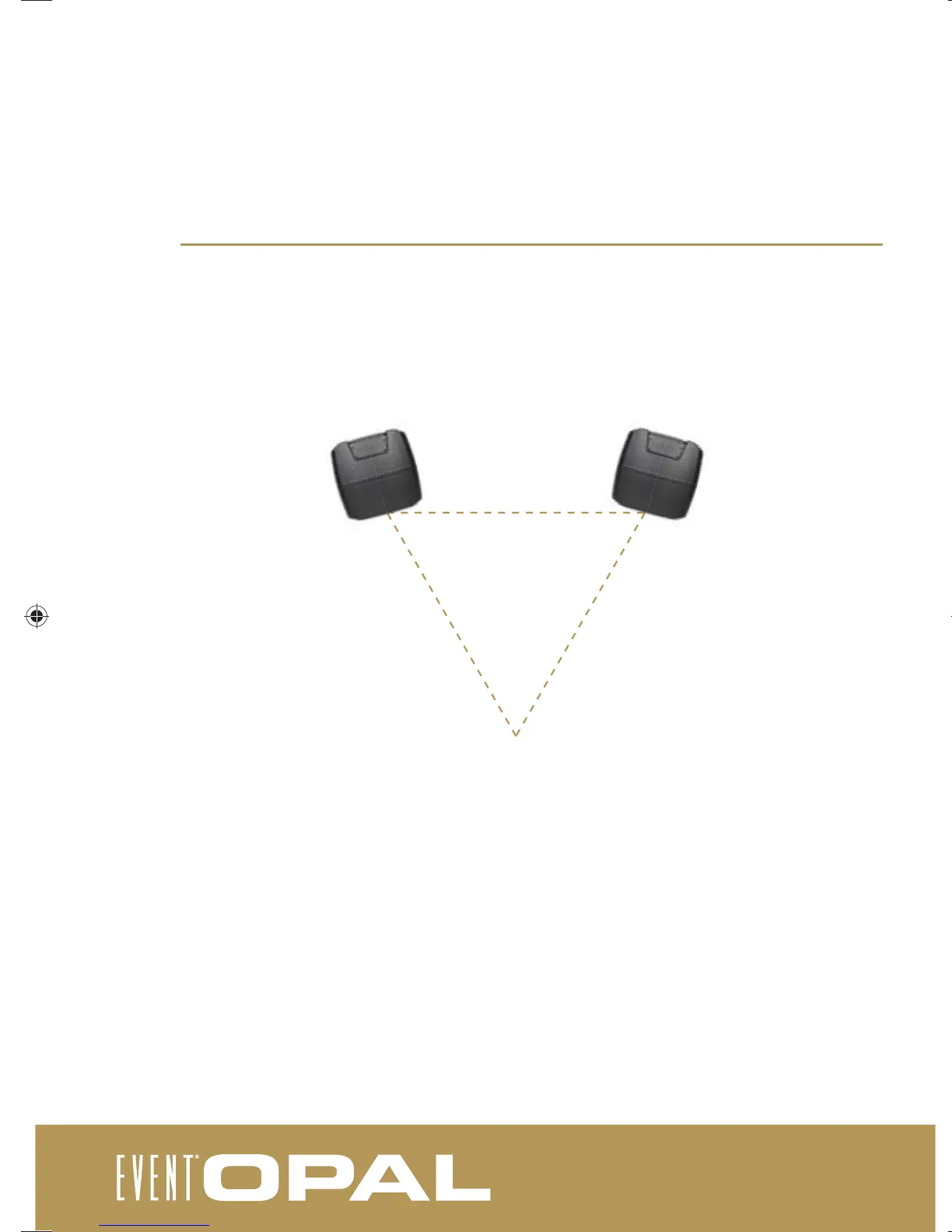
Mount the speakers slightly inward, so that the driver components directly face the listening position. When
oriented this way, the listener is in the “sweet spot” which yields the most accurate stereo reproduction. If you
need a wider sweet spot to allow for greater listener movement or for group monitoring, face the speakers in
a slightly more open position, but never more than necessary.
While not ideal, if you must mount the speakers substantially above or below ear level, you will also need to tilt
the cabinets downward or upward to keep the driver components directly facing you.
It is important to note that the listening space has a large effect on the performance of speakers,
particularly the low frequency response. It is best to try your monitors in a variety of positions to acheive
optimum results. Additionally the Opal’s in-built acoustic fi lters can be introduced (see front control panel).
sweet spot
030-950-4-1_opal_user_manual.indd 12030-950-4-1_opal_user_manual.indd 12 19/12/2011 9:07:26 AM19/12/2011 9:07:26 AM


 To Next Page