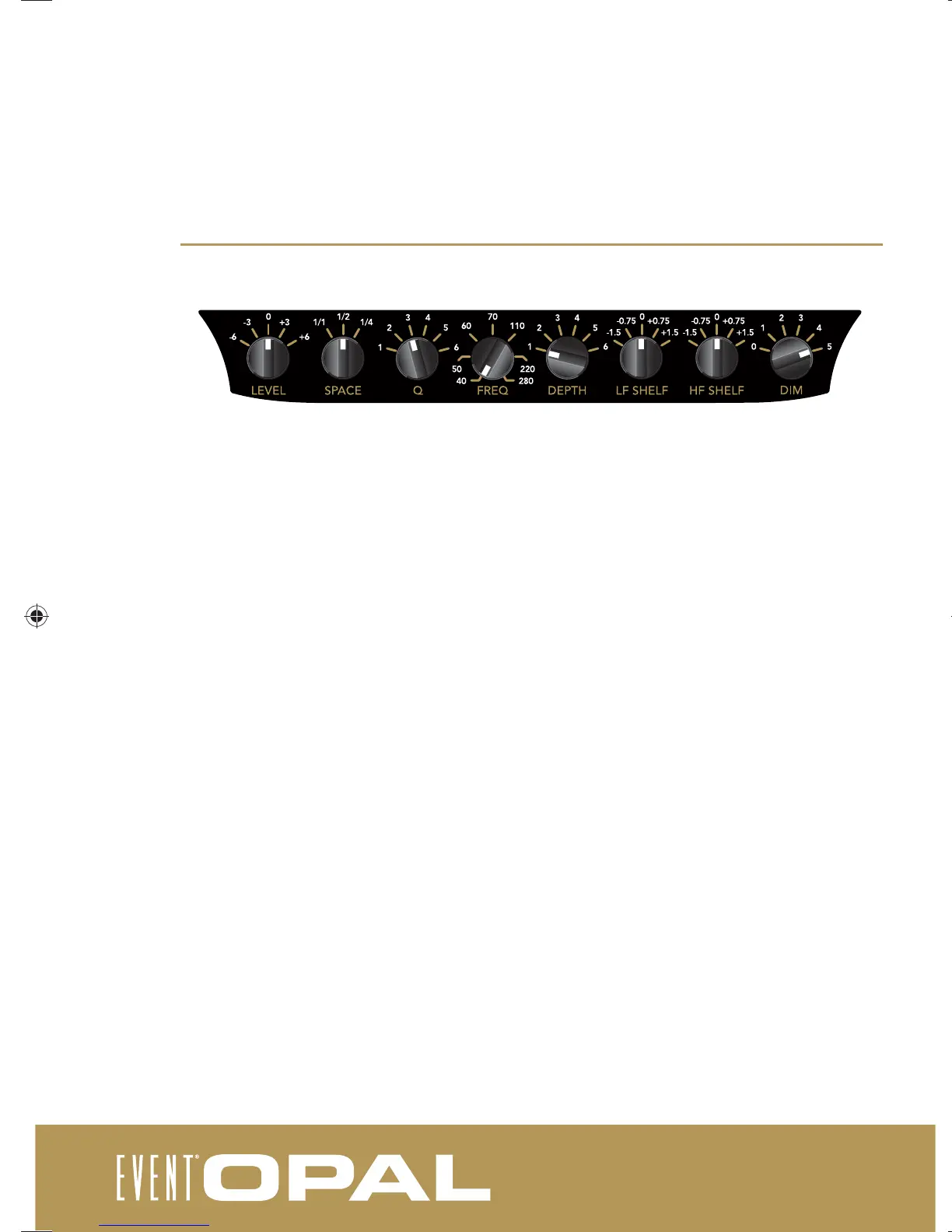
front control panel
Level: Allows for modifi cation of the input sensitivity, from -6dB to +6dB in regards to the reference sensitivity
of 0.775v RMS. The default setting is 0.
Space: Allows for the setting of Full, Half and Quarter space to compensate for the low frequency output
caused by the speaker location. If placed in an open environment, select ‘Full’ space. If placed against a wall,
select ‘Half’ space. If placed in a corner, select ‘Quarter’ space.
Room EQ Controls
The room equalisation controls allow for the implementation of an acoustic fi lter that can be used to eliminate
room resonance under 200Hz that can cause less defi ned bass reproduction.
Q: Adjusts the bandwidth (in frequency) of the acoustic fi lter -
1=Q of 50, 2=Q of 30, 3=Q of 20, 4=Q of 15, 5=Q of 10, 6=Q of 5
Freq: Adjusts the center position of the acoustic fi lter, from 40Hz to 280Hz.
Depth: Adjusts the intensity of the acoustic fi lter - 1 (0dB), 2 (-1.5dB), 3 (-3.0dB), 4 (-6.0dB), 5 (-12.0dB), 6 (-18.0dB).
The default setting is 0dB - fi lter not engaged.
LF shelf: Allows for the implementation of a shelving fi lter, centered at 200Hz. Available options are -1.5, -.75,
0, +.75 and +1.5dB. The default setting is 0 - fi lter not engaged.
HF shelf: Allows for the implementation of a shelving fi lter, centered at 5kHz. Available options are -1.5, -.75,
0, +.75 and +1.5dB. The default setting is 0 - fi lter not engaged.
DIM: Allows for the adjustment of the brightness of the EVENT rotatable badge on the front of the cabinet.
Settings range from 0 (completely off) to 5. The default setting is 5.
030-950-4-1_opal_user_manual.indd 8030-950-4-1_opal_user_manual.indd 8 19/12/2011 9:07:14 AM19/12/2011 9:07:14 AM


 To Next Page