ModFactor User Guide Control Knobs
22
a controlled organic feel. Increase the amount of S-Mod/D-Mod for complex and interesting
and even extreme modulation effects.
The availability of expression pedal and envelope mod shapes allows the modulation rate to
be controlled dynamically by your playing as well.
Intensity
Controls the intensity of the effect from 0 to 99%.
For TremoloPan type Bias, Intensity controls the amount of Drive. For high input levels, setting
Drive to high levels can cause overload distortion.
For TremoloPan type Opto, Intensity controls input slew rate (Edge) and, depending on the
input signal, may only have a subtle effect.
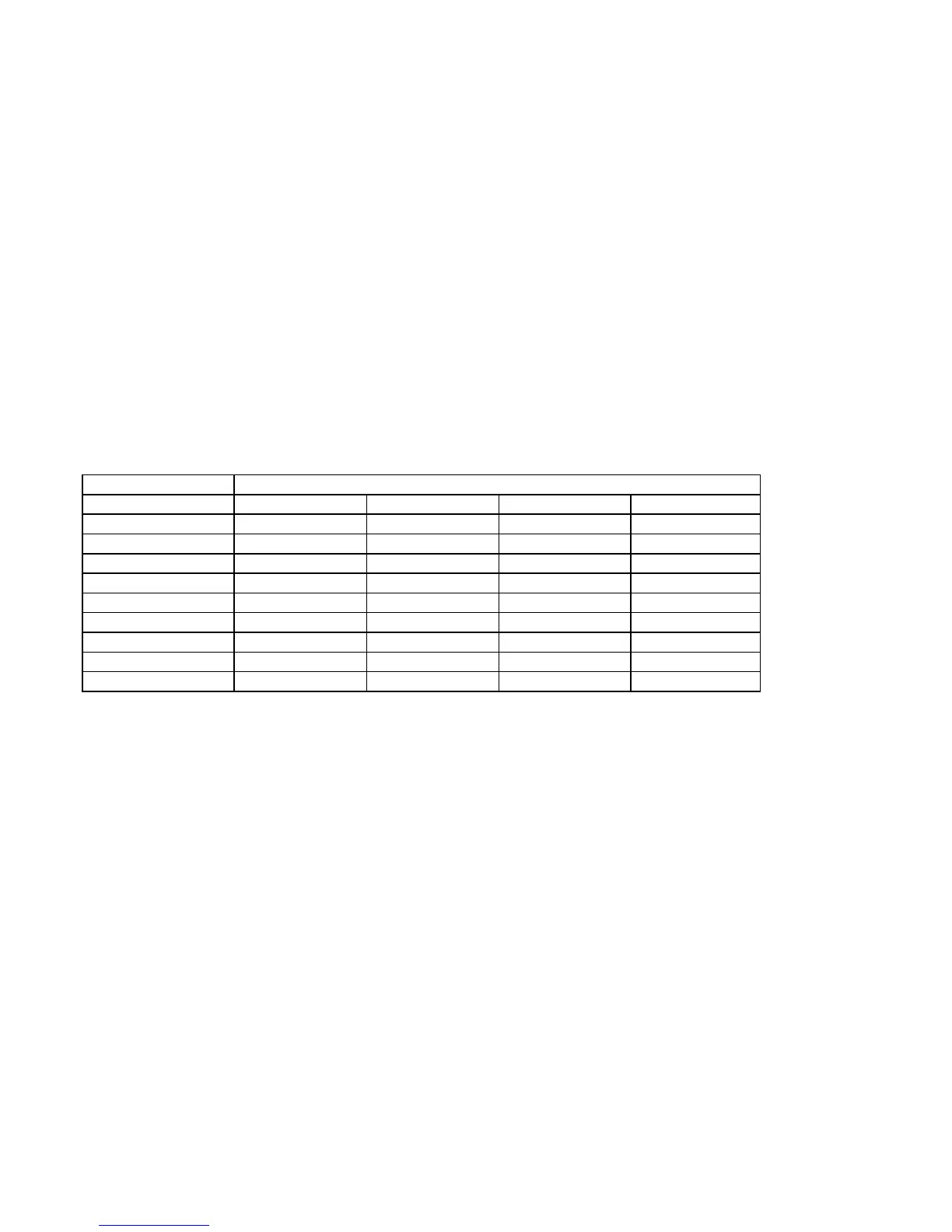
Type
Selects the type of effect. For example, ModFactor has 4 distinct types of Phasers – Negative,
Positive, Feedback and Biphase.
EFFECT TYPE
CHORUS LIQUID ORGANIC SHIMMER
PHASER NEGATIVE POSITIVE FEEDBACK BIPHASE
Q-WAH WAH-WAH V-WAH
FLANGER POSITIVE NEGATIVE JET THRU-0
MODFILTER LOPASS BANDPASS HIPASS
ROTARY STANDARD GIANT
TREMELOPAN BIAS OPTO
VIBRATO MODERN VINTAGE RETRO
UNDULATOR PITCH FEEDBCK
RINGMOD DC AC
Depth
Sets the modulation sweep range from narrow to wide. In Play Mode, the Billboard displays
an animated graphic that indicates the sweep range. With Depth set to minimum, the
graphic displays a vertical bar at the leftmost of the display. As Depth is increased, the bar
sweeps farther to the right. With Depth set to maximum, the vertical bar traverses the full
length of the Billboard display.
Speed
Sets the modulation sweep rate. In Play Mode, the Billboard displays an animated graphic
sweeps back and forth at the modulation sweep rate.
Note: If Envelope or ADSR is selected for the Shape parameter, the modulation is driven by
the amplitude of the audio input and the Speed control becomes a Sensitivity control.
Note: If Slow Mode is enabled, an “S” prefix is added to the Speed Parameter value.



 To Next Page