LT-101A User’s Manual
Copyright © EVERFINE, Copy or spread without authorization is prohibited. 25
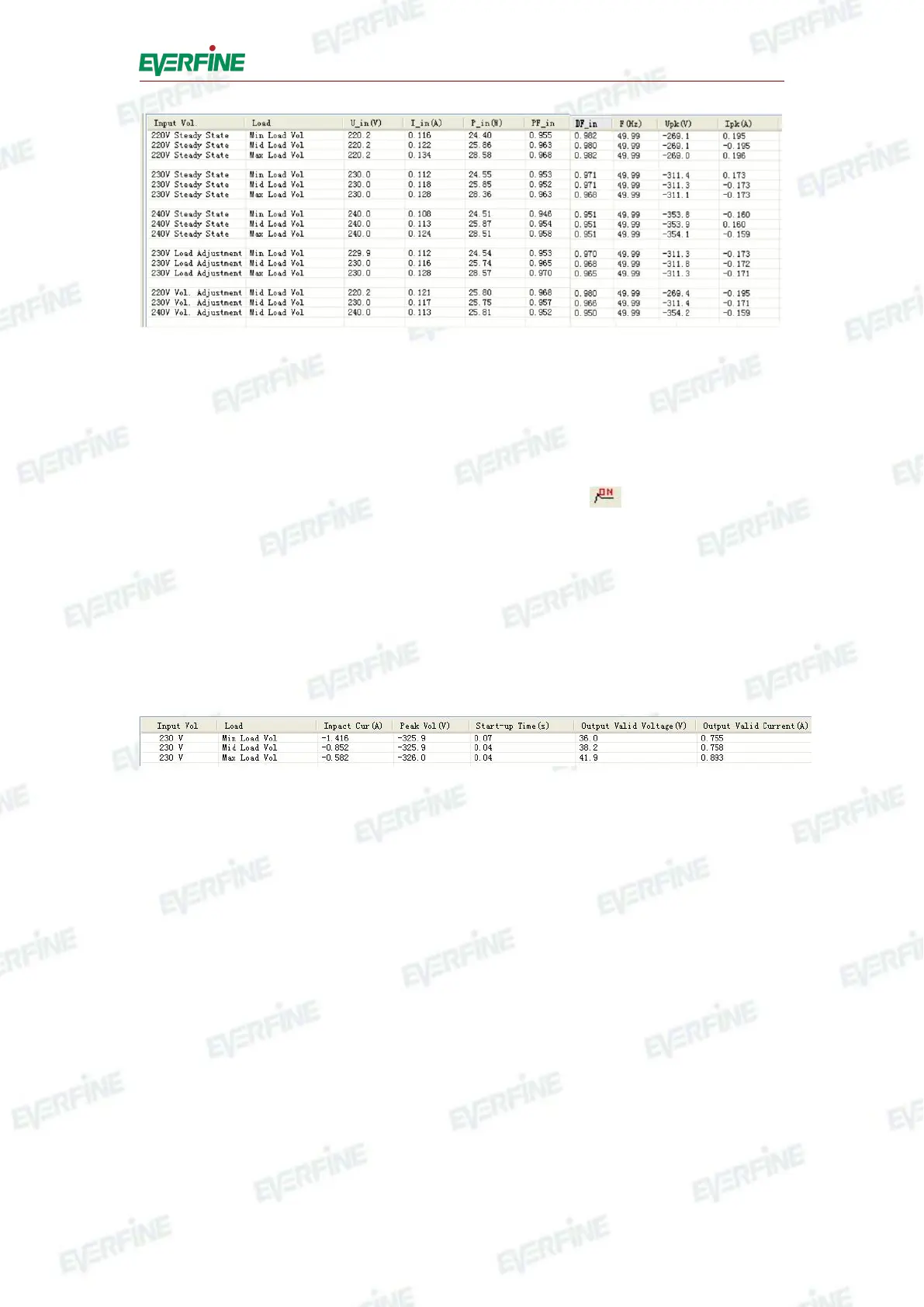
Fig.6.3 Display of steady state test data(picture for reference only)
2. Start-up test
Choose rated load current or rated load voltage in combo box for start-up test while
testing.
Method for start-up test: click "start-up test" button, or in toolbar, or click
"start-up test" in test menu, or use the shortcut key "F6".
When the instrument is under the state of steady state test, if users turn on "START",
it will switch to the state of start-up test automatically.
After finishing the test, users can browse all the test data of start-up test.
After finishing all the test, users can browse all the test data.
Fig.6.4 Display of start-up test
Click the radio button in combo box of steady state test and start-up test, users can
check the wave form data in coordinates at the bottom of the interface.
6.3.3 Testing setup
1. Testing information
To distinguish different testing products, users should record the characteristics of the
products: select "setup" menu, click "test characteristic setup", then input information
including product type, serial number of product, manufacturer, tester, test date,
temperature, humidity, remarks, etc.
2. Print



 To Next Page