EAN800A/EAN800AW
37
Press Apply to apply the setting changes or Reset to reset without saving the
change.
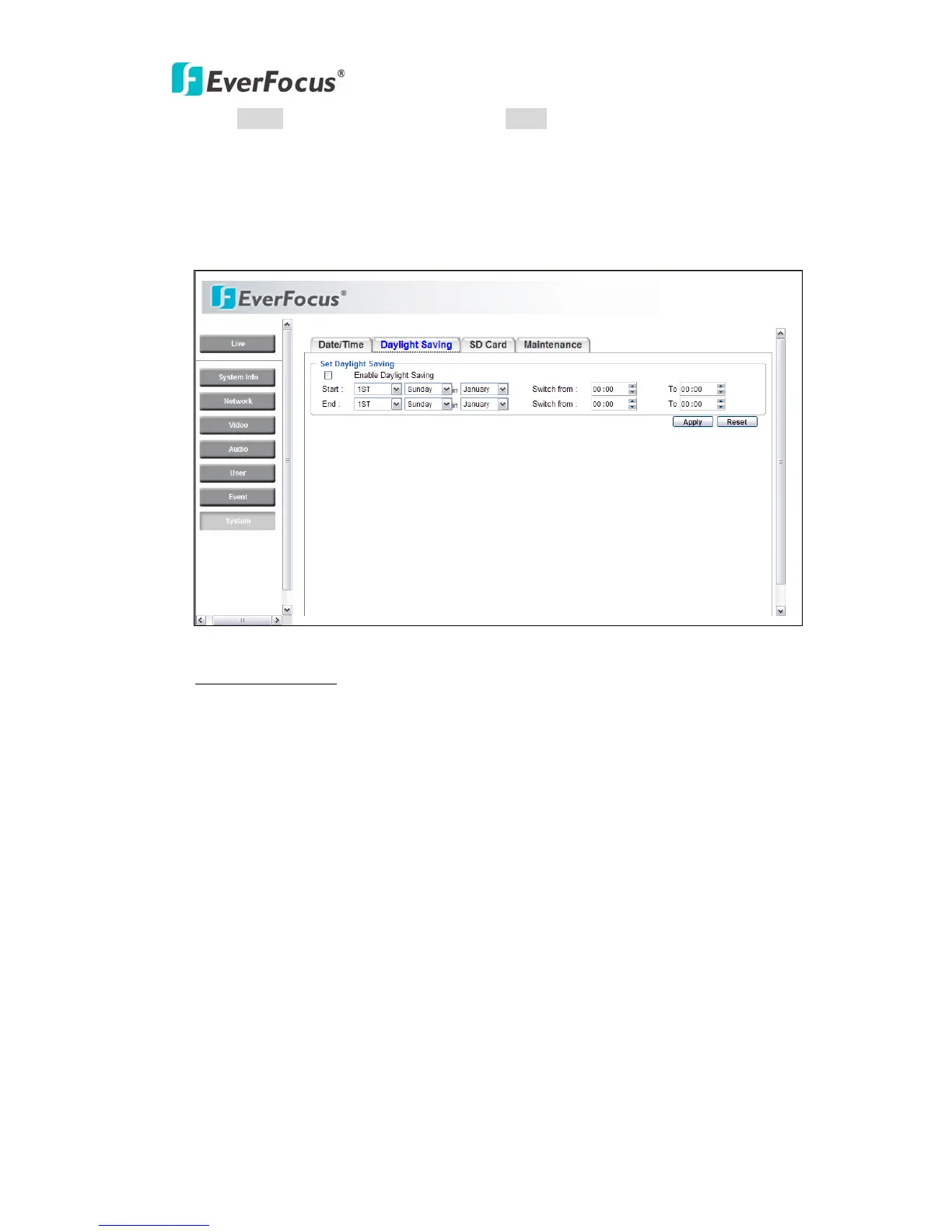
4.8.2 Daylight Saving
Set Daylight Saving
Check Enable Daylight Saving checkbox to enable daylight saving.
Set the start time to daylight saving time.
Set the start week of daylight saving time: 1
st
/ 2
nd
/ 3
rd
/ 4
th
/ Last
Set the start date of daylight saving time: Sunday / Monday / Tuesday / Wednesday
/ Thursday / Friday / Saturday
Set the start month of daylight saving time: January / February / March / April /
May / June / July / August / September / October / November / December.
Set the starting time change of daylight saving time: Choose the “From” time and
“End” time when daylight saving starts.
Set the end time of daylight saving time.
Set the end week of daylight saving time: 1
st
/ 2
nd
/ 3
rd
/ 4
th
/ Last
Set the end date of daylight saving time: Sunday / Monday / Tuesday / Wednesday
/ Thursday / Friday / Saturday



 To Next Page