ELUX16x2 FHD Hybrid DVR
5
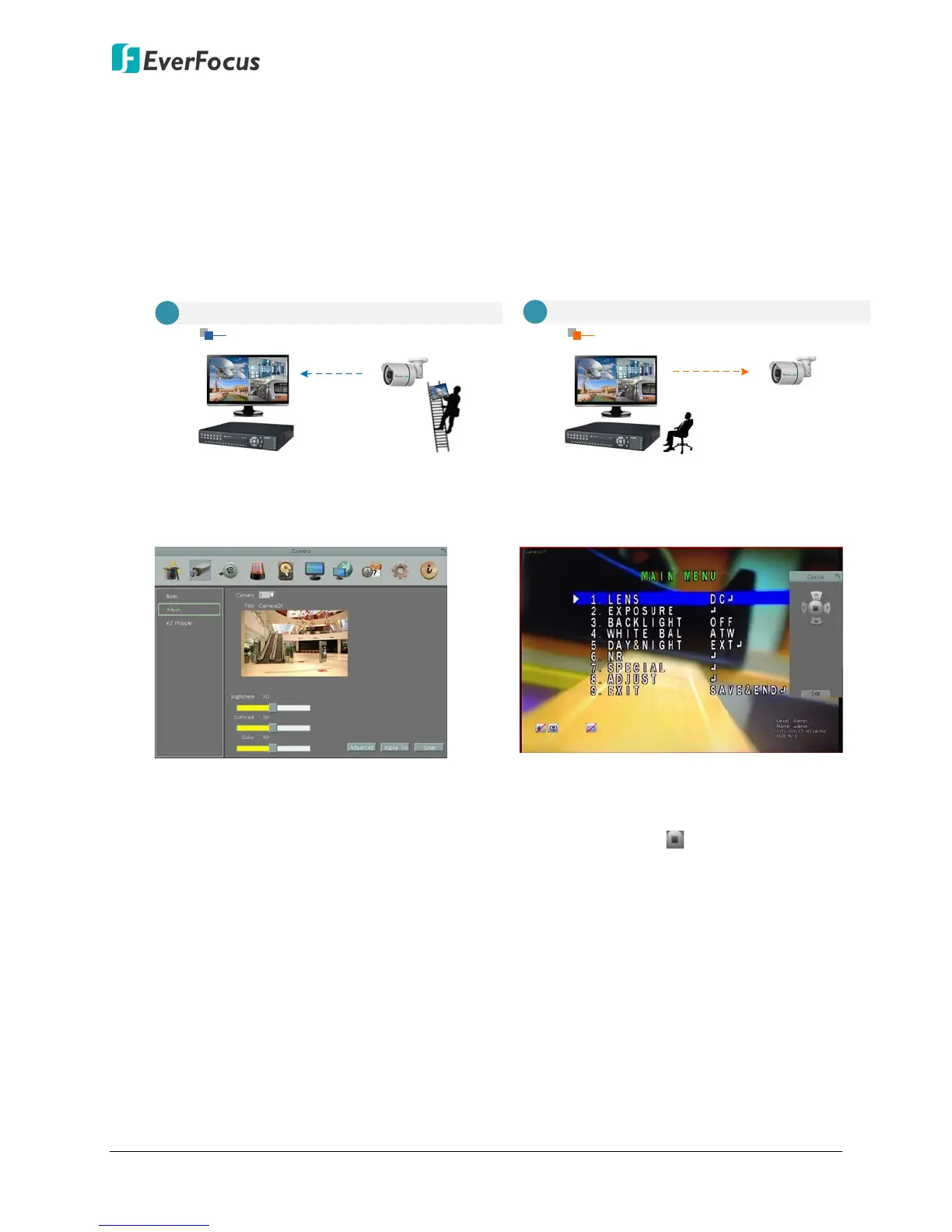
eZ.Controller: Easily control eZ.HD camera’s OSD at the DVR end.
Traditionally, the CCTV installer needs to take a portable monitor to connect to the
camera for controlling the camera OSD at the camera installation site as the Diagram A
below. It will take extra effort, time and people to adjust the camera.
Now, EverFocus’ eZ.Controller allows users to control the camera OSD simply on the
monitor at the DVR end as illustrated in Diagram B.
Traditional Way to Control Camera OSD
Control Camera OSD at Camera End
A
Camera EndDVR End
Use eZ.Controller to Control Camera OSD
Camera OSD Control Directly at DVR End
DVR End
Camera End
B
How to Control eZ.HD Camera’s OSD at the DVR End?
3.
To display the OSD menu, click the
Enter button on the Coaxial Panel.
4. You can use the direction buttons on
the Coaxial Panel to control the
camera’s OSD setting menu.
5. To exit the camera OSD setting, click
Exit to return to the Adjust setting
page.
1. On the DVR’s OSD setting menu, go
to System > Camera > Adjust. Select
a camera you want to adjust.
2. Click the Advanced button, and the
camera live view with the Coaxial
Panel will be displayed.












 To Next Page