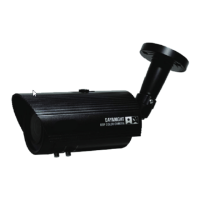
5. Optionally connect the camera to a portable monitor using the supplied Test-Out Cable for
configuring the OSD menu. Connect one end of the Test-Out Cable to the Test-Out
Connector on the camera and the other end to the portable monitor. The Test-Out
Connector is located on the bottom of the Camera Body. Unscrew and remove the Circle
Cap, and you can see the Test-Out Connector.
This Manual:http://www.manuallib.com/everfocus/eqh5102-mini-ir-bullet-camera-manual.html


 To Next Page