EZN268
12
5.3 ConnectingtheCameratotheNetwork
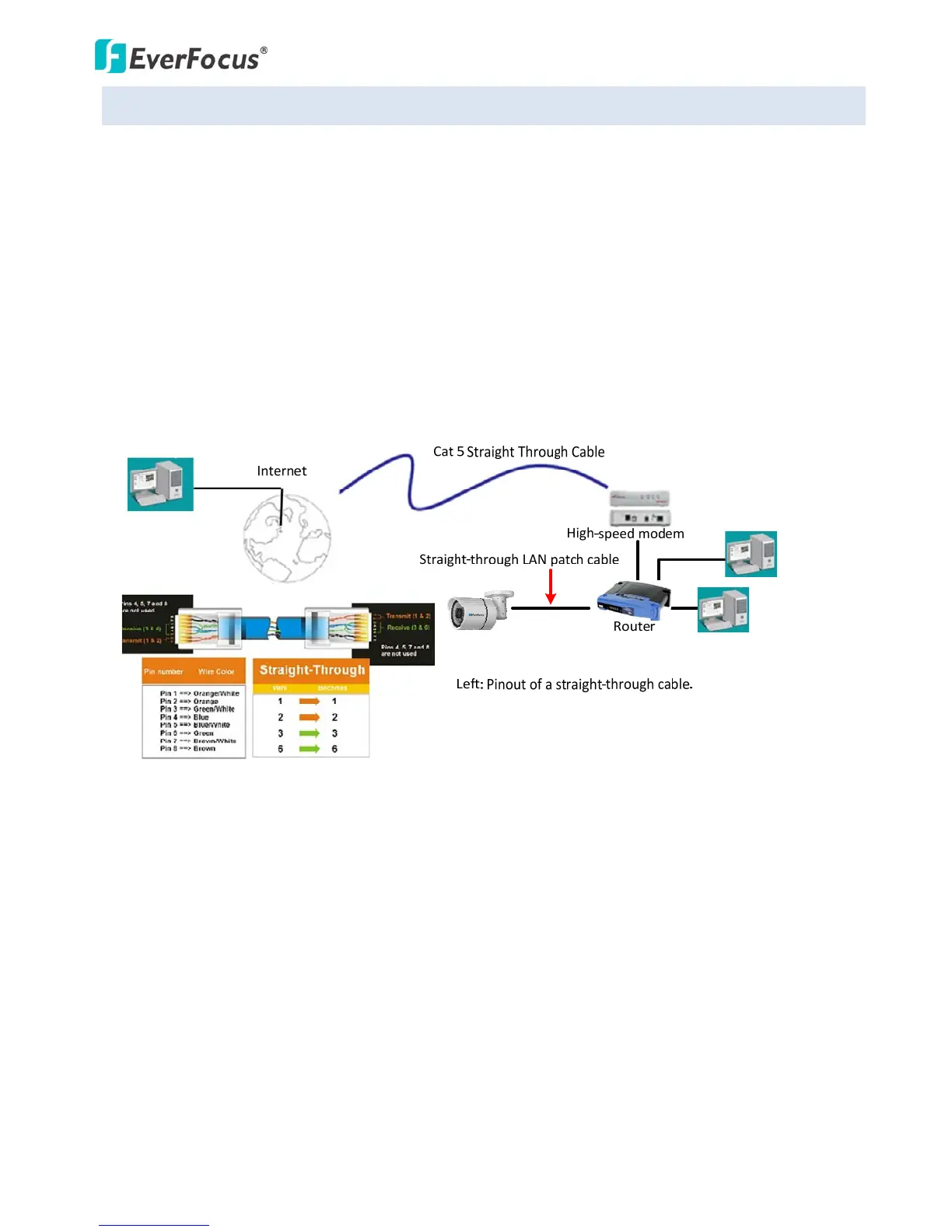
TherearethreemethodstoconnecttheIPcameratothenetwork:RouterorLANConnection,Direct
High‐SpeedConnectionandOne‐to‐OneConnection.
RouterorLANconnection
ThisisthemostcommonconnectioninwhichtheIPcameraisconnectedtoarouterandallows
multipleusersonandoffsitetoseetheIPcameraonaLAN/WAN(Internet).Thecameramustbe
assignedanIPaddressthatiscompatiblewithitsLAN.Bysettingupportforwardingontherouter,you
canremotelyaccessthecamerasfromoutsideoftheLANviatheInternet.ToremotelyaccesstheWeb
interfaceoftheIPcamera,pleasereferto6.1.1Network(DDNSSettings).Tosetupportforwarding,
pleaseconsultthemanualoftherouter.



 To Next Page