EZN268
41
6.2.3 Camera
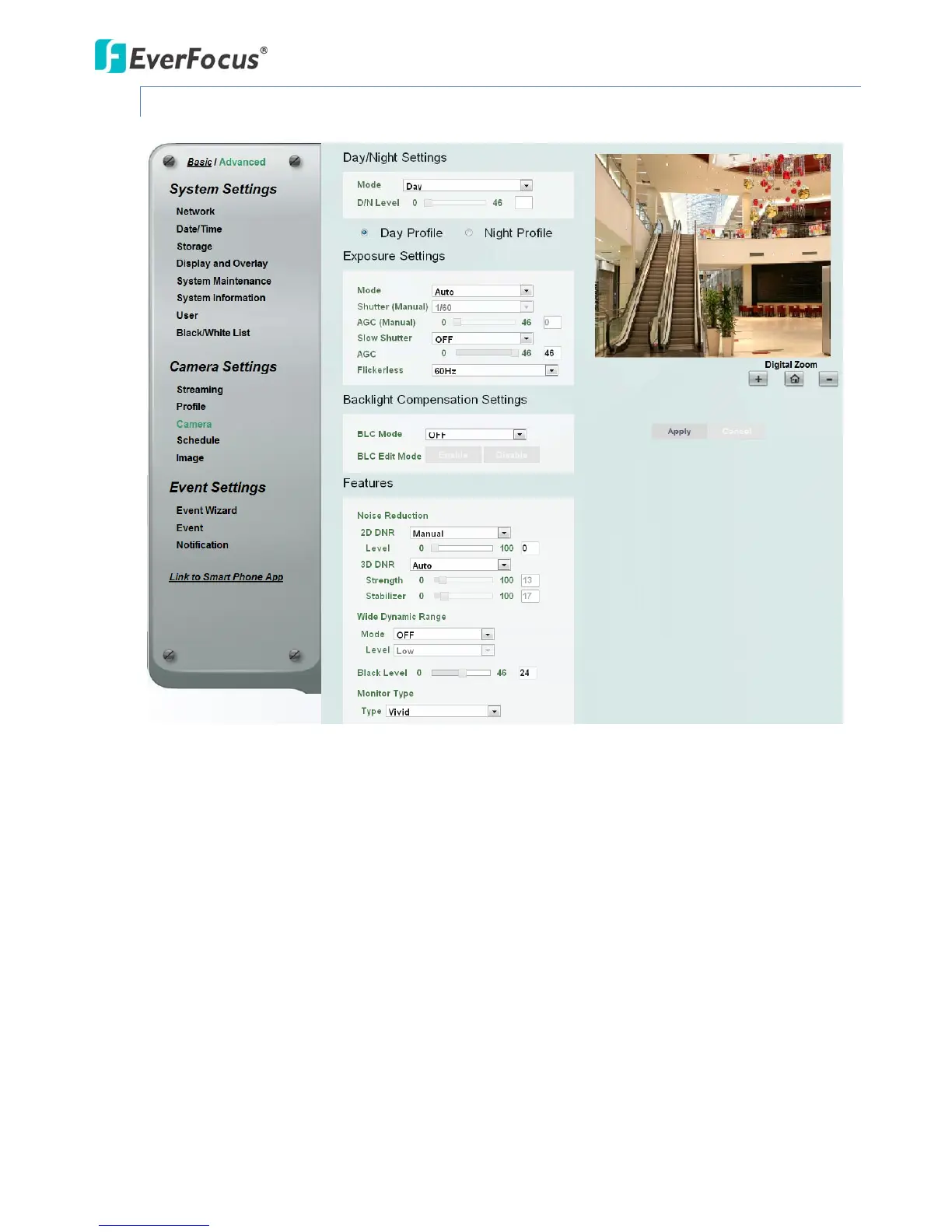
【Day/NightSettings】
Mode:Selectamodefromthedrop‐downlist.
Auto:SelecttoletthecameraautomaticallyswitchtoNightmode(blackandwhiteimages
withIRLEDon)whenthelightlevelsfalltoaspecifiedlevel,andbacktoDaymode(color
images)whenthelightlevelsrisetoaspecifiedlevel.
Day:SelecttokeepthecamerainDaymode(colorimageswithIRLEDoff),evenin
nighttime.
Night:SelecttokeepthecamerainNightmode(blackandwhiteimageswithIRLEDon),
eveninday time.
Schedule:SelecttoletthecameratoswitchtoDaymodeorNightmode(IRLEDon)based
onthedayandnightschedulesettings(see6.2.4Schedule).
AutomodewithoutIRLED:SelecttoletthecameraautomaticallyswitchtoNightmode
(blackandwhiteimageswithIRLEDoff)whenthelightlevelsfalltoaspecifiedlevel,and
backtoDaymode(color)whenthelightlevelsrisetoaspecifiedlevel.



 To Next Page