CHAPTER 9 CONTROLS
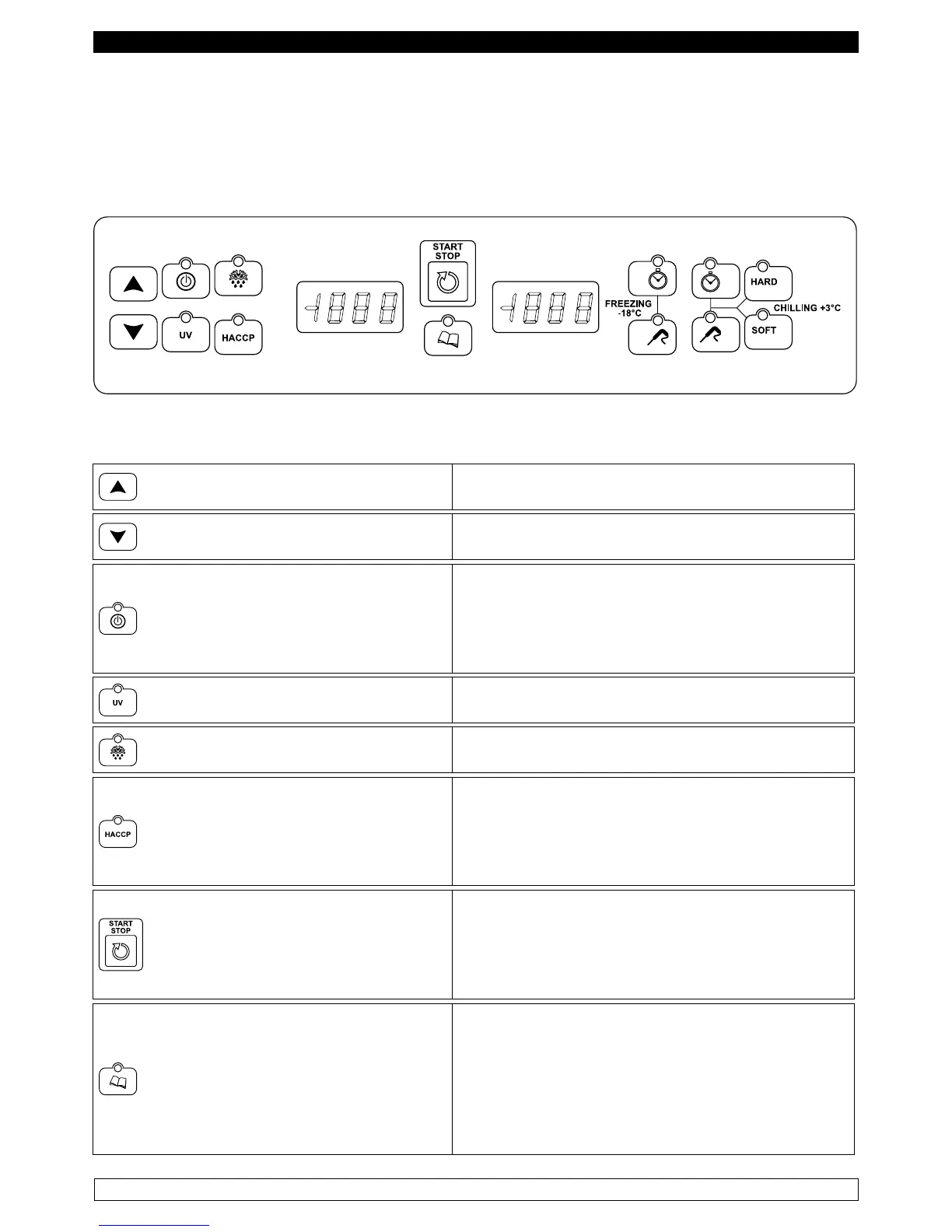
9.1 Description of the controls and buttons (Fig. 3)
The control panel has a digital temperature controller for cold and has 14 buttons with specific
functions:
Fig.3
The control buttons with which the blast chiller is equipped are:
INCREMENTED
It allows you to increase the value displayed on the
displays.
DECREASE
It allows you to decrease the value displayed on
the displays.
ON/OFF
With the card in OFF: pressing once puts the card
in STANDBY.
With card in STANDBY or with cycle in progress:
press continuously for ve seconds to put the card
in OFF.
STERILIZATION
With card in STANDBY: pressing once selects a
sterilization cycle. (Optional)
DEFROST
With card in STANDBY: pressing once selects and
starts a defrost cycle.
HACCP
With card in OFF: press continuously for ve
seconds to view the alarms history.
With alarm history displayed: press once to print
the history.
START/STOP
With cycle selected: press once to start the
execution of the cycle.
With cycle in progress: press once to end the
execution of the cycle.
PROGRAMS
With card in STANDBY: press once to select a
prestored program.
With cycle selected: press continuously for ve
seconds to enter programs storage.
With HACCP history display: press once to scroll
through history data



 To Next Page