v
Connection Mode B: Station (the
rst time to set up)
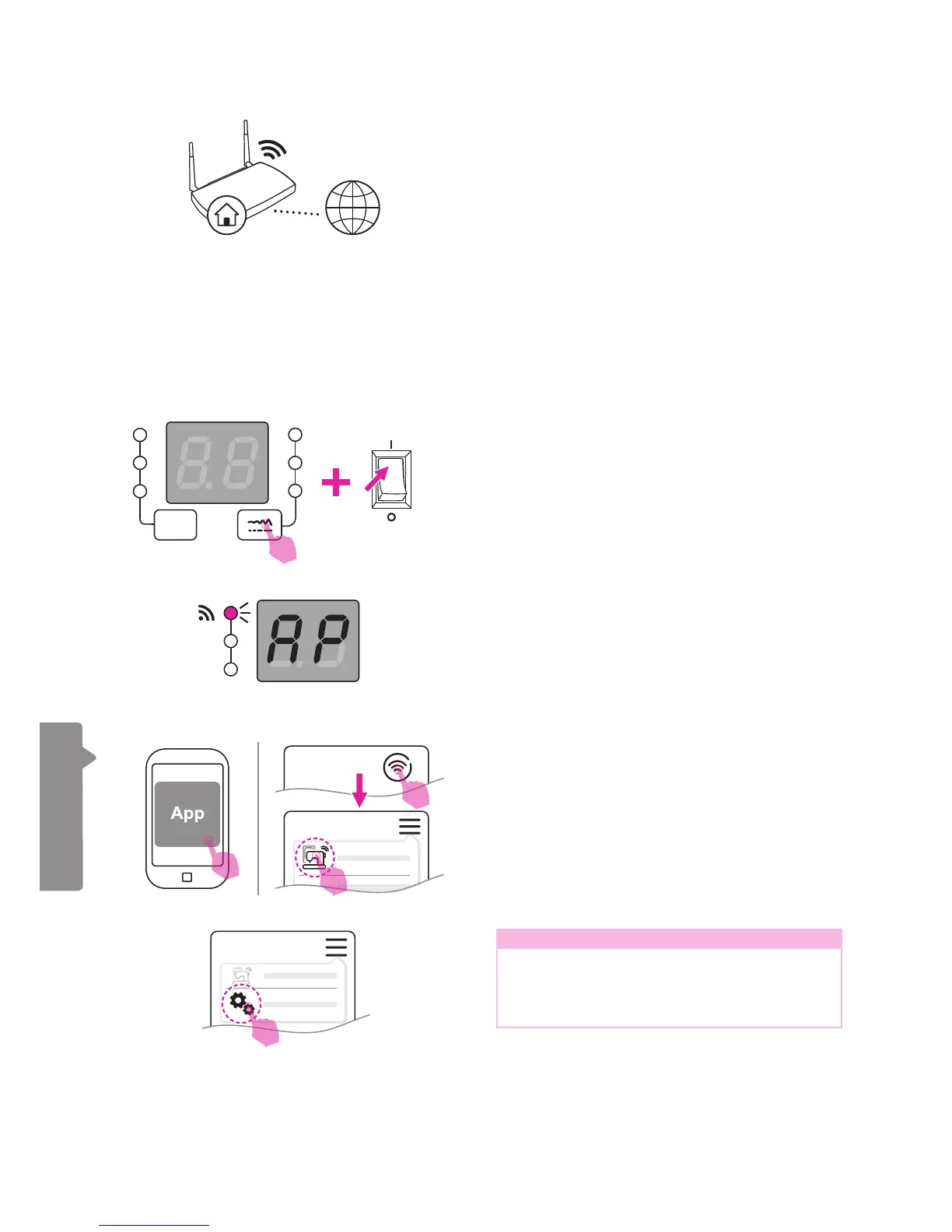
Before setting up, please conrm that
the environment is equipped with the
WiFi router and make sure it is connected
to the internet in order to starting the
connection.
Please set the SSID of your WiFi access
station in English letters or digital
numbers then re-connect again.
ON
OFF
Please open the app on your portable device.
(smart phone or tablet)
Press the connection button and nd the
"Station Mode Connection" option. Press on it
and process the WiFi setting as instructed on
screen.
Note
If you wish to switch to another WiFi router
or the embroidery machine has been
changed, please press "Reset connection"
and re-congurate it.
When the WiFi light turns on and starts
ashing, it means that power is on and it has
entered the base station setting function.
Press the stitch adjustment button and turn on
the power at the same time, in order to start
the base station setting function.


 To Next Page