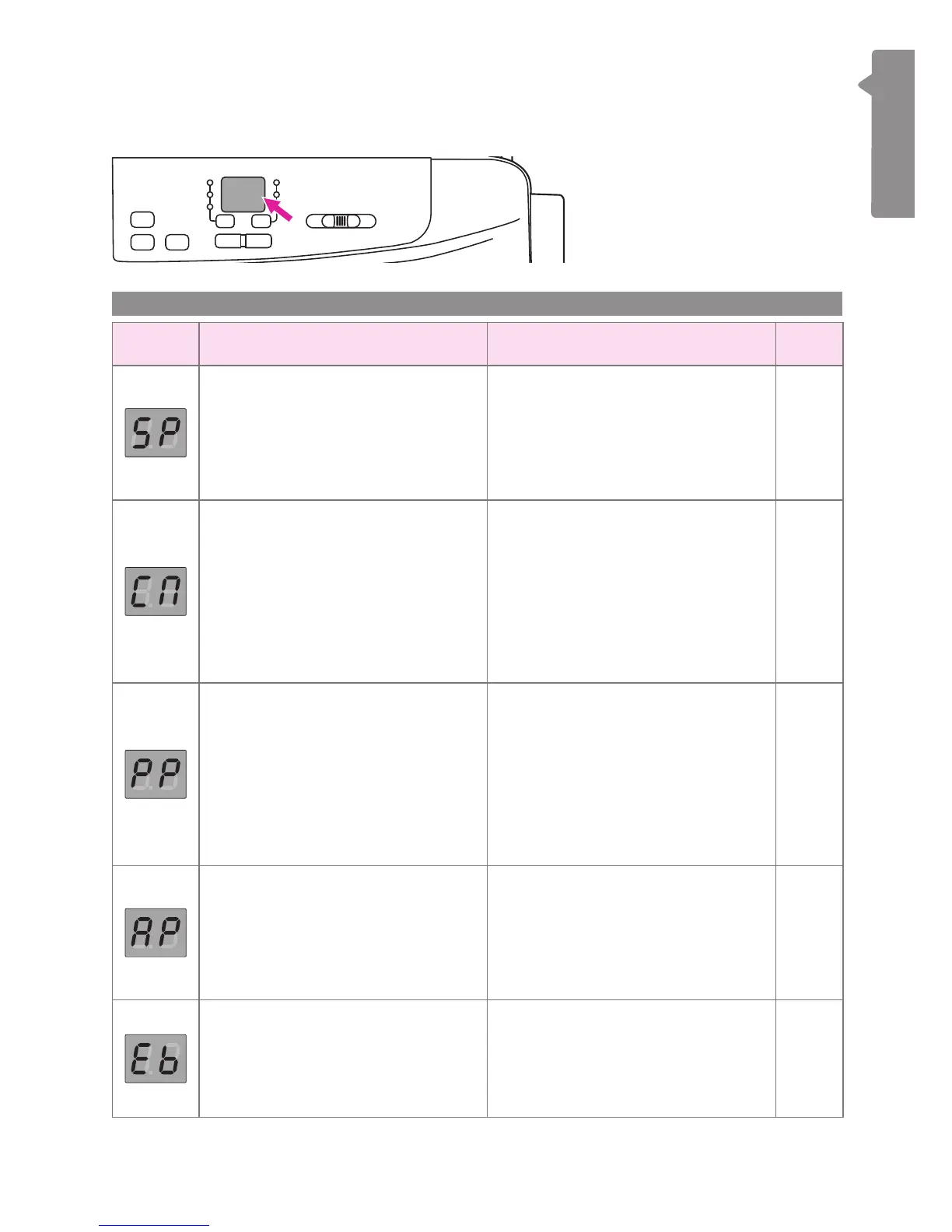
Display instruction
v
Screen
Screen In general Embroidery mode Page
Winding the bobbin
Bobbin winder spindle is on the
right for bobbin winding. Push the
spindle to the left for sewing. Please
refer to "Winding the bobbin"
chapter for more information.
- 8-10
-
The machine is connecting to
the WiFi router
The WiFi light keeps ashing until it
successfully connects to the base
station (screen shows "Eb").
Please refer to "Starting the
connection" chapter for more
information.
43
-
Machine is in point-to-point (PP)
mode
The WIFI light keeps ashing until
the setup is ready (screen shows
"Eb").
Please refer to "Starting the
connection" chapter for more
information.
40
-
Machine is in Access Point (AP)
mode
For the rst-time setting, please
refer to "Starting the connection"
chapter to complete the internet
setting.
42
-
Machine can be connected to
APP
Please refer to "Starting the
connection" chapter to complete
the internet setting.
40
5
Operation mode


 To Next Page