v
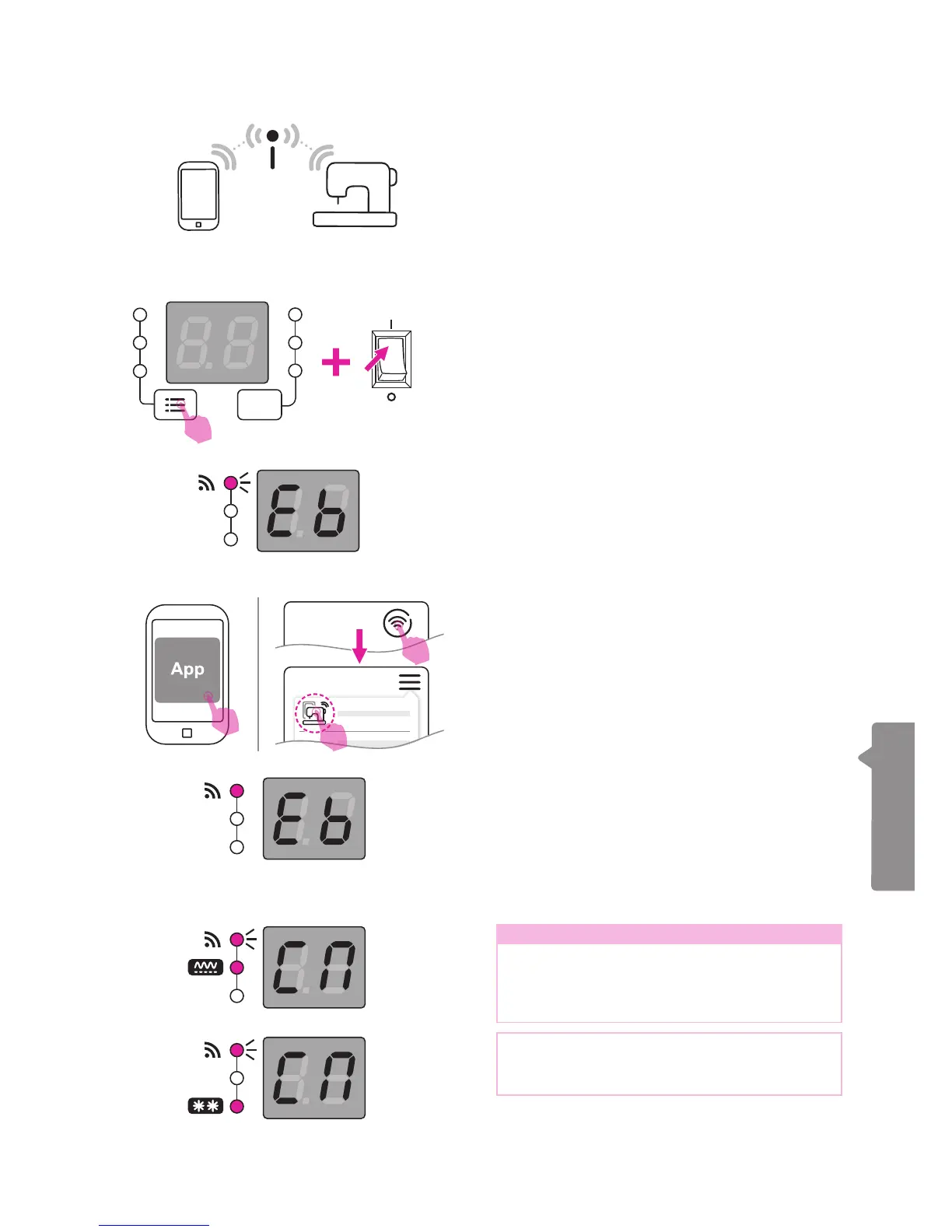
Connection Mode B: Station
Please conrm that the "The rst time to
set up station mode connection" process
has already been completed in order
to enable the general connection mode
successfully.
Once it has successfully connected to the
base station, the screen will show "Eb" and
the WiFi light will ash continuously, waiting
to connect with the app.
Once it has successfully connected to the
APP, the WiFi light will change to become
constantly on, which means that the
embroidery function can now be normally
executed.
Note
If the WiFi light keeps ashing and A group
patterns light existing, please check if the
base station works properly and the SSID
setting is correct.
If the WiFi light keeps ashing and B group
patterns light existing, please check if the
password is input correctly.
ON
OFF
Press the group switch button and turn on the
power at the same time. The embroidery unit
will perform the reset action and the WiFi light
will start ashing. The screen will light up and
show "CN", which means it is connecting to
the base station.
Please open the app on your portable device.
(smart phone or tablet)
Press the connection button and nd the
"Station Mode Connection" option. Press on it
and process the WiFi setting as instructed on
screen.


 To Next Page