- 12 -
Antenna
Press the ▲▼ button to select Antenna and press the ◄► button to select CATV or
Air.
Auto Scan
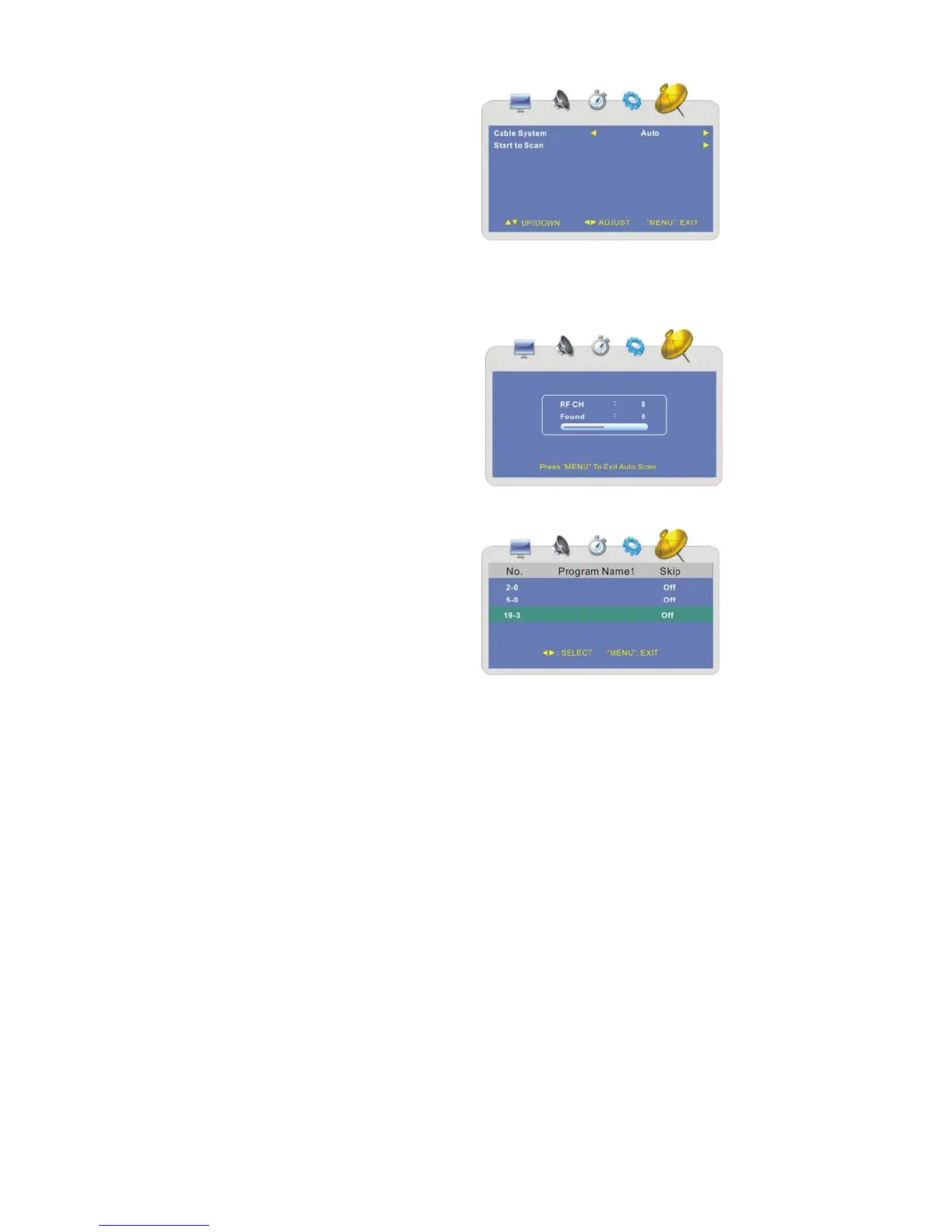
Press the ▲▼ button to select Auto Scan
and press the ► button to enter the menu
as shown on the right:
1. Cable System
Press the ▲▼ button to select Cable System and press the ◄► button to select
the desired item.
Note: This item is only available when “Antenna” is set to “CATV”.
2. Start to Scan
Press the ▲▼ button to select Start
to Scan and press the ► button to
start the scanning.
After scanning, the unit will automatically
memorize the programs searched in
sequence and tune the first searched
channel.
During scanning, press the MENU button
to cancel and exit.
Channel Skip
Press the ▲▼ button to select Channel
Skip and press the ► button to enter the
menu as shown on the right:
Within this menu, press the ▲▼ button to
select the channel you want to skip and
press the◄► button to select On or Off.
Press the MENU button to return to the
previous menu.



 To Next Page