OPERATOR INSTRUCTIONS
Affinity 30G
Evo, Inc. | 8140 SW Nimbus Ave., Bldg 5 | Beaverton, Oregon 97008 USA
Phone 503.626.1802 | Fax 503.213.5869 | www.evoamerica.com | support@evoamerica.com
30
REPLACING ELECTRONIC IGNITOR BATTERY
If the ignitor does not work, you may need to replace the battery.
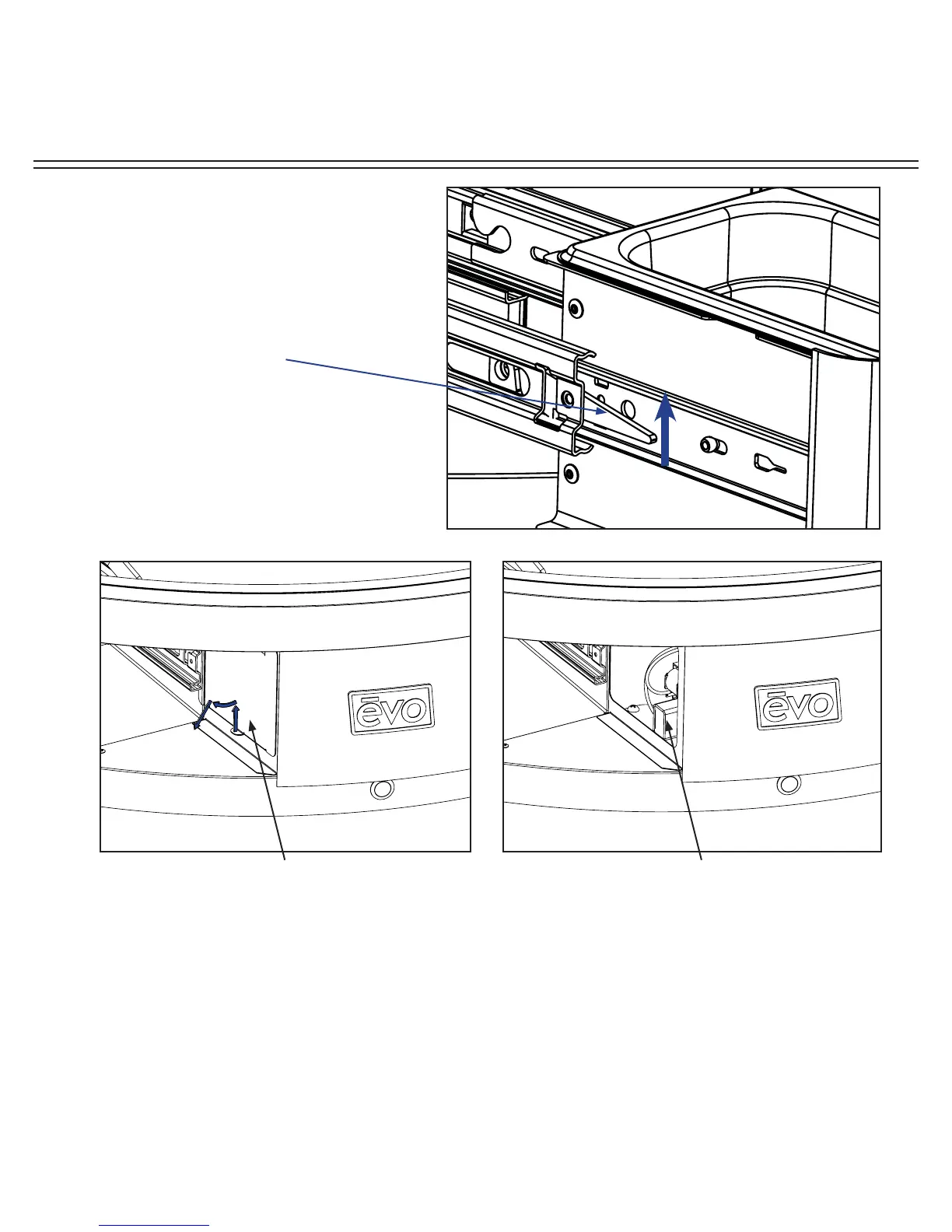
1. Remove the left spillover tray drawer by pulling outward and unlatching from the drawer
slide
(A)
2. Remove the battery cover located on the right inside the drawer opening by lifting the tab
upwards and swinging it out and downwards.
(B)
3. Pull the old 9V battery out and replace with a new one. Make sure to push it in all the way.
Place the cover back on and insert the spillover drawer carefully onto the slides.
(C)
4. If the ignitor is still not working, contact Evo Customer Support for an ignitor replacement.
Remove left drawer by
unlatching the drawer
from the slide. Make
sure to lift the left black
slider tab UP and the
right black slider tab
DOWN simultaneously
while pulling the
drawer outwards.
Remove the battery cover located on the
inside of the left drawer opening.
Remove the battery located on the inside of
the left drawer opening.
A
BC


 To Next Page