82
5.3) Display panel cleaning mode
- When "Cleaning mode" is selected, the touch screen is deactivated for 30 seconds.
(This function cannot be stopped until it is completed.)
5.4) Display
- Set the screen brightness.
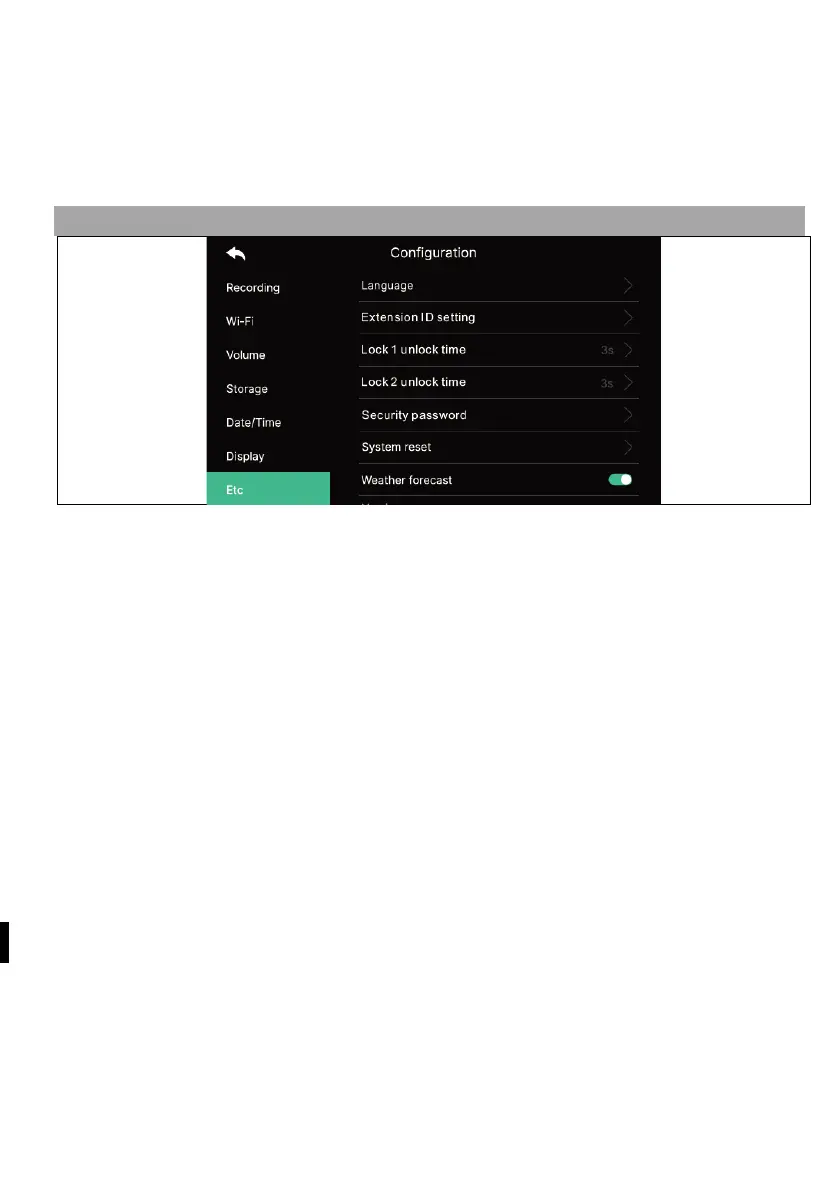
6) ETC
6.1) Jazyk
- Selection of system languages.
6.2) Extension ID Settings
- When connecting multiple monitors, select a different ID for each monitor.
6.3) Lock unlock time 1/2
- Selection and setting of the door opening relay time.
6.4)
Security password (Initial value: 1234)
- Set a password (4 digits) to be used to disable the security mode or cancel the
alarm.
- 0000, 1234, 4321 cannot be used as password.
6.4.1) Enter the password :
Enter the new password and confirm it again, then click the apply button to
confirm. (If you lose the password you were using, you can restore the default value
[1234] by performing a system reset.)
6.5) Resetting the system
- Clears all settings to factory defaults.
6.6) Weather forecast
- Activate the weather forecast information displayed on the main screen.
6.7) Security settings
When using this function, a door or camera is detected when a sensor is connected.



 To Next Page