83
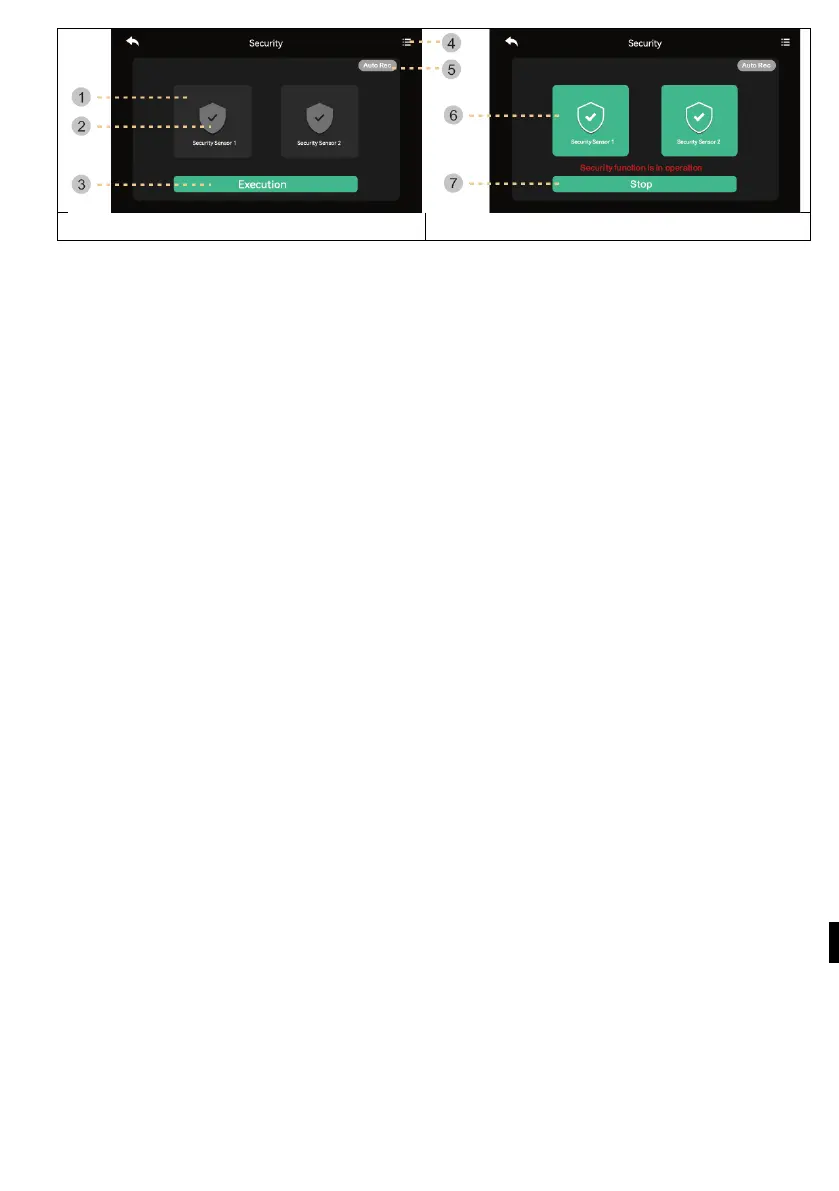
1) Before starting the security mode
Warning: Before proceeding, find out your password. If you do not know the
current password, you cannot disarm the alarm. (Factory default settings : 1234)
Only NC type encoder is available, so make sure your encoder is NC type.
1) S
afety sensor 1, safety sensor 2: Select the sensor you want to work with
2)
C
heck the box: The sensor is selected
3 ) Activate button: Activate the selected sensor. (Please note that the alarm occurs
when the sensor is
4 ) Record of emergencies: You can check the emergency log.
5) Automatic recording: In the event of an emergency, the camera recording is
automatically recorded for 10 seconds.
- If the function is active (red), the function is activated. (Click to turn it off.)
- CCTV1 is recorded in case of an emergency state of sensor 1 and CCTV2 is
automatically recorded in case of sensor 2. (If the SD card is not available, it will b
e
r
eplaced with a photo. If there is no camera system connected to the sensor, it will
not be recorded.)
2
) In security mode:
6) Indicates the implemented safety sensor.
7 ) Exit the security function.
- Press the button and enter the four-digit password. (Factory default password:
1234)
- If the password is correct, the mode will switch to Off and the screen will return to
the main screen. (If the password is incorrect, you cannot turn on the mode and
continue initializing the device.)



 To Next Page