14
Using eXact
®
Strip Micro Standard strip test procedure
Used for Total Alkalinity
1
, Biguanide, Bromine, Calcium Hardness
2
, Chloride
3
, Chlorine High Range
4
, Chromium
5
, Copper,
Total Hardness High Range
6
, Total Hardness Low Range
6
, Hydrogen Peroxide
7
, Nitrate
8
, Nitrite, Ozone, Peracetic Acid
9
,
Permangante, pH
10
, Acid pH, Phosphate
11
, Quaternary Ammonia Compound QAC, Sulfate
(SEE NEXT PAGE FOR SPECIAL NOTES)
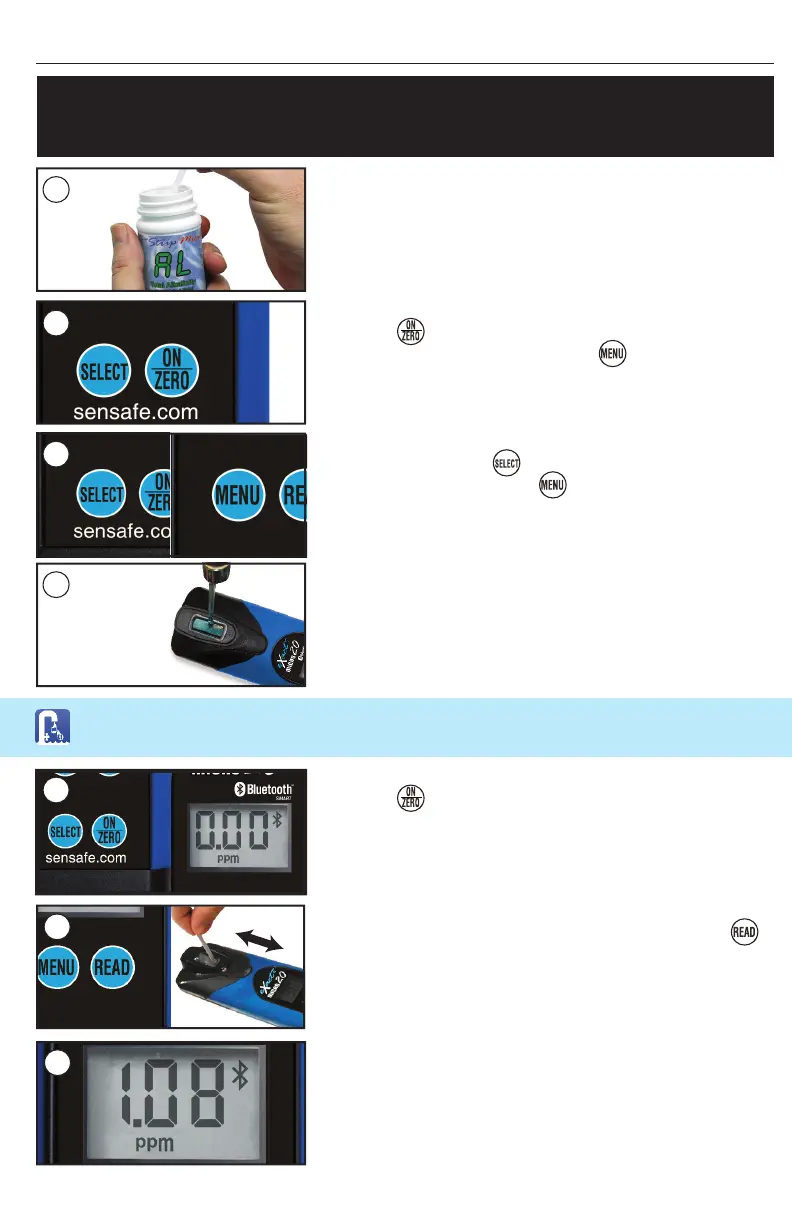
REMOVE STRIP
Remove 1 eXact
®
Strip Micro (ex. Total Alkalinity) from
the bottle before beginning the test. Set the strip in a dry,
convenient place and recap the bottle immediately.
TURN METER ON
Press the button to power the meter on; the display will
show all annunciators, then the current selection, followed
by the last reading.
RINSE CELL AND FILL WITH SAMPLE
Rinse the CELL at least 3 times with the water sample you
will be testing (rinsing minimizes the potential for cross–
contamination from a previous test). Finally, fi ll the CELL to
capacity with the water sample.
ZERO METER*
Press the button. The cursor will move across the display
followed by a display reading of 0.00 PPM. This indicates the
sample is ready for testing.
1
2
SELECT GROUP AND MENU
Press and re–press the button to Select your group.
Then, press and re–press the button to select the test
parameter (see chart on pages 6–7).
4
5
DIP STRIP & PRESS READ
Dip the required strip into the CELL, and immediately press
This will start a 20 second countdown timer. During this time,
move the strip in a gentle back and forth motion (approx. 2
strokes per second). Remove and discard the strip after ‘1’
on the display disappears.
*
RECORD RESULT & RINSE CELL
The cursor will move across the display while the meter
prepares to measure the sample. Record the value displayed
for the respective parameter. This value is automatically stored
in its MENU and if using the eXact iDip
®
app, the result will
be saved in the app’s ‘RESULTS’. After testing, rinse cell
immediately and clean with brush.
6
7
Follow the steps to ‘SELECT CUSTOMER’ & ‘CONNECT DEVICE VIA BLUETOOTH’ before
proceeding (see page 12).
*For best accuracy, when testing outdoors in sunlight, place cap over cell cover
3


 To Next Page