GB
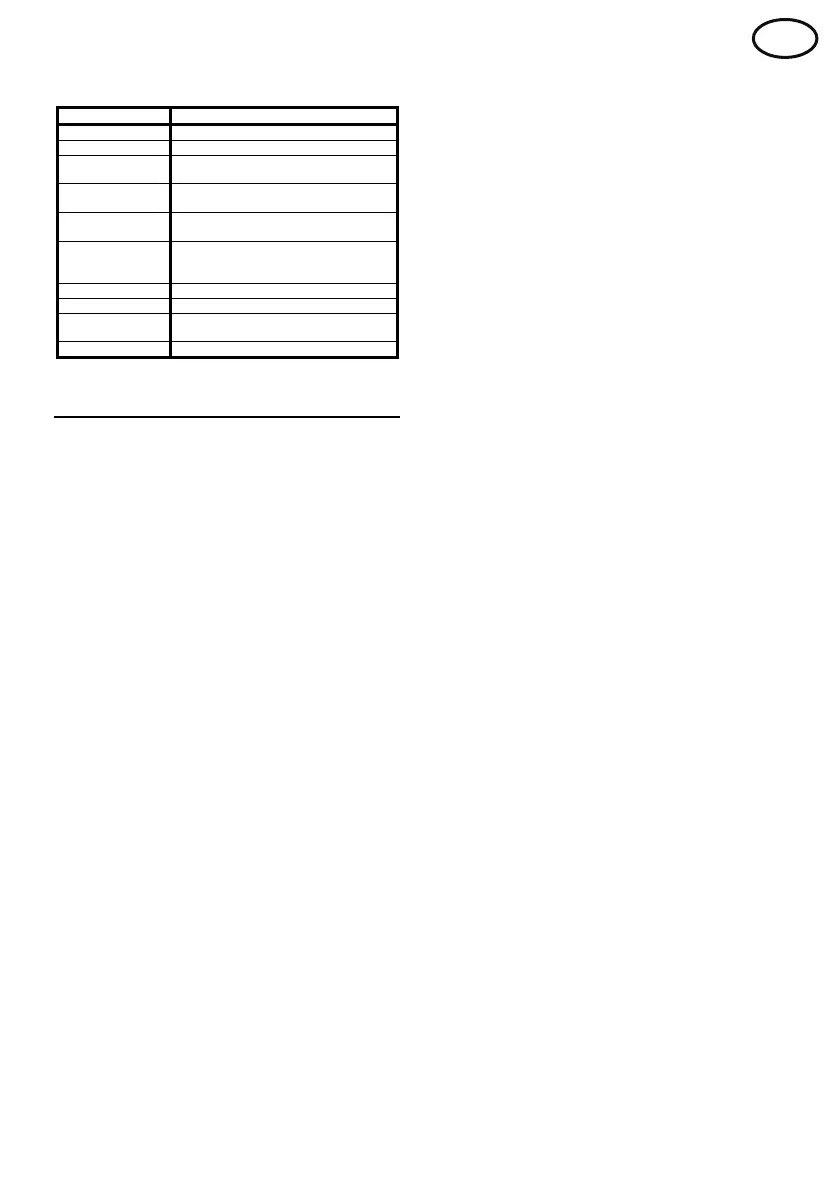
Charge Status Indicator Summary
M
ode Indication
Bulk Charge Red
S
econd Stage Amber
Charge
Complete
G
reen
Reset
Four seconds of Amber followed by a
one second blank period
A
uto-balance /
Refresh
Green / Amber (Alternating)
F
ault
Green followed by a number of Red
f
lashes indicating the fault code
number (Sequence repeats)
E
qualise Flashing Green (fast)
Cool Down Flashing Green (slow)
Battery
R
ecover Mode
Red / Amber (Alternating)
Pause Flashing Amber
Operation
Before connecting the battery, check that
the battery voltage corresponds to the
voltage indicated on the charger rating
plate.
Charging
When a battery is connected to the charger &
mains applied, charge will start automatically.
The charge status indicator will show RED
during bulk charge or AMBER during the
second stage of charge.
Charge Complete
When charge is complete the charge status
indicator will show GREEN.
The battery should be left connected to the
charger until required; under these conditions
the battery will receive periods of auto-balance /
refresh charge to maintain it in the fully charged
condition. During these periods, the charge
status indicator will alternate between GREEN
& AMBER.
Removing the battery
The battery can only be disconnected when
charging current has stopped flowing.
Therefore, the pause button must be
pressed before disconnection. A second
press of the pause key will clear the pause
condition and continue charge.
When the charger is paused the charge status
indicator will flash AMBER, indicating that it is
safe to remove the battery.
If the pause mode is entered but the battery is
not removed within 10 minutes, the charge will
automatically continue.
Equalise Mode (Profile Dependant)
Periodically, low maintenance batteries require
additional charging to equalise all of the cells to
the same charge state, this should be
performed after the battery is topped up.
Equalisation charge can be set at any time
during the charge cycle by pressing the pause
button for 5 seconds. Repeating this action will
cancel equalisation.
To indicate that equalise has been set the
charge status indicator will flash GREEN for 5
seconds then return to the previous display.
To indicate that equalise has been cancelled
the charge status indicator will switch off for 5
seconds then return to the previous display.
Only one equalisation cycle is allowed per
charge cycle.
If enabled, the charger will automatically
perform the equalise function after the standard
charge has been completed.
Battery Recover Mode
If a battery is connected to the charger that is
below the normal operating voltage an incorrect
battery fault (F3) will be displayed. However if
the battery voltage is between 1 and 1.5VPC,
battery recover mode is available. This mode
employs a special charging technique to
recover batteries that have been stood for a
long time or have been over discharged.
This mode can be enabled by pressing the
pause button for 5 seconds whilst the fault is
displayed. Battery recover mode will then start;
once the battery voltage has been recovered to
a normal level a standard charge will be
performed.
Cool Down Mode (Profile Dependant)
Cool down mode is activated after the charge
has completed and allows the battery time to
‘cool down’ before its next use. During this time
the battery should remain connected to the


 To Next Page
 Loading...