GB
charger, but can be removed if required.
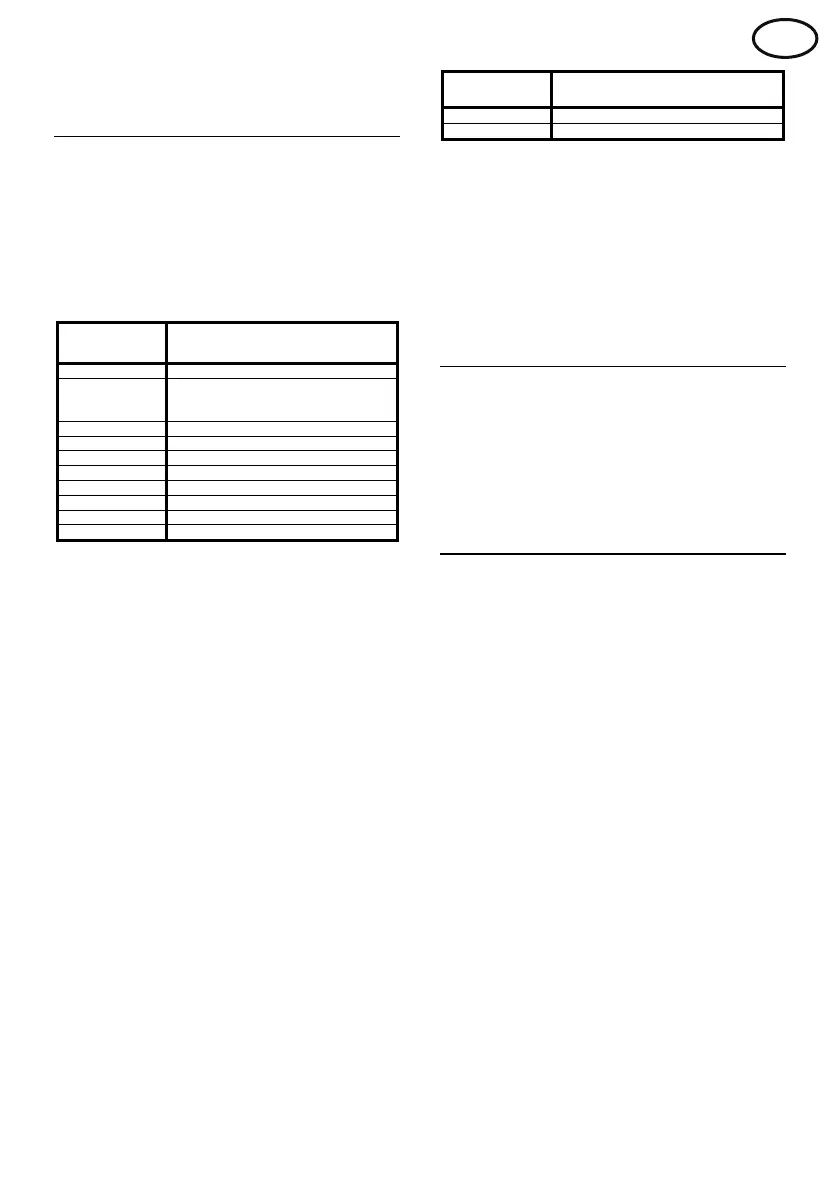
Faults / Warnings
In the event of a problem occurring, the charger
will display an appropriate fault / warning code
via the charge status indicator. This code will
consist of a number of RED flashes, as shown
in the tables below, followed by a GREEN flash.
Faults permanently stop charge until they are
rectified.
No. of RED
f
lashes
Fault
1
No mains supply
2
Incorrect mains voltage
(<207 or >253) or incorrect mains
f
requency (<45 or >66Hz)
3 Incorrect battery voltage
5 Incorrect current control
6 Bulk timeout
7 Gassing timeout
8 Auto-balance timeout
9 Charger over temperature
10 Configuration error
11 Safety disconnect system error
x Faults 1 to 3 are critical faults and will
prevent charging.
x Fault 5 is likely to indicate an internal
charger fault.
x Faults 6 to 8 occur when a particular stage
of charge takes too long. This indicates that
the battery might be at fault or have been
over discharged.
x Fault 9 may occur if the charger is in an
ambient temperature above 55°C or airflow
is restricted. Charge stops under these
conditions until the charger has cooled
sufficiently.
x Fault 10 will occur if an invalid switch
combination is used.
x Fault 11 will occur if the optional safety
disconnect system wiring is damaged.
Note: Fault 1 will only be shown for 5 minutes.
After this the charge status indicator will switch
off. The display can be re-activated by pressing
the pause button.
Warnings do not affect the charge procedure.
No. of RED
flashes
W
arning
4 Sulphated battery
12 Battery disconnected during charge
x Warning 4 indicates that the battery might
be at fault or have been over discharged.
This fault code will be shown every 10
seconds.
x Warning 12 will occur if the battery has
been disconnected from the charger,
without the pause button being pressed.
Repair
This product is not user serviceable. To
prevent electric shock, the case must not be
removed.
In the event of a problem occurring please
contact your local Service Department.
Maintenance
Before carrying out maintenance, isolate the
mains supply and disconnect the battery.
Only suitably qualified personnel should
perform maintenance work on this
equipment.
The charger will require little maintenance, but
the following schedule is recommended once a
month:
(a) Check the condition of all cables,
paying particular attention to the points
where cables may be severely flexed,
i.e. at the entry to charger cabinet,
charging plugs and sockets.
(b) Check condition of charging plugs and
sockets for wear and any evidence of
overheating, which could ultimately
lead to charger malfunction.
(c) Check that ventilation is not obstructed.
(d) Ensure that all safety covers and
panels are correctly in place.
GNB I.P recommends that a yearly periodic
inspection / test is performed on this equipment,
contact your local agent for details.


 To Next Page
 Loading...