Powerware
®
Plus 12 Operator's Manual (164200090 Rev E) 47
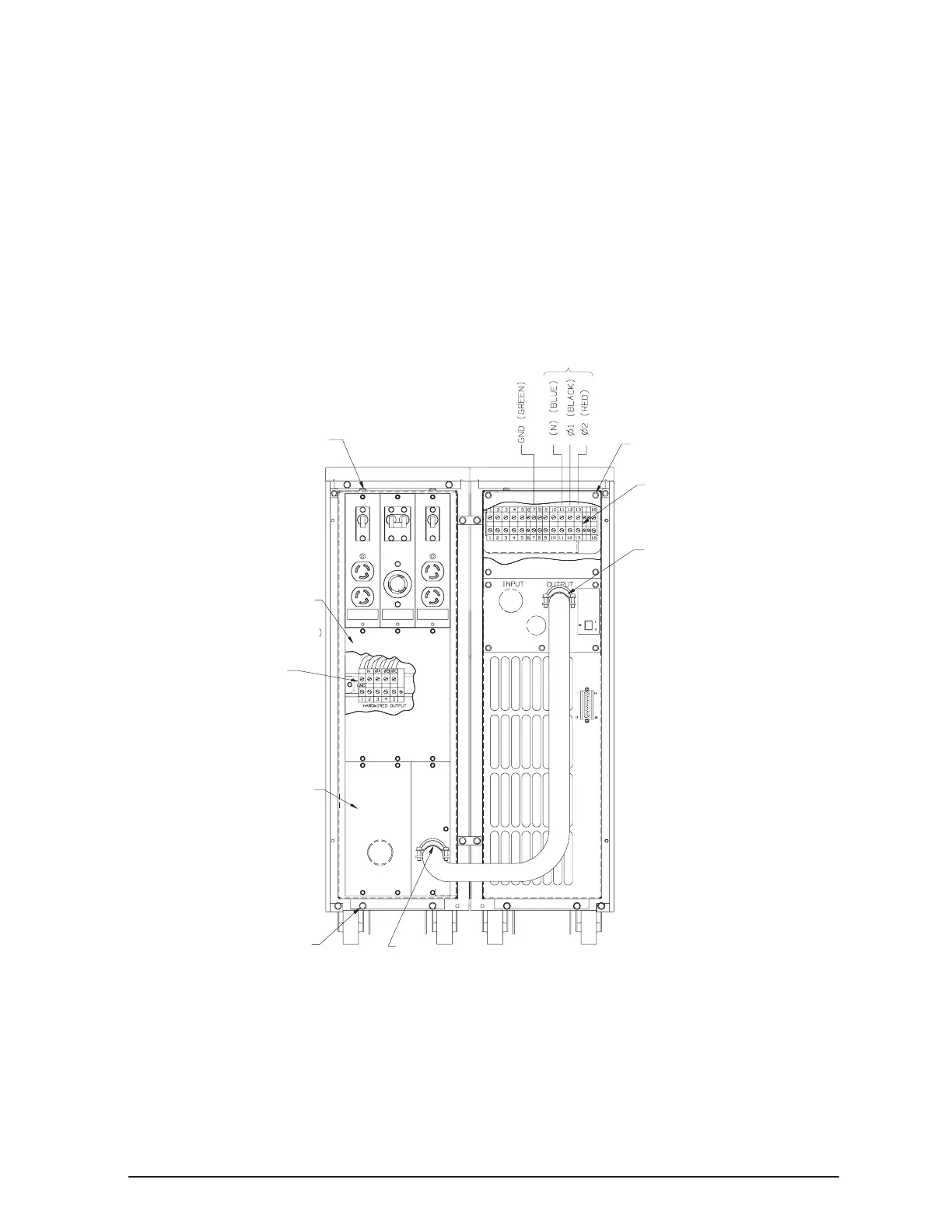
. Make sure all of the PDM circuit breakers are in the OFF (O) position.
. Hang the PDM on the PDM mounting bracket, aligning the mounting holes on
the PDM with the holes on the mounting bracket. Using the four hexĆhead
screws provided in the hardware kit, secure the PDM to the top and bottom
frame of the battery cabinet.
. Remove the PDM terminal block access plate and retain the screws.
. Attach the strain relief connected to each end of the output cable to the
conduit mounting plate by removing the nut and placing it on the back side of
the conduit mounting plate. Secure tightly.
To ensure proper strain relief of the cable, do not loosen or remove the strain relief
clamp from the cable during installation.
PDM
PDM Terminal
Block Access
Plate
PDM Terminal
Block
(optional)
Conduit
Mounting
Plate
PDM Mounting Screws
Output Cable (strain relief)
UPS Terminal Block
UPS Terminal Block
Access Plate
Output Cable (strain relief)
Output Terminals



 To Next Page