33
Recording Images
Recording Images
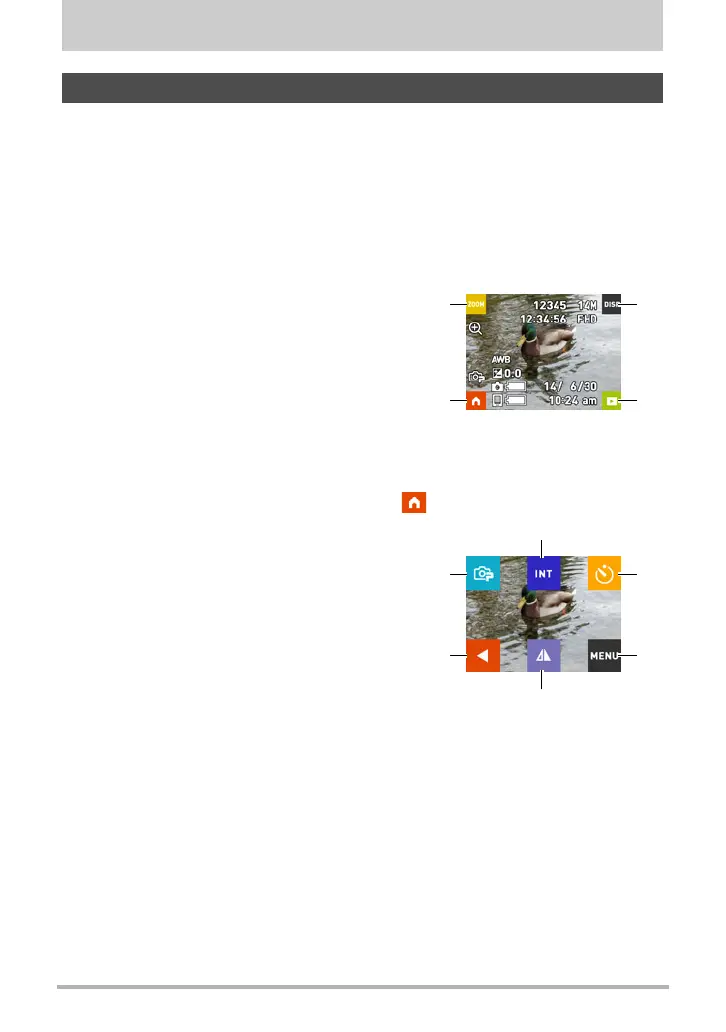
This section explains the contents of the REC mode screens. While the REC mode
main screen or home screen is displayed, pressing the camera or controller shutter
button will shoot a snapshot.
. Main Screen
The main screen appears when you turn on the camera or when you enter the REC
mode from the PLAY mode.
. Home Screen
The home screen appears when you touch the “ ” icon on the main screen.
REC Mode Screen
1
Zoom (page 39)
2
Information (page 9)
3
Go to PLAY mode (page 25)
4
Go to home screen
4
1
3
2
1
Recording mode (page 37)
2
Interval Snapshot (page 34)
3
Self-timer (page 38)
4
Menu (page 42)
5
Display mirror image (page 36)
6
Go to main screen
6
1
4
5
2
3


 To Next Page