95
Appendix
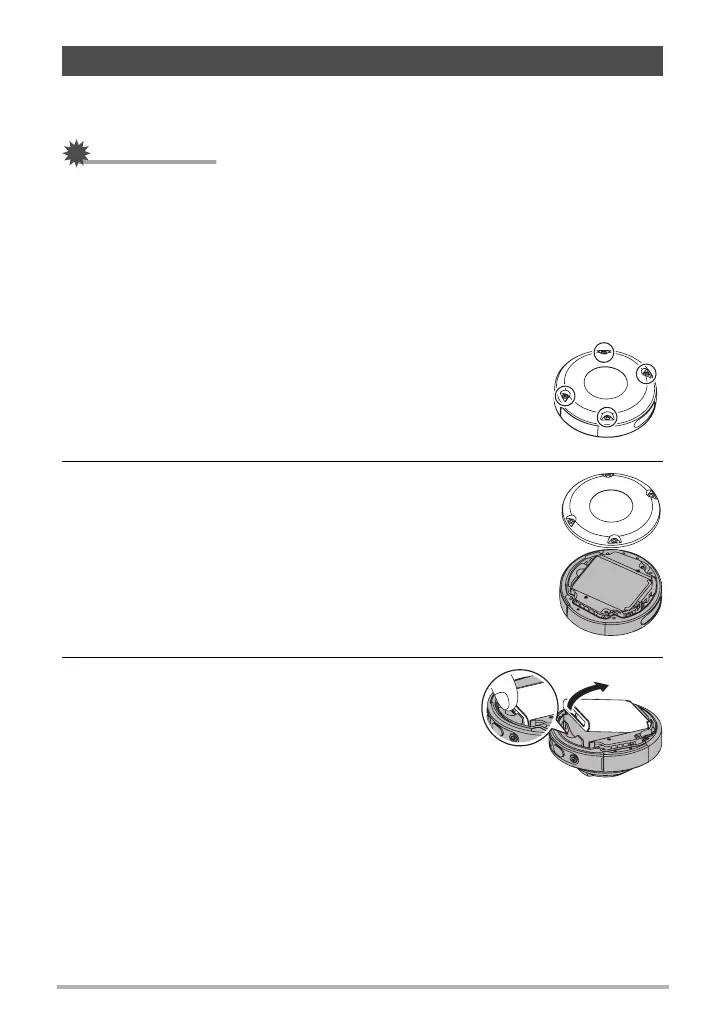
When disposing of the camera, be sure to first remove its built-in lithium ion battery
and send it in for recycling.
IMPORTANT!
• The battery of this camera is built-in and cannot be replaced by you. Contact your
retailer or a CASIO authorized service center to have the battery replaced.
• Make sure that the camera is turned off before removing the battery.
• The edges of the back cover are sharp. Take care not to cut your fingers when
removing it.
• When removing screws, use a precision Phillips tip screwdriver.
. Camera
1. Remove the four screws that secure the back of the
camera.
2. Remove the back cover.
3. Hook your fingertip at the location indicated
in the illustration and remove the battery.
Disposing of the Camera


 To Next Page