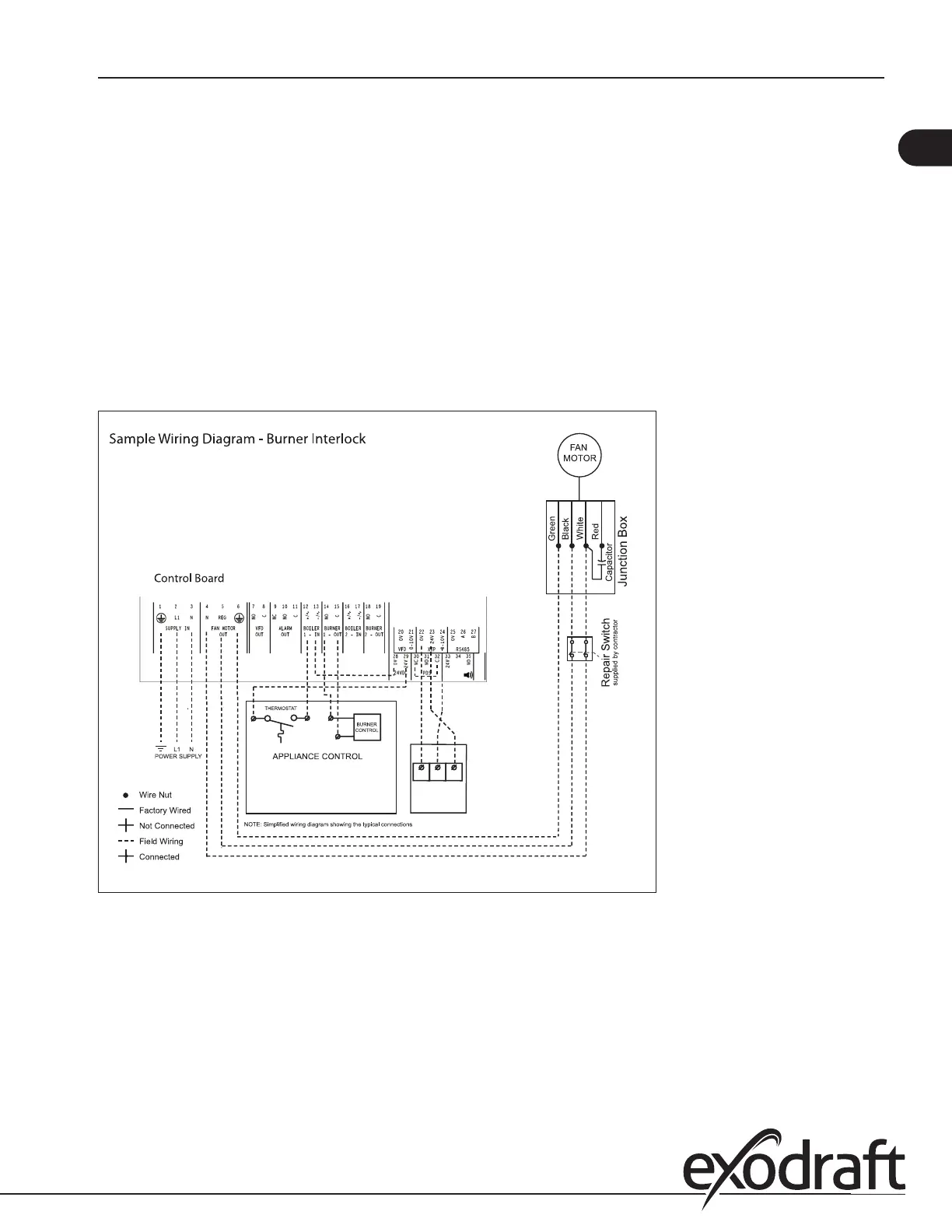
Interlock with dry set of contacts
Figure 9 shows how a dry set of contacts is connected to the MEC24:
y Connect the power supply to terminals 1, 2 and 3.
y Connection to the appliance:
Connect the dry set of contacts to terminals 12 and 13.
Connect the start signal to the burner to terminals 14 and 15.
y To connect the chimney fan:
If using a 1x120V chimney fan, connect it to terminals 4, 5 and 6. Refer to the fan’s Installation Manual.
If using a 3-phase fan and VFD, connect the VFD to terminals 20 and 21 as shown in Fig. 10 and 11. DO NOT con-
nect the fan directly to the MEC24 control.
Connect the XTP transducer to terminals 22, 23 and 24
XTP2
COM Vout Vin
Connection to 120 V Fan - Intermittent Operation
1 x 120V AC
Fig. 9
11
3120066 MEC24 US 20210325


 To Next Page