
 Need help?
Do you have a question about the Extech Instruments RH520B and is the answer not in the manual?
Safety precautions and warnings regarding device usage, battery handling, and potential hazards for users.
Information on the device's compliance with FCC rules for digital devices and potential radio frequency interference.
Details on how the RH520B operates on battery or AC power, including battery replacement advice.
Instructions for placing the device on a table or mounting it on a wall using the provided holes.
Information about the detachable sensor probe, its cable, and potential extension methods.
Procedure to lock and unlock the device's push-buttons to prevent tampering or accidental changes.
Step-by-step guide to setting the device's internal clock and date for accurate logging.
Instructions on how to reset display parameters and clear stored readings or alarm history.
Guide to switching temperature display units between Celsius and Fahrenheit via an internal switch.
Procedure to adjust the upper and lower range limits for the temperature graph on the LCD.
Procedure to adjust the upper and lower range limits for the RH graph on the LCD.
Instructions on how to set the interval at which the device records measurements.
Guide to configuring high and low alarm thresholds for temperature readings.
Guide to configuring high and low alarm thresholds for relative humidity readings.
Description of the default display state and how to return to it after other modes.
Explanation of the cursor's function for navigating and viewing data points on the graphs.
Instructions for replacing the device's batteries, including a note on battery life indicator.
Legal obligations and methods for disposing of used batteries and the device itself.
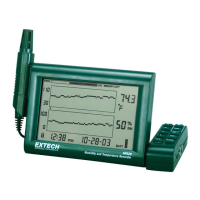
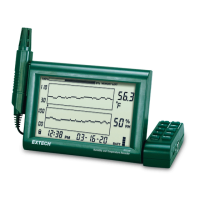
The Extech RH520B is a paperless humidity and temperature chart recorder designed to measure and display temperature, humidity, and dew point. This device is ideal for monitoring ambient conditions over time, providing both graphical and numerical representations of the readings. Its remote (detachable) probe allows for flexible placement, while the main unit's LCD display provides comprehensive data visualization.
The primary function of the RH520B is to continuously monitor and record environmental temperature and humidity. It features an internal memory capable of storing a significant number of measurements, which can later be transferred to a PC for further analysis. The device's graphical LCD displays real-time data, including temperature and relative humidity graphs, alongside numerical readings for temperature, humidity, and dew point. A cursor on the graph allows users to pinpoint specific data points and view their corresponding time, date, and measurements.
The RH520B is equipped with programmable audio-visual alarms that alert users when ambient conditions exceed or fall below preset alarm limits. These alarms can be configured for both high and low temperature and humidity thresholds. An optional alarm module allows for automatic relay switching when alarm presets are reached, enabling integration with external control systems.
The device also records and displays MAX/MIN readings for both temperature and humidity, allowing users to quickly identify the highest and lowest values recorded over time. The internal memory usage meter provides a visual indication of how much storage capacity remains, while a projected time and days display estimates when the memory will be full based on the current sample rate.
The RH520B offers a user-friendly interface with several push-buttons for navigation and configuration. The "VIEW" button allows users to switch between different display modes, including the standard view, MAX/MIN temperature, and MAX/MIN humidity. It also serves as an escape function to exit setting menus without saving changes. The "ALARM" button is used to display or set alarm values and to step through the alarm history. The "TIME" button enables users to view readings stored at specific times and dates, as well as to set the recording sampling rate and the device's internal clock.
The "SET" button is crucial for storing new parameter values and confirming changes made in various setting functions. In combination with other buttons, it allows for setting vertical graph ranges, temperature and RH alarm values, and the recording sample rate. The "TEMP" button, when used with other buttons, sets the vertical graph range for temperature and temperature alarm values. When pressed simultaneously with the "RH" button, it displays the dew point. Similarly, the "RH" button, in combination with other buttons, sets the vertical graph range for humidity and RH alarm values.
Arrow buttons (UP, DOWN, LEFT, RIGHT) facilitate scrolling through data, navigating menus, and incrementing/decrementing values during setup. A push-button lock-out security feature prevents unauthorized tampering with settings. This feature can be activated or deactivated by simultaneously pressing the UP, DOWN, LEFT, and SET arrow buttons from the main view screen.
The RH520B's remote sensor is connected via a 1-meter cable, offering flexibility in probe placement. The cable length can be extended using an RJ45 cable and a gender changer. The device can be used as a table-top unit utilizing its swivel keypad as a stand, or it can be wall-mounted using the provided holes on the rear.
The RH520B is designed for ease of maintenance, particularly concerning its power source. It operates on three 'AA' batteries or an AC adapter (5VDC 1A), both of which are supplied. The AC adapter serves as the primary power source, with the batteries acting as a backup in case of power failure. A 5-segment battery life indicator on the display allows users to monitor the battery status, prompting replacement when only one segment remains.
Battery replacement involves opening the compartment on the rear of the instrument, removing old batteries, and inserting new 'AA' alkaline batteries with correct polarity. After battery installation or in the event of a complete power failure (AC and battery backup), a "Programming Reset" is required. This involves pressing the RESET button located inside the battery compartment, which clears all settings (time, date, logging interval) but retains measurement data and alarm history in non-volatile memory. It is crucial to set the Date, Time, and Sample Rate immediately after a reset and then clear the internal data memory by pressing the DATA RESET button on the rear for more than 4 seconds to ensure correct time and date stamps for recorded data.
The device also includes a °C/°F switch inside the battery compartment, allowing users to select their preferred unit of measure for temperature displays. This ensures that the device can be adapted to different regional standards or user preferences. The RH520B's robust design and clear maintenance instructions contribute to its long-term reliability and ease of use.
 General
| Humidity Range | 0 to 100% RH |
|---|---|
| Dew Point | Yes |
| Wet Bulb | Yes |
| Datalogging | Yes |
| Sampling Rate | 1 second |
| PC Interface | USB |
| Data Hold | Yes |
| Auto Power Off | Yes |
| Warranty | 1 Year |
| Resolution | 0.1°F/°C; 0.1%RH |
| Accuracy Temperature | ±1.0°C |
| Display | LCD |


 To Next Page