The Source User Manual Mobile App12
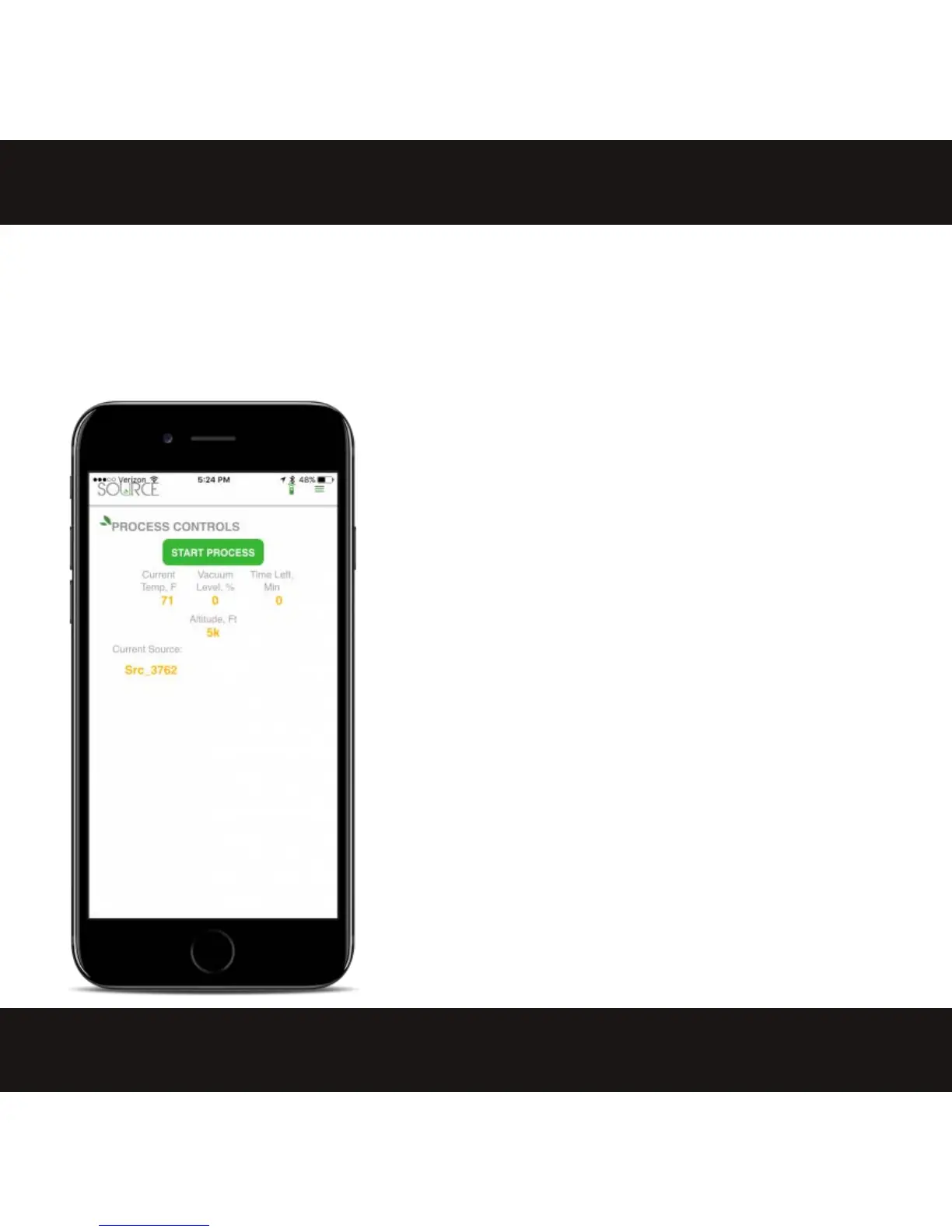
START/STOP PROCESS BUTTON
Select this button to start or stop the
process. The green illuminated button on
the base of the unit will flash to confirm
the app's command.
INTERPRETING THE DISPLAY VALUES
Process control readouts for the Source are available from the Control
screen:
Current Temp, F: Displays the heat being pumped into the unit at any
given time. When the heater is at rest it may display a low value, and
when it is active it may display a higher value. Those heat input temps
change to keep the alcohol in the cup at a constant 100°F-105°F.
Vacuum level %: Indicates the current vacuum as a percentage of total
achievable vacuum. The internal controls will determine when it's
necessary for the pumps to engage and reestablish 100%.
Time Left, Min: Shows the time remaining for the current cycle. This can
be reset to the max 120 min by turning the machine off and on.
Altitude, Ft: Reflects the default altitude that has been programmed into
the unit. If the displayed value is not the closest 1,000 feet of elevation
for where you are located, follow the Altitude Tuning directions on page
13 to set accordingly.
Current Source: This area lists the ExtractCraft Source unit that is
connected.
CAUTIONS ABOUT USING THE APP AND CONNECTIVITY
Only one device can be paired to the Source at any time. If the unit is still
paired to a different device from a previous session it will not appear in
the "Select Appliance Screen".
The app must stay connected to the Source for the entire process.
Removing the device from bluetooth range and reconnecting mid-
process will shut the machine off and it will wait for a new cycle.
If the comm icon flashes between green and red that means the
bluetooth connection is low quality and having trouble maintaining
connection.


 To Next Page