5The Source User Manual Source Operation & Making A Plant Extract
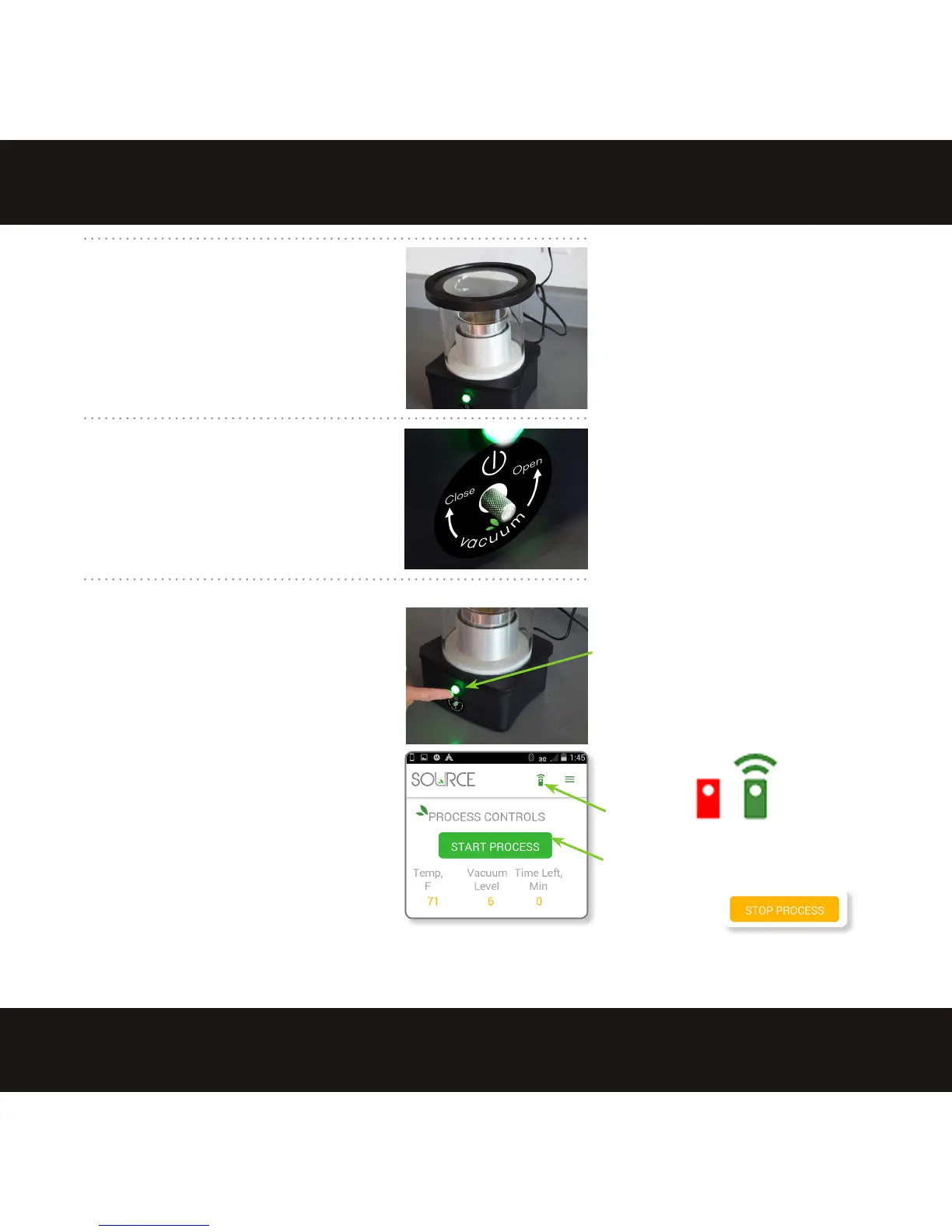
Turn the screw
fully to the
RIGHT to seal
the chamber.
Never
remove screw
9. PLUG IN THE SOURCE
Plug the Source into a 120 VAC outlet. The
indicator button on the base glows steady
green when the Source has power and is
ready for use. If the button is not lit, then
the Source is not getting power. When
the Source is plugged in, the fan runs to
ventilate the base.
10. SEAL THE VACUUM
Turn the vacuum valve screw fully to the
right to close the vacuum release valve.
(When turned to the left, the vacuum
relief opens to allow air into the unit,
releasing the vacuum seal so the lid may
be removed.)
11. START THE SOURCE
Normal Mode
Press the green button once or select the
START PROCESS button on the app to start
in normal mode.
• 1 slow ash of the green button
indicates the proces
s starting.
• 2 fast ashes indicates stopping.
Turbo Mode
Press and hold the green button on the
base for a full 3 seconds then release; 2
slow flashes indicate Turbo mode began.
(When using the app a green comm icon indicates
the app is com
municating
with the Source via
Bluetooth. A red comm icon indicates no Bluetooth
communication: see trouble shooting p.15)
Mobile app START PROCESS button
(When the process is running, the
same button is for
STOP PROCESS.)
comm icon
completely.
1 slow flash = starting Normal Mode
2 slow flash = starting Turbo Mode
2 fast flashes = stopping process
Press the green button on the base to
start the Source or use
the mobile app.
Plug in
the Source.


 To Next Page