Model Part Number Description
(FDX) of Stackable Chassis throughput per
switch in Stacking Mode
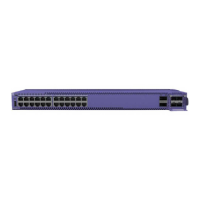
ERS 3524GT-PWR+ AL3500A15–E6 24 port Ethernet Switch configured as:
• 24 ports of 10/100/1000BASE-T (support for
IEEE 802.3af PoE or IEEE 802.3at PoE+) with
4 shared SFP ports (combo with ports 21-24)
• 2 rear SFP ports can be used as additional
ports in Standalone Mode or as 2 rear HiStack
ports delivering up to 10Gbps (FDX) of
Stackable Chassis throughput per switch in
Stacking Mode
ERS 3526T AL3500A01–E6 26 port Ethernet Switch can be configured as:
• 24 ports of 10/100Base-TX, plus 2 combo
10/100/1000BASE-T or SFP ports
• 2 rear SFP ports can be used as additional
ports in Standalone Mode or 2 rear HiStack
ports delivering up to 10Gbps (FDX) of
Stackable Chassis throughput per switch in
Stacking Mode
• Fanless operation
ERS 3526T-PWR+ AL3500A11–E6 26 port Ethernet Switch can be configured as:
• 24 ports of 10/100BASE-TX (support for IEEE
802.3af PoE or IEEE 802.3at PoE+), plus 2
combo 10/100/1000BASE-T or SFP ports
• Rear SFP ports can be used as additional
ports in Standalone Mode or 2 rear HiStack
ports delivering up to 10Gbps (FDX) of
Stackable Chassis throughput per switch in
Stacking Mode
ERS 3549GTS AL3500A06-E6 49 port Ethernet Switch configured as:
• 48 ports of 10/100/1000BASE-T with 2 shared
SFP ports (combo with ports 47-48)
• 1 SFP+ (1Gig or 10Gig) uplink port
• 2 rear SFP ports can be used as additional
ports in Standalone Mode or 2 rear HiStack
ports delivering up to 10Gbps (FDX) of
Stackable Chassis throughput per switch in
Stacking Mode
Table continues…
Switch models
December 2017 Installing Ethernet Routing Switch 3500 Series 11


 To Next Page
 Loading...