3
Add Device
The open/close sensor should be used along with EZVIZ Smart Gateway (afterinafter
referred to as "gateway"). Please add the gateway to the EZVIZ Cloud, and then add the
sensor to the gateway by the following two methods.
1� Method One: Add by Scanning QR Code
1. Log in to your account through EZVIZ app, tap the device adding icon and
then the QR code scanning interface will be displayed.
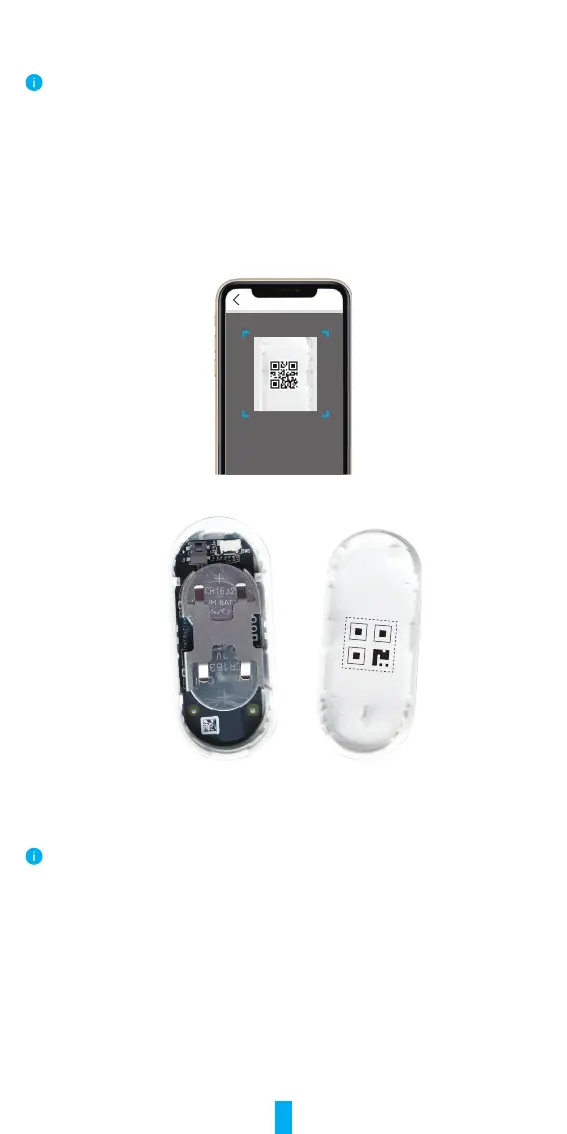
2. Scan the QR code on the inner side of the cover or on the user manual, and
then add the sensor to the gateway.
Scan QR Code
3.Placethesensorasdisplayedinthegurebelow.
4. Place the cover back.
2� Method Two: Add by the Gateway
When adding sensor by the gateway, place the sensor as close to the gateway as possible.
1. Make the gateway enter device adding mode as instructed by the user
manual of the gateway
2. Press and hold the RESET button for over 5 seconds until the indicator on
thesensorashesrapidlyblue,andthenthesensorwillenteraddingmode.
3. The sensor will be added to the
gateway automatically.



 To Next Page