5
Main Menu
1
4
7
2
0
5
8
Enter Del
9
3
6
BACK
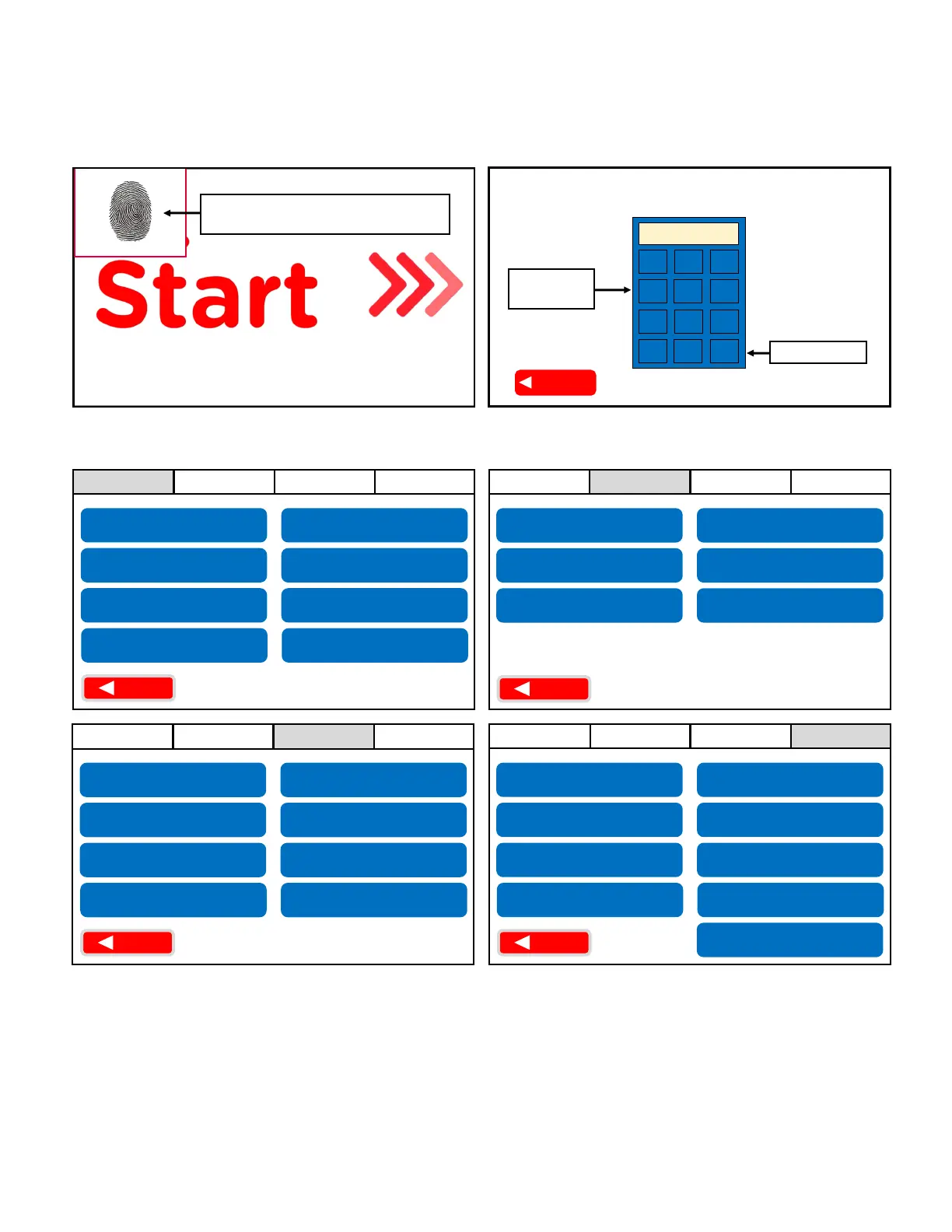
Press “Enter”
Step 2
Input “461”
on keypad
Clear Errors
Main Menu Opons
The Main Menu ulizes a 4-tab layout that results in a single access point.
Press and hold the top le corner
for 10 seconds unl a keypad appears
Step 1
Access the Main Menu
Locate the lower screen and follow the instrucons below to access the Main Menu:
Network
Used while Troubleshoong errors from pages 6-13
1. Follow Steps 1 & 2 in the “Access the Main Menu” above.
2. Press the “Clear Errors” buon on the “General” tab.
General Service Procedures
BACK
Network
General Service Procedures
Network
General Service Procedures
BACK
Network
General Service Procedures
BACK
Blender Info
Sanize Time
Sanize Descripon
LVCB Status Window
*
Reset Screen
Cleaning and Sanizing Log
Contact f’real
Check Cell Signal
Synchronize with Server
Congure Network for
Cellular Connecon
Network Status
Restart Network
Congure Network for
Ethernet
Raise Cupholder
Shut Down the Blender
Calibrate Cupholder
Water Purge/Boil Water
Set Time Zone
Reset Blender
Congure Languages
Acvate Cleaning
and Sanizing
Toggle Registraon
Update Content
f’real Training
Gather Diagnosc Info
Set Volume
Manual Commands
Update Firmware
from HEX File
Reinstate Customer
Install Sequence
Run Diagnosc Roune
*
How to Reset a Blender Error Code
BACK


 To Next Page