57
EN
WARNING!
When using on stairs, the appliance should be located below the user.
NOTE!
During using with oor nozzle with LED lights, it is recommended to adjust the speed to
medium/minimum carpet oors, and maximum level for hard oors.
WARNING!
If you are going to leave the work area, switch off the machine.
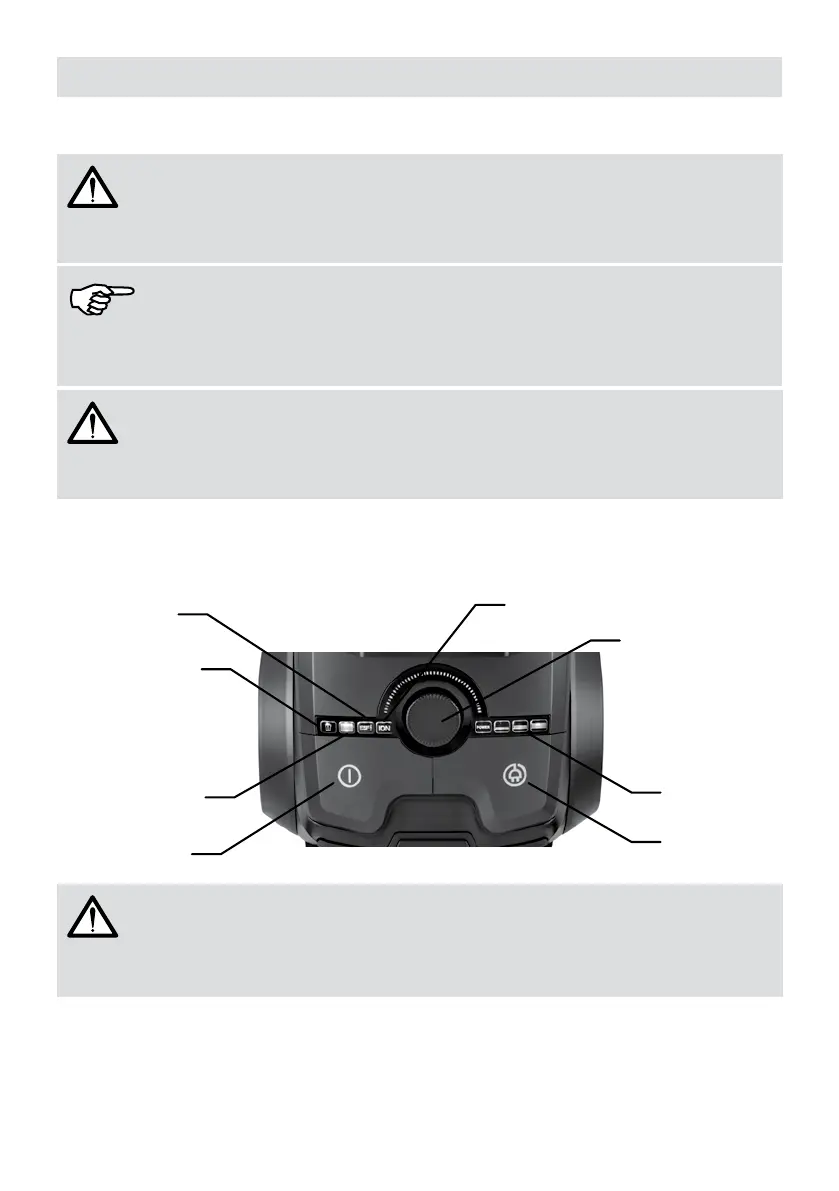
Control Panel
Dust container
indicator light
H.E.P.A. Filter
indicator light
On / Off button
ESF indicator
light
ION indicator
light
Speed setting
button
Floor type
indicators
Cord rewind
button
ATTENTION!
Speed adjustment switch can be adjusted innitely variable.
On / Off Button
Turn the adjustment switch to clockwise to increase the speed and counter-clockwise to
decrease the speed. When the switch is turned clockwise, speed adjustment indicators on the
control panel activates. Indicators turn on gradually as the speed increases until maximum
speed is reached. Once maximum speed is reached, there will be no more changes. When





 To Next Page