68
EN
ATTENTION!
Never use alcohol or solvent based cleaners. Otherwise, you may harm your device. Clean
your appliance with a soft, damp dry cloth. You can clean the dust container as the same.
Accessories such as hose, brush etc. should be checked and cleaned against blocking
periodically.
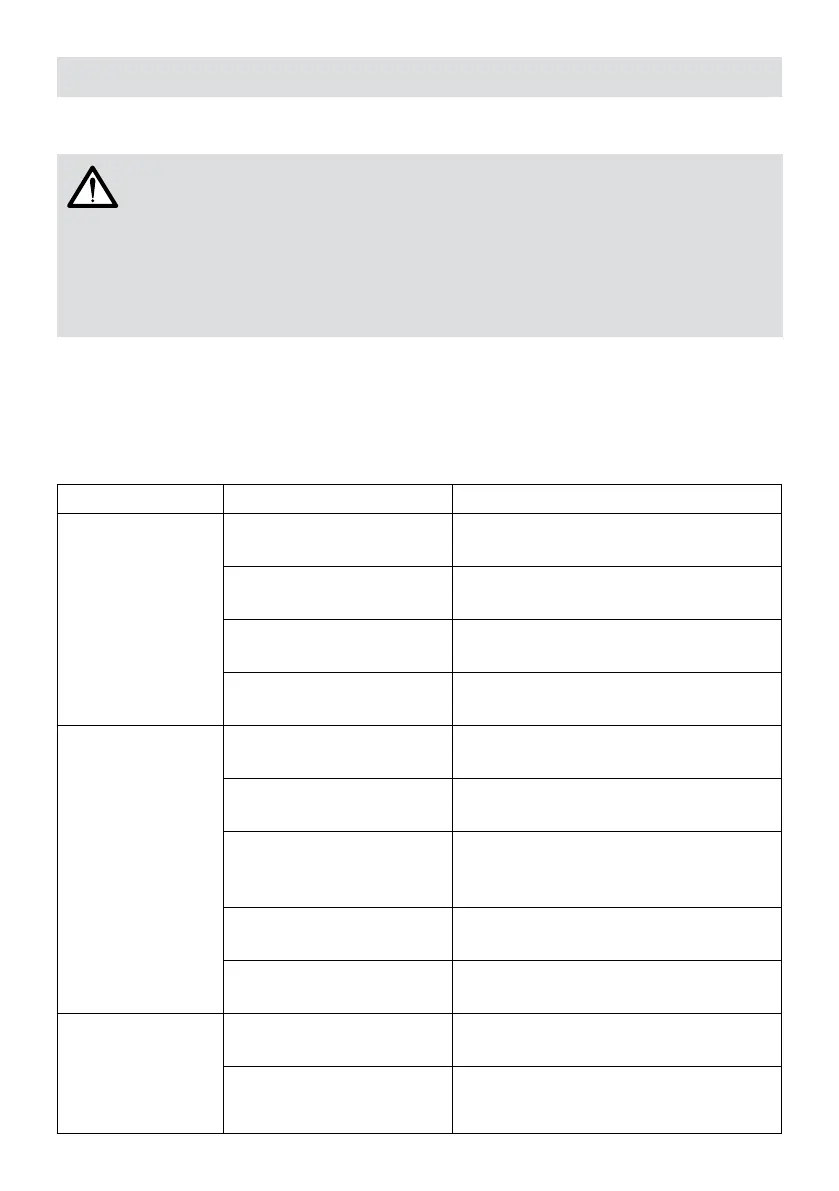
Problem Possible Cause Solution
Your appliance is processed via Quality Control against any malfunction. However if it is not
operational due to any reason, ensure that you have tried the solutions specied in the table
below before contacting Fakir Authorized Service.
Malfunction Possible Cause Remedy
Appliance does not
operate
Appliance is not plugged in or
is not switched on.
Plug in the power plug and switch on the
appliance
No electricity at socket
Test the vacuum cleaner on another socket,
where you are certain that there is electricity
Power cord is damaged
Have the power cord replaced by a Fakir
Authorized Service.
Exhaust cover is not installed
Install the exhaust cover or make sure it is
installed properly
Appliance does not
pick up dirt
Dust container is full or
blocked.
Empty/clean the dust container.
The selected brush is not
suitable for the surface.
Replace your brush with one suitable for the
surface.
Filter is dirty.
Clean or replace the corresponding lter.
See Filters section.
Hose, suction tube or nozzle
is clogged.
Check the accessories and remove the
blockage.
Accessories are not properly
installed
Check connections
If the machine is
making too much
noise during
operation
Vacuumed objects may be
clogging the airway.
Check accessories / lters
Accessories are not properly
installed
Check connections





 To Next Page