11
12
ADD
ADD
FSC881 QUICK START GUIDE FSC881 QUICK START GUIDE
After you use one phone to get your camera connected to your WiFi and you can view the live
video from your first phone.
If you would like to add your camera to the second phone, please ensure your second phone
connects to your WiFi (the same WiFi your camera connected to) .
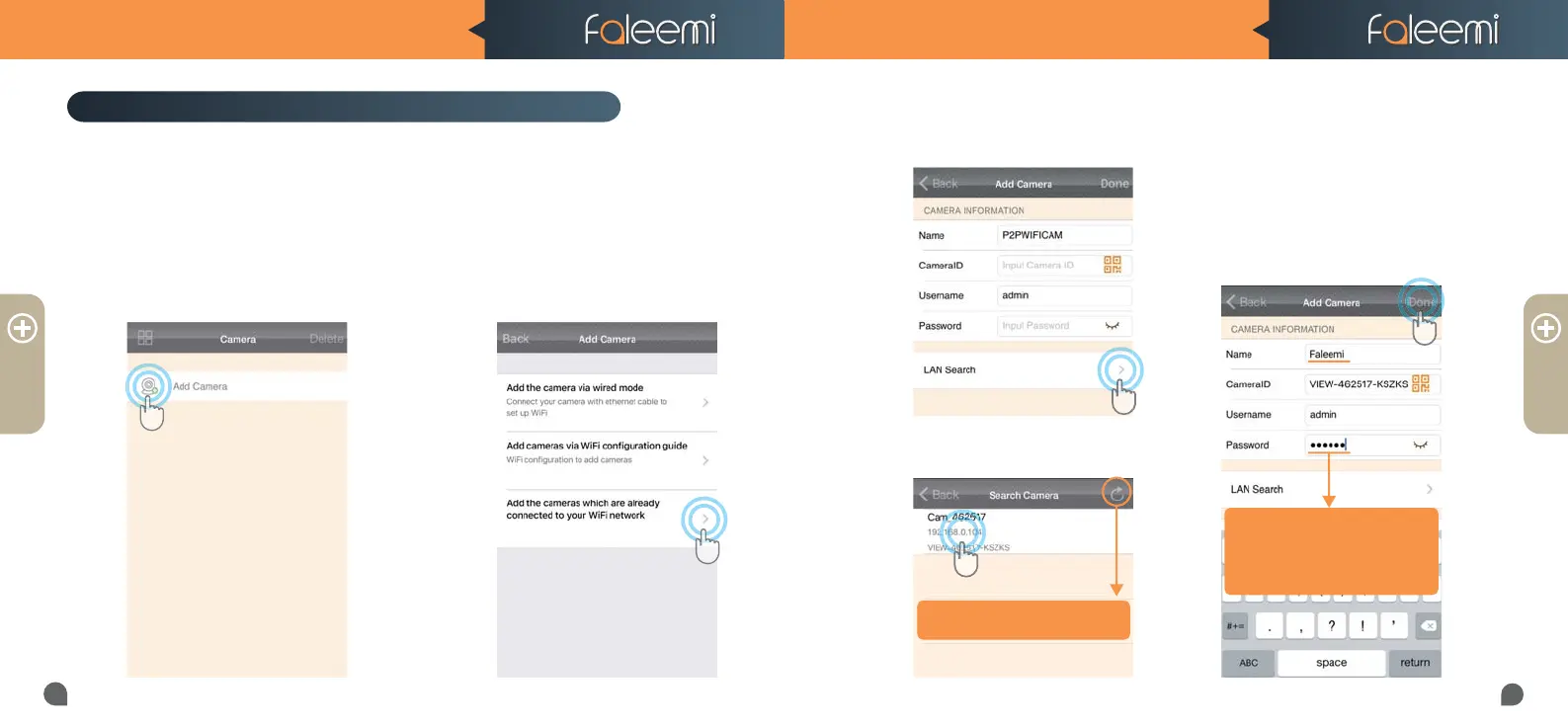
How to connect the camera to the second Phone?
5.Click on the camera searched.
6. Give your camera a name, and
input your Password, click on
[Done] go back to home to start
to view & control.
2. Open the Faleemi App,
Click on [Add Camera].
1. Download the Faleemi App to your second phone.
Tips:
Default (123456), but if you
Default (123456), but if you
changed the password on your
changed the password on your
first phone, please enter your
first phone, please enter your
new password here.
3. Click on [Add the cameras
which are already connected to
your WiFi network]
4. Click on [LAN Search].
If you don’t find it, please click on
If you don’t find it, please click on
this icon to refresh.



 To Next Page