13
14
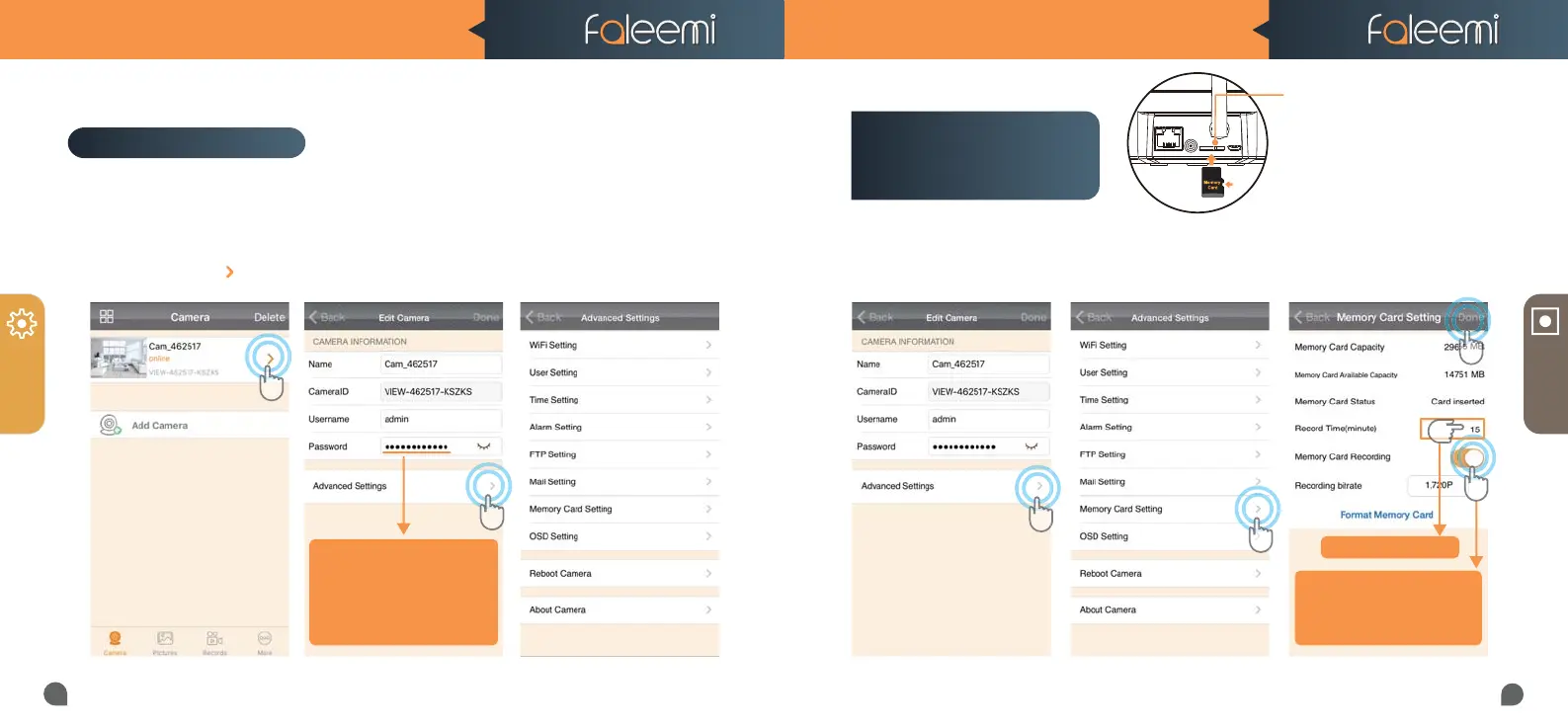
Please follow below steps to go to Advanced Settings to do more settings.
2. Click on [Advanced Settings]. 3. Do advanced settings here.1. Click on the icon [ ].
MORE
RECORD
1. Click on [Advanced Settings].
* Please format your memory card before using.
3. Enable [Memory Card Recording]
4. Set [Record Time] (15 mins Max)
5. Click on [Done].
2. Click on [Memory Card Setting].
3
5
Meromy Card Slot
Please insert the Micro SD card as what
shows at left.
Suggest to use MicroSDHC* Class10
UHS-1 Memory Card.
(* MicroSD, MicroSDHC text and logo are the trademark
of SD-3C, LLC)
Advanced Settings
1
2
4
How to set it to record
constantly to the
memory card?
Tips:
If you change your password,
If you change your password,
please remember to update
please remember to update
the new password to your
other phone and click on
"Done"
Tips: Max 15 Minutes
Tips:
If you just want to record alarm
If you just want to record alarm
video to the memory card,
video to the memory card,
please disable this button.
please disable this button.
FSC881 QUICK START GUIDE FSC881 QUICK START GUIDE



 To Next Page