21
22
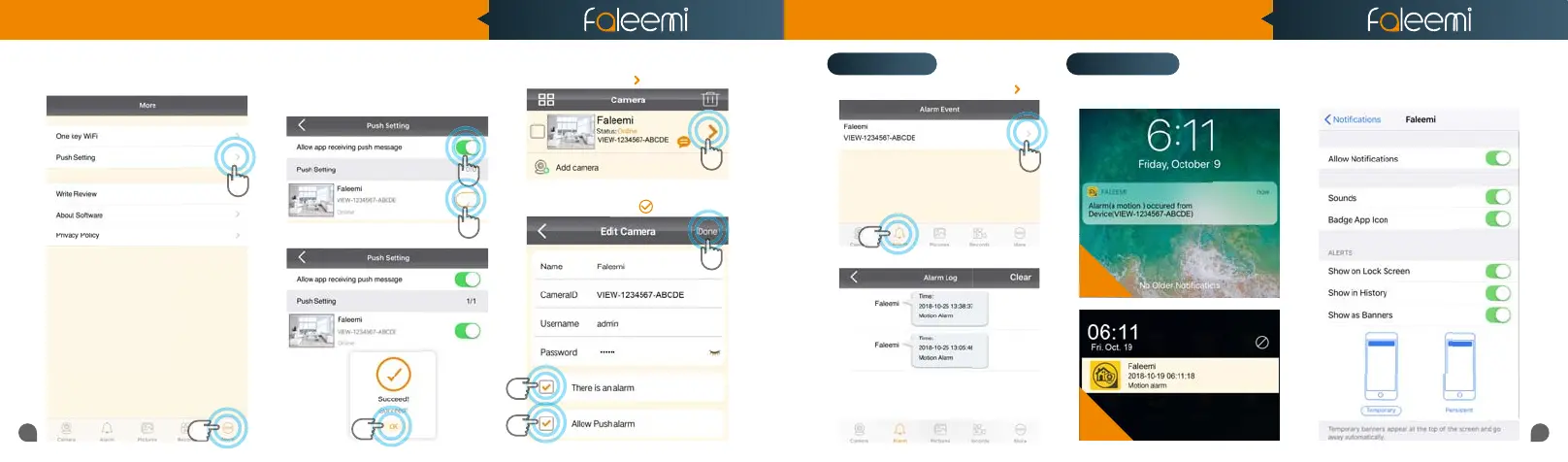
1. Click on [Alarm]. 2. Click on [ ].
3. It shows alarm log list.
1
1
1
2
2
2
3
3. Find the camera you want to receive
message alert and turn on the button
[Allow app receiving push message].
4. Click on [OK].
1. Click on [More]. 2. Click on [Push Setting].
You will receive text messages when
there’s motion.
If you don’t receive the message, please go
to your phone’s [Settings]—[Notica-
tions]—[Faleemi APP] to check if you turn
on the button “Allow Notications”.
1. Click on the icon [ ].
2. Enable [There is an alarm], [Allow Push
alarm]
3. Click on [ ].
iOS
Android
2
[Push Setting - iOS] [Push Setting - Android]
NotificationsAlarm Event
1
Quick Start Guide
1080P Weatherproof WiFi Security IP Camera
Model: FSC861



 To Next Page