25
26
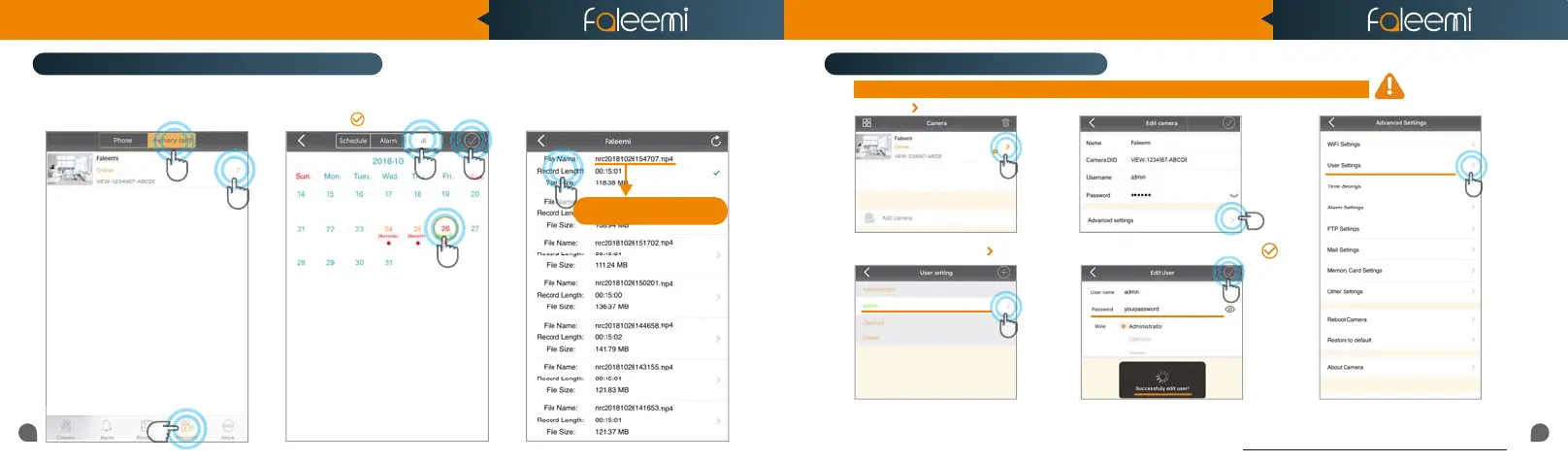
4. Click on [All], Select recording.
5. Select Date.
6. Click on [ ].
1. Click on [Records].
2. Click on [Memory Card].
3. Click on [Camera].
7. Click on the file to playback the
recorded video.
2
5
4
7
6
Tips:
3
NRC 2018/10/26/15:47:07.mp4
NRC YEAR/MONTH/DAY/START TIME
How do i change my camera password?
How to view the recorded video on memory card?
1
Record your new password here:
4. Select [admin], Click on [ ]. 5. Enter your new password, Click on [ ].
The camera password is only saved in the camera, please keep your password in mind, and if you forget it, you can only reset
the camera and reconnect it.
To ensure the security of your camera, you are suggested changing the default password.
2. Click on [Advanced Settings].
1. Click on [ ].
3. Click on [User Settings].
Quick Start Guide
1080P Weatherproof WiFi Security IP Camera
Model: FSC861



 To Next Page