Faleemi_FSC861
29
30
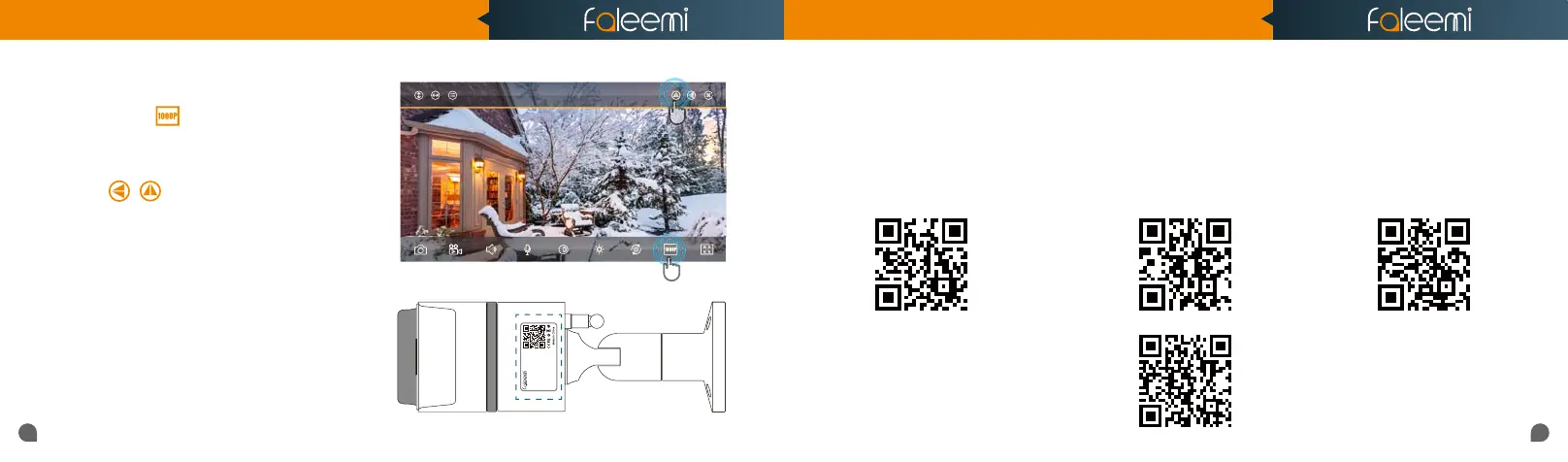
4. How do i change my video stream resolution?
5. I mounted my camera upside down,
how do I flip my camera’s video stream?
Click on the icon to change the resolution.
Click on to flip and mirror your camera.
6. How do I find the WiFi MAC address of my camera?
If you need the WiFi MAC address of the camera to
connect it to your router, please take the photo of the
label on the camera and send it to
support@faleemi.com.
We will provide you with the WiFi Mac address
Username: admin
Password: 123456
DID: VIEW-1234567-ABCDE
DDNS: 008abcde.nwsvr1.com
IP Camera
Model:
FSC861 V2.0
Windows 7
Windows 10
More Router Settings
https://youtu.be/8gx60SEHSu4 https://youtu.be/V3pgXHvQ67U
8. How do I change the WiFi SSID on my router?
7. If I change the router, how do I reconnect the camera?
https://youtu.be/qzwRIwLnNPg
MAC
for more router settings,
please visit
https://www.faleemi.com/blocks/router
If there is no the guide
for your router settings,
please email us at support@faleemi.com
A. We recommend that you change the WiFi name (SSID) and password for the new router to the same as the old router,
so you don't need to reconnect your camera, please just replug it in and it will be online automatically. So do your other
wireless devices.
B. If you can not change the new router WiFi name (SSID) and password, you need to reset the camera (refer to page 27)
and then reconnect it according to the instructions (
page 3)
Quick Start Guide
1080P Weatherproof WiFi Security IP Camera
Model: FSC861



 To Next Page