23
24
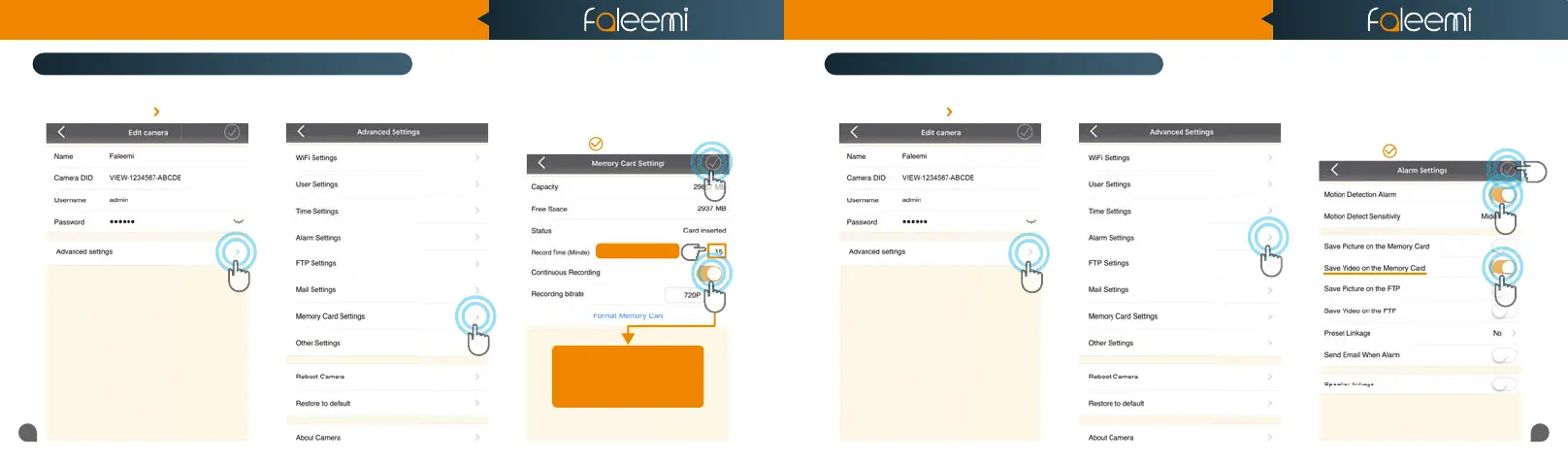
3. Enable [Continuous Recording].
4. Set [Record Time] (15 Mins Max).
5. Click on [ ].
2. Click on [Memory Card Settings].
4
Tips: Max 15 Minutes
1. Click on the icon [ ].
1
2
1. Click on the icon [ ].
1
2
5
Tips:
If you just want to record alarm
If you just want to record alarm
video to the memory card,
video to the memory card,
Please turn off this button.
Please turn off this button.
2. Click on [Alarm Settings].
3
4
5
3. Enable [Motion Detect Alarm].
4. Enable [Save Video on the Memory
Card].
5. Click on [ ].
How to set it to record constantly to the memory card?
* Please follow the instruction in Page 16 to insert the SD card and format your memory card before using.
How to record alarm video to the memory card?
3
Quick Start Guide
1080P Weatherproof WiFi Security IP Camera
Model: FSC861



 To Next Page