3: Detailed User Interface Features
36
3.5.6 Settings Display
When enabled, selection of this display button allows the operator to change measurement
settings.
Note: This display is for factory technicians and authorized service personnel use only.
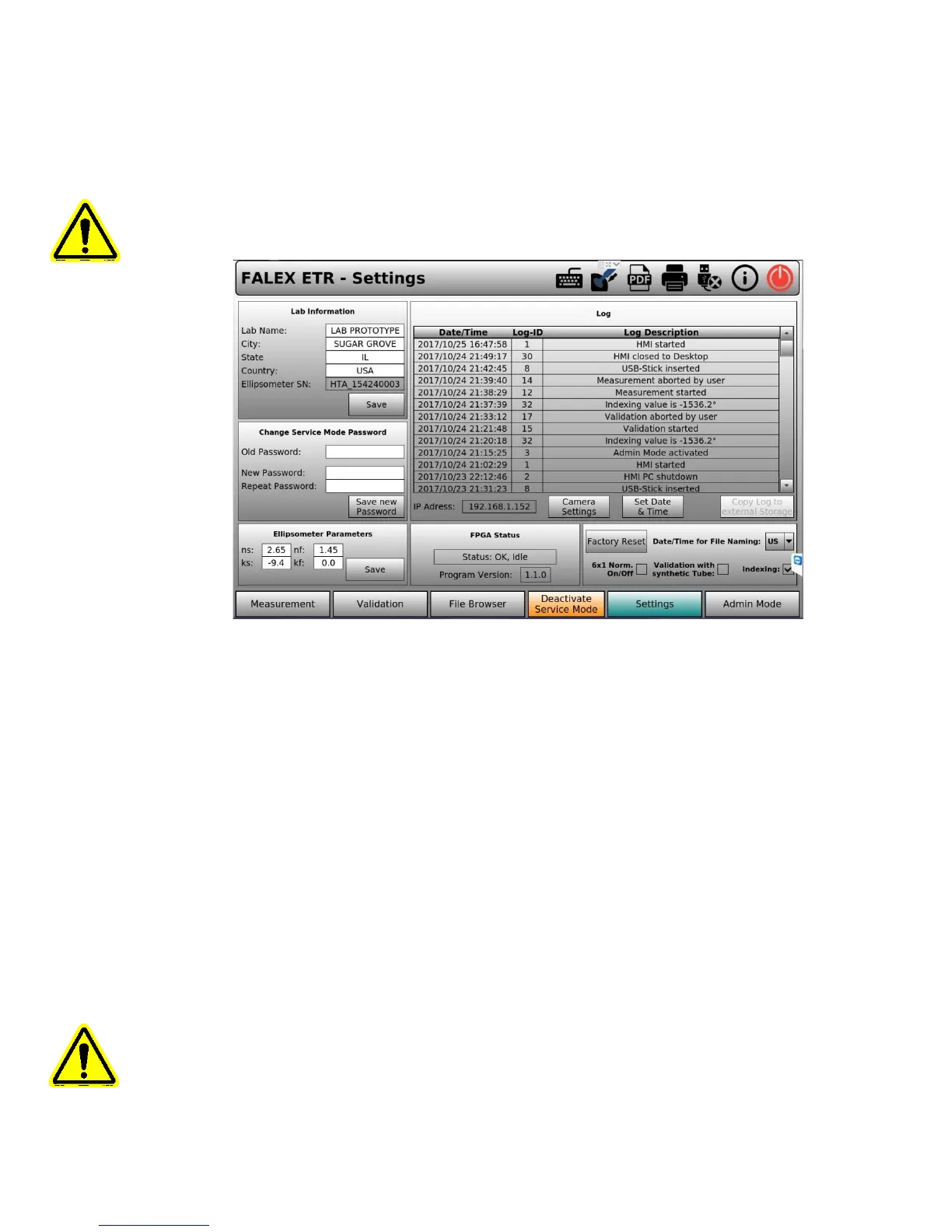
Figure 3-10 – Settings Display
In the Settings Display (figure 3-10) you can change parameters for use in the Measurement
test as well as others parts of the Falex 430 ETR.
Lab Information – Lab Name, City, State & Country can be modified. The Ellipsometer SN
cannot be modified. The keyboard icon will open up a full size keyboard for use in modifying
these fields.
Change Service Mode Password – To modify the Service Mode Password you have to type in
the current password (default is ETR). In the next text fields you have to type in the new
password. If the current password is correct you can click the ‘Save New Password’ button
Ellipsometer Parameters – These parameters can be modified to change the Ellipsometer
Properties. These parameters describe the optical properties of the heater tube (ns, nf) and
the deposit film (ks, kf) [default properties is for aluminum ns, nf, ks, kf]. Once modified, the ‘Save’
button stores the new parameters to be used for the next Measurement test(s).
Note: Incorrect optical properties will result in unreliable measurement results, modify these
parameters with caution.
FPGA Status - Shows the actual status of the built-in FPGA firmware and the current version.


 To Next Page