162236M User Manual GSM Gateway Page 7 of 20
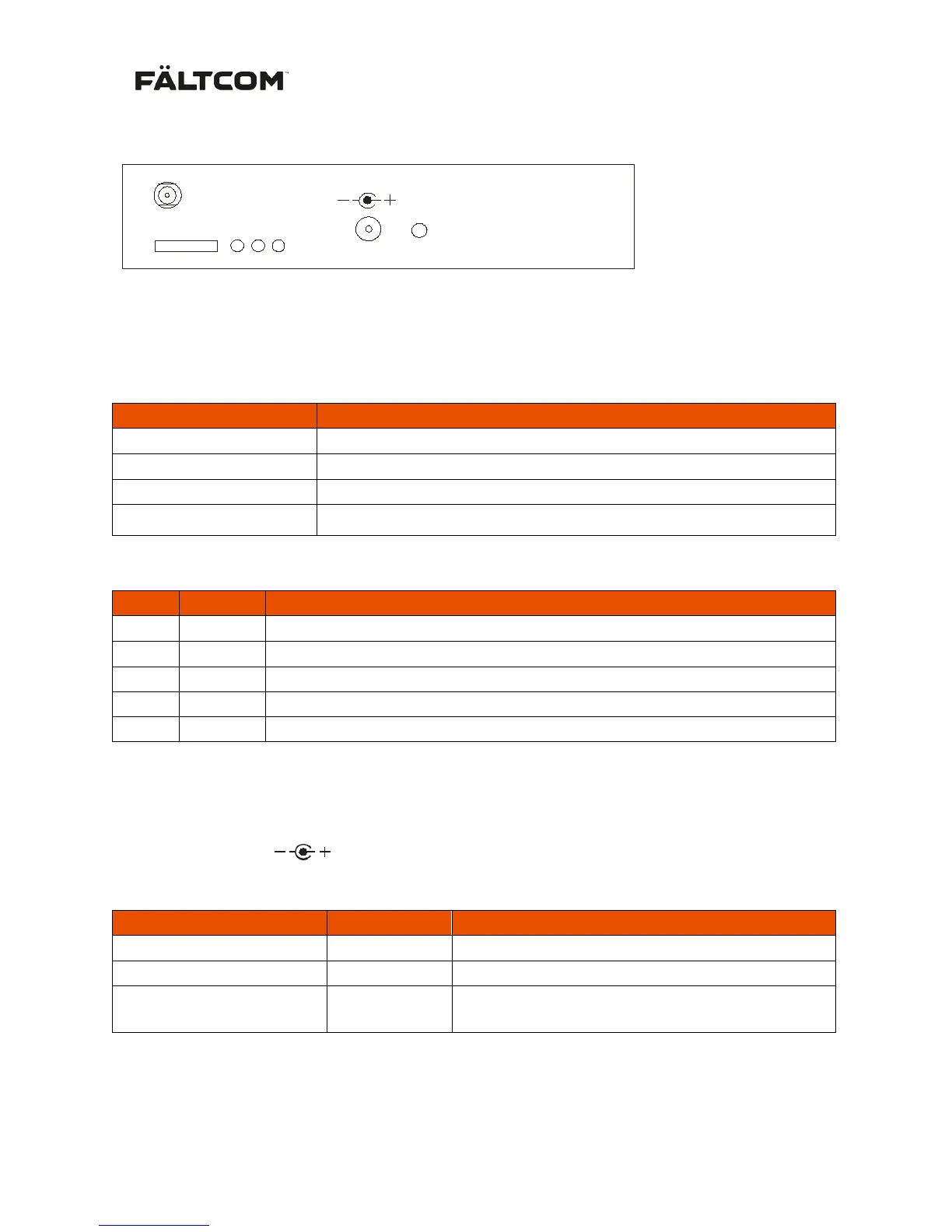
3. Back panel connectors and indications
ANT SMA Connector for the antenna
SIM Input of the SIM card
GSM Status for the GSM connection when the GSM Gateway is up
and running (Green LED):
No service, No connection with GSM network or SIM-card missing.
Connection with the GSM network OK, Backup power in use
Normal status. Connection with the GSM network OK, AC-powered.
S1 and S2 Indications for GSM signal strength (Green LED):
Good ( default 15 = -83 dBm)
Very good ( default 25 = -63 dBm)
Good, Backup power in use.
Very good, Backup power in use.
LED levels are programmable in 2 dB steps from -113 dBm to -51 dBm via USB (Fältcom Manager)
12V DC
+ + 9-28 V DC
- GND
RESET
GSM Gateway is switched off
Hold button for >20 sec External
All settings are reset to factory settings. This is
indicated by the LED´s PHONE and BATT
Note: Factory reset also changes the PIN-code back to the default “1234” if PIN –code is in use, this
may cause the SIM-card to be locked if a SIM-card is mounted inside the GSM Gateway.


 To Next Page