14
Sustain pedal: prolong the lasting time of a pitch.
Press and hold the [sustain pedal] to enable the sustain effect , and release
the pedal to disable such effect.
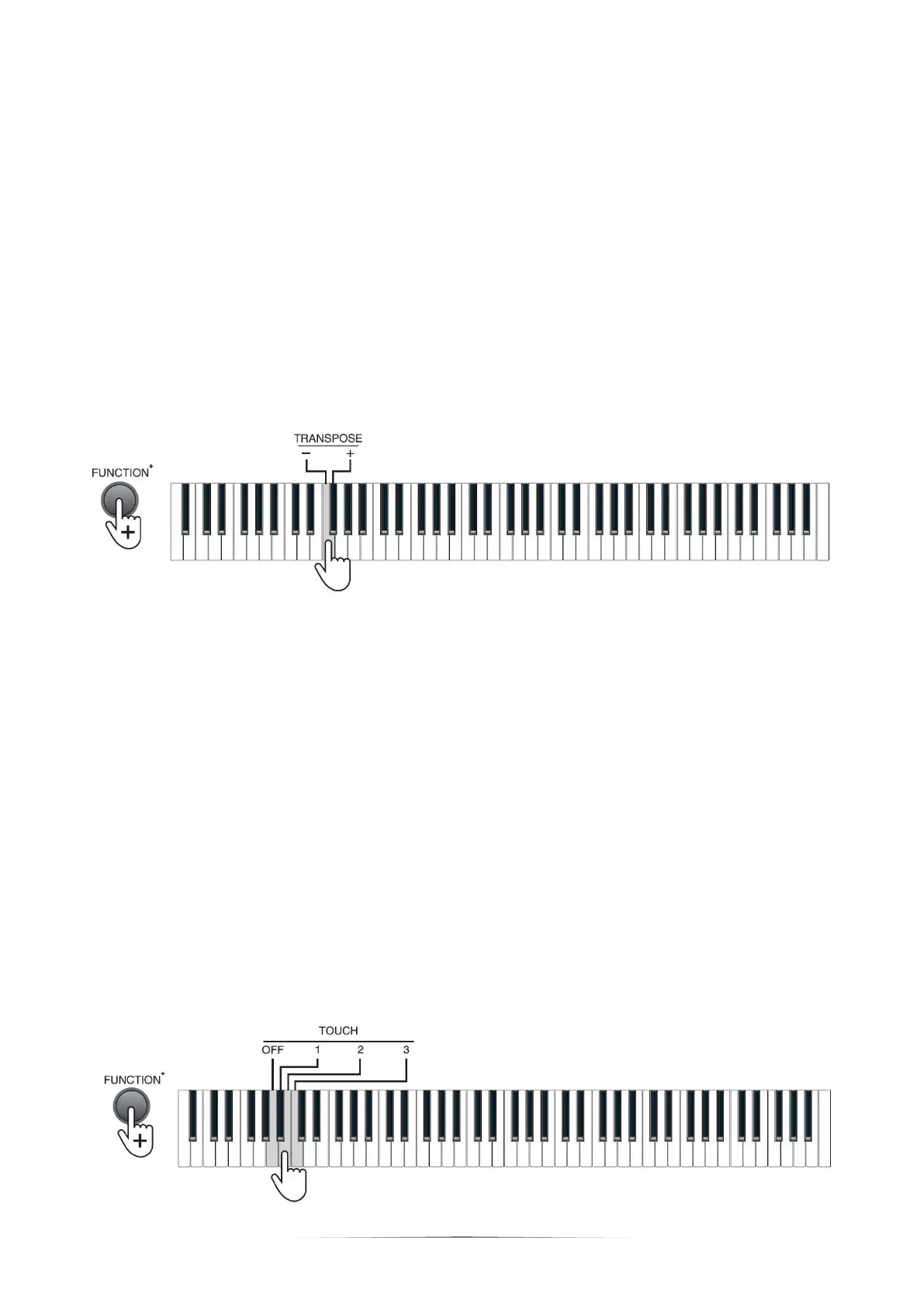
TRANSPOSE
The transpose control function of the Piano is adjustable from "-6" to "+6", and the
default setting is 0. Press the [FUNCTION+] button + the [TRANSPOSE -/+] keys
for transposing within ±6.
The transpose function saves the trouble of raising and lowering the key when
playing on the keyboard. You can play songs in every key in the same way as that
for playing songs in key C. lt may decrease the key by half-step (minor second),
thus the keys positions for key Cis changed to those for key B; press the "+"
button to increase all keys by half-step (minor second), in this case, the tone of the
key position of key Cis changed to key C# or key Db. lf the button is pressed for
twice, key C will decrease to Bb; and if the button is pressed for fifth times, key C
will decrease to key F. Press the "+" and "-" buttons simultaneously to reset key C.
Touch control
Press the [FUNCTION+] button + [TOUCH] OFF, 1-3 keys to turn off or shift touch
force among 3 grades.


 To Next Page